


In-depth: Forminit vs Web3Forms
A detailed comparison of Forminit and Web3Forms for developers and teams choosing a form backend: collecting and validating data, protecting the endpoint, workflows, delivery logs, analytics, company and data hosting, and pricing, including where Web3Forms is the better fit.

Summary
Forminit and Web3Forms are both form backends. Web3Forms is the cheaper choice for email delivery: 250 free submissions a month and a $15 Pro plan. Forminit is the more complete one: it validates typed fields on the server, can require an API key on the endpoint, runs a Workflow with If / else branching and AI Classify, logs every delivery with Retry, and counts every answer in built-in analytics. Forminit is a UK company with data in Ireland; Web3Forms is run from India.
On this page
Forminit and Web3Forms are both established form backends run by registered businesses. Forminit is operated by UXPLUS LTD, based in London, United Kingdom, and has been in service since 2015: it began as Getform.io and took its current name in January 2026. Web3Forms is operated by Web3Creative, a registered business in Kerala, India, and its site reports more than 412,000 people using it and more than 13 million emails delivered. Whichever you choose, you are picking a real, working service with a track record.
With either product you build the form in your own HTML or framework and point it at an endpoint, and the service receives each submission and forwards it. The difference is how much of the backend each one covers.
- Web3Forms is a contact form API built around email. By its own description it sends form submissions to your inbox with no server, no backend code and no database. You put a public access key in the form, and paid plans add webhooks and a few integrations. It suits personal sites, portfolios and small projects that want submissions emailed at the lowest cost.
- Forminit is a complete form backend: one service for everything a form needs behind it. It collects and validates typed data, can require an API key on the endpoint, runs a Workflow that branches on the answers, and logs every delivery so a failed one can be retried. It also reports on what people answered. Built-in analytics count every option chosen and every source a submission came from, so a survey, an onboarding form or a bug report form becomes a live report, with no export and no external tool. An inbox, client workspaces, an API and an MCP server cover the rest, and through MCP an AI assistant can build the reports you ask for. You own the frontend; Forminit owns the backend.
The short answer: choose Web3Forms if you mostly want a contact form that emails you, at the lowest cost. It has the larger free allowance and the cheaper paid plans. Choose Forminit when you want the whole form backend in one service, including validation on the server, routing, traceable delivery and reporting on what people answered, or when form data has to be stored in the EU.
| At a glance | Forminit | Web3Forms |
|---|---|---|
| Collect: server-side validation Values checked by field type before they are stored |
Yes, set by the field name | No |
| Protect: API key on the endpoint Reject any submission without a secret key |
Yes | No; a separate API with a secret key on Pro |
| Automate: workflow with branches Several actions per form, If / else routing, an AI step |
Yes, every plan | No; one webhook URL per form |
| Deliver: logs and retry See why an action failed and run it again |
Yes | No, automatic webhook retries only |
| Analyze: field and campaign analytics Counts for each answer option and each source, with no export |
Yes, from Pro | No |
| Manage: inbox, client workspaces, AI assistants Follow-up statuses, a workspace per client, access through MCP |
Yes; workspaces on Business | No |
| Company and data hosting Who runs the service and where data is stored |
UK company, data in Ireland (EU) | India-based business, servers in the United States |
| Free plan Monthly submissions and file uploads |
100, with uploads (100 MB) | 250, no uploads |
| Pro plan Where autoresponses and API access start |
$19/month with 5,000 submissions | $15/month with 10,000 submissions and 3 seats |
Plans, limits and legal pages were checked on 16 November 2026.
How is Forminit different?
A complete form backend does six jobs: it collects and validates the data, protects the endpoint, automates what happens to each submission, delivers it and traces every delivery, reports on the answers, and gives you a place to manage what came in. Each section below covers one job: what Forminit does, what Web3Forms does, and the details side by side. Where a plan name appears in a table, the feature starts on that plan.
1. Collect: typed data, validated on the server
Web3Forms accepts the fields you send as they are. Its guides validate in the browser, with HTML attributes and JavaScript, and its webhook guide advises checking data types and required fields in your own handler. Browser checks are easy to bypass by posting to the endpoint directly, so a submission can reach your inbox with an address that is not an email or a phone number that is not a number.
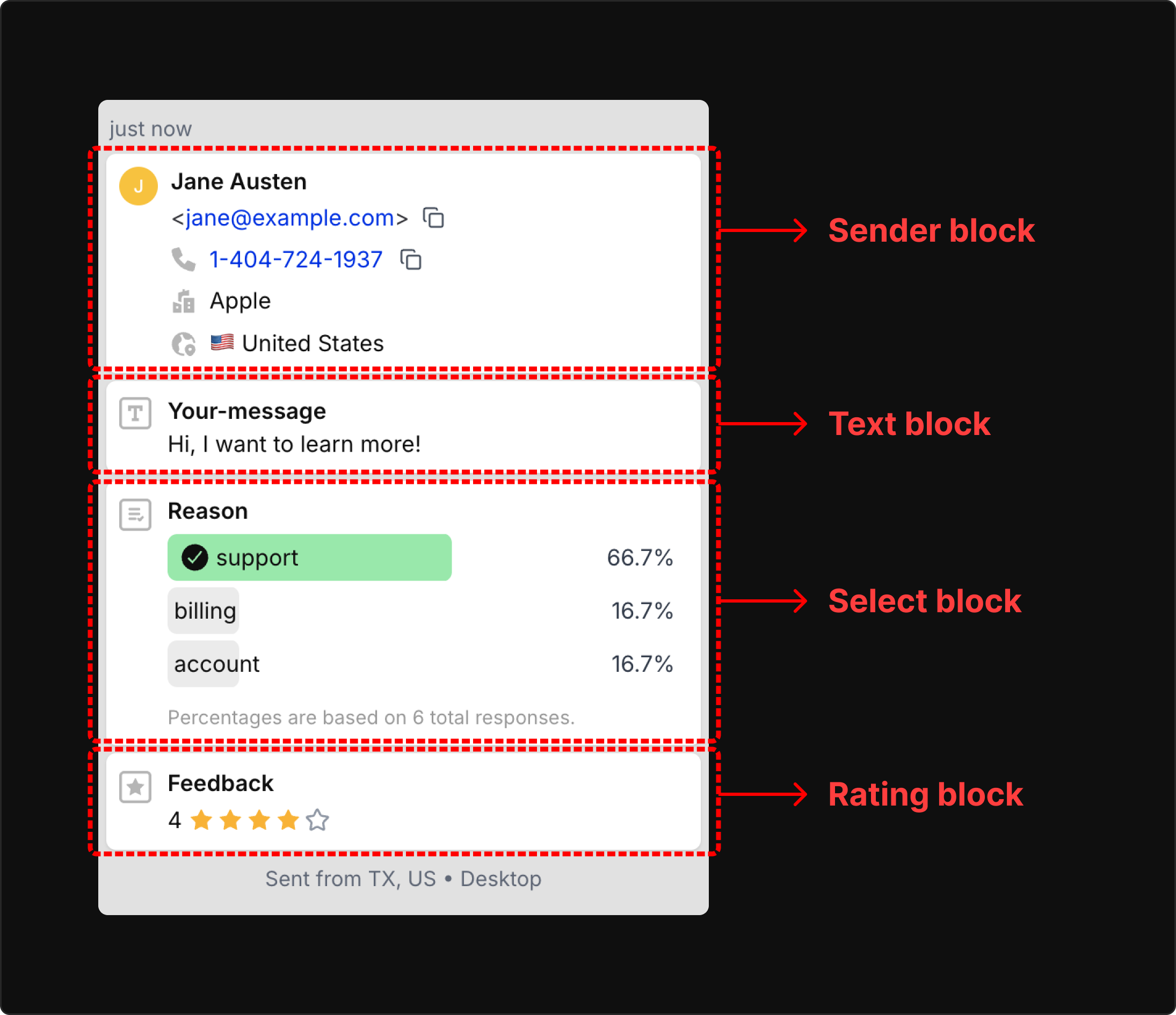
Forminit checks on the server. Every input is named fi-{blockType}-{name}, such as fi-sender-email or fi-phone-mobile, and the type in the name decides the check: email, phone in E.164 format, URL, country, rating, date and number. A value that fails is rejected before anything is stored, and there are no rules to configure. Required fields and length limits stay in your frontend. Contact details and campaign data also land in fixed sender and tracking blocks, so every submission has the same shape in the inbox, the API and your webhooks. See the Form Blocks reference.
| Feature | Forminit | Web3Forms |
|---|---|---|
| How rules are defined Where validation is set up |
In the input name | In your own browser code |
| Email, URL and number checks Format validation on the server |
Yes | No |
| Phone in E.164 format International numbers with country code |
Yes | No |
| ISO country codes Two-letter country values |
Yes | No |
| Required and length rules Rules you choose for each field |
No, these stay in your frontend | No, these stay in your frontend |
| Contact schema A fixed structure for name, email, phone and company |
Yes, the sender block |
No |
| Attribution schema A fixed structure for UTM values and click IDs |
Yes, the tracking block |
No |
File uploads
Forminit includes uploads on its Free plan. Web3Forms includes more storage on its paid plans, and its Advanced File Uploader adds a drag-and-drop widget for larger or multiple files.
| Feature | Forminit | Web3Forms |
|---|---|---|
| Uploads on the free plan Accept attachments without paying |
Yes, 100 MB of storage | No |
| Size limit How much one submission can carry |
25 MB combined | 5 MB per file with the standard file input; larger files through its Advanced File Uploader |
| Storage on the mid tier Capacity on each product’s Pro plan |
1 GB | 5 GB |
| Extra storage Buy more capacity without changing plan |
No | $3/month for 10 GB |
| How files are delivered What your team receives |
Stored with download links | Stored with links in the email |
Spam protection
Web3Forms makes hCaptcha easy: it works on the Free plan without registering your own keys. Cloudflare Turnstile, reCAPTCHA and domain restriction need a paid plan there. Forminit’s setup guides: Cloudflare Turnstile, reCAPTCHA, hCaptcha, honeypot and authorized domains.
| Feature | Forminit | Web3Forms |
|---|---|---|
| Built-in filtering Spam detection with no setup |
Yes | Yes |
| Cloudflare Turnstile Privacy-focused challenge |
Yes | Pro ($15) |
| reCAPTCHA Google’s challenge |
Yes, v3 | Pro ($15), v3 |
| hCaptcha Alternative challenge |
Yes | Yes, every plan, with no keys to set up |
| Honeypot field A hidden input that catches bots |
Yes | Deprecated in its docs |
| Restrict to your domains Reject submissions from other sites |
Yes | Pro ($15) |
| Custom spam rules Your own conditions for what counts as spam |
Workflow conditions can move a submission to Spam | No |
| AI spam check AI reads the submission and flags it |
Yes, with AI Classify, from Free | No |
Where Forminit stands out: bad data is rejected on the server before it is stored, and uploads work on the free plan. Web3Forms is ahead on paid storage and on hCaptcha without setup.
2. Protect: a Public or Protected endpoint
Web3Forms identifies a form by an access key that sits in your HTML. The key is public by design, described in its own documentation as an alias for your email address, so the form endpoint accepts any request that carries it. You can narrow that with a captcha or with domain restriction. That does not mean Web3Forms has no authenticated API: on Pro it has a separate Submissions API where a secret key can create and read submissions from your server. That API sits next to the public endpoint; it does not close it.
Forminit lets you choose per form. Public mode works like any HTML form endpoint. Protected mode makes the endpoint itself reject every submission that does not carry a secret API key in the X-API-KEY header, so nobody can post to it just because they found your Form ID. You put it behind your own server, or behind the Next.js or Nuxt handler, where your session checks and validation cannot be bypassed, or you call it from a backend job as an authenticated API. Protected requests also get a higher rate limit: 5 requests per second per IP address, against 1 request per 5 seconds in Public mode. See the authentication guide.
Where Forminit stands out: with Web3Forms the public endpoint always stays open. With Forminit you can close it.
3. Automate: the follow-up workflow is built into the form backend
Web3Forms has no workflow builder. Each integration you switch on runs for every submission, and a form takes one webhook URL. To reach several endpoints, its documentation says to use one webhook URL and forward from your automation platform, which is also where it places conditional logic. That works, but the routing then lives in a second tool that you pay for and maintain.
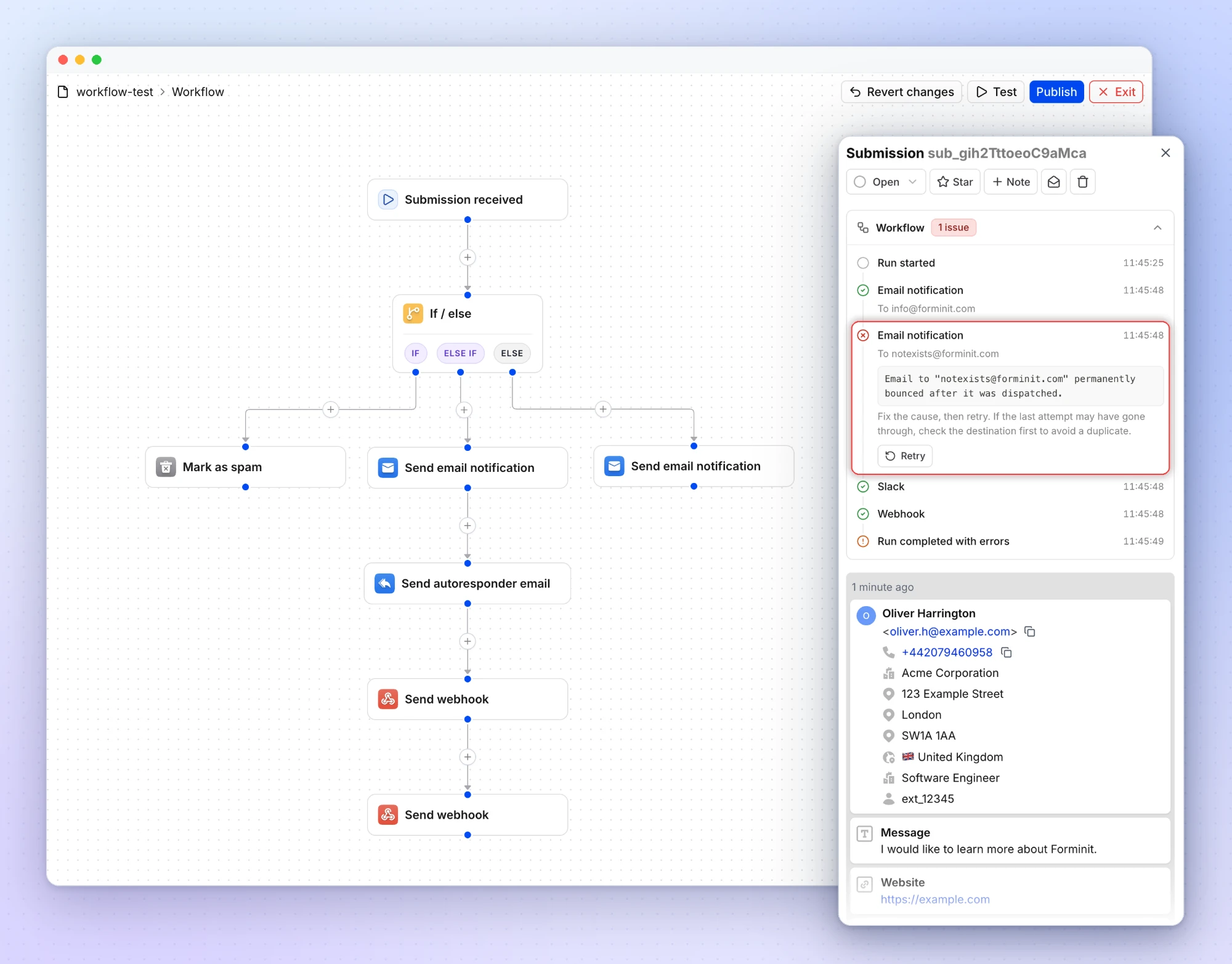
In Forminit the routing is part of the form. Workflow is a visual canvas: after Submission received you add Webhook, Email notification, Autoresponder, Slack, Discord and Google Sheets nodes, as many of each as you need, and If / Else if / Else steps that send different submissions down different branches. An optional AI Classify step answers questions you write about a submission, such as “Is this sales, support or something else?”, and later branches can route on its answers.
Example. A studio’s enquiry form collects a message, the service wanted and a budget range. AI Classify labels the message as sales, support or other. Sales enquiries above a budget you choose go to a Slack channel and to the CRM through a webhook, with an autoresponse that offers a call. Support messages go to a different inbox. Everything else gets a general autoresponse, and each submission’s status is set as it is routed.
Email notifications, conditions, status actions and one AI Classify step work on the Free plan. Autoresponder, Webhook, Slack, Discord and Google Sheets nodes start on Pro, along with up to five AI Classify steps per workflow.
| Feature | Forminit | Web3Forms |
|---|---|---|
| Visual workflow builder Set up actions on a canvas, without code |
Yes, every plan | No |
| Actions of the same type per form Several webhooks, emails or Slack messages from one submission |
As many as you add | One webhook URL per form |
| If / else branching Run different actions for different submissions |
Yes, every plan | No, done in an automation platform |
| Combined conditions Match all or match any across several fields |
Yes | No |
| What conditions can read Data a condition can test |
Form fields, sender details, UTM and tracking data, uploaded files, AI Classify answers | No |
| AI classification step Have AI answer questions about a submission and route on the answers |
Yes: 1 step per workflow on Free, 5 on Pro and Business | No |
| Draft and publish Edit a workflow without affecting live submissions |
Yes | No |
Where Forminit stands out: the routing rules and the follow-up live in the form’s own workflow, so you can change them without maintaining a separate automation flow or a custom backend for each form.
4. Deliver: notifications, integrations and a log for every delivery
Web3Forms delivers by email first: the submission is sent to your inbox, and on paid plans to one webhook URL and the integrations you switch on. It retries failed webhooks automatically. To check whether a delivery worked, its webhook guide points you to the execution logs in your automation platform, and its documentation describes no log of its own for a submission’s actions and no button to run a failed one again. When a notification email does not arrive, its troubleshooting guide suggests checking the spam and promotions folders.
Forminit records the result of every action for every submission. A submission’s Workflow section shows each action that ran and, for a failed one, the error, and Settings → Logs lists the same for the whole form, with filters by status and action type. After you fix the cause, Retry runs only the failed action again with the same submission. Webhooks are also retried automatically with exponential backoff, and Forminit can email you a failure alert. See Check results and retry failures.
Example. A client changes their email address, and the notification for a new enquiry bounces. With an email-first service that enquiry is easy to miss. In Forminit it is in the inbox with an error badge: you correct the address, publish and select Retry, and only that email is sent again. The visitor does not resubmit, and the actions that worked are not repeated.
Integrations
| Feature | Forminit | Web3Forms |
|---|---|---|
| Automatic retries The service tries a failed delivery again by itself |
Webhooks, with exponential backoff | Webhooks |
| Delivery logs See which actions ran for each submission, and the error behind any failure |
Yes, per submission and per form | No |
| Manual retry Run one failed action again for the same submission after you fix the cause |
Yes, for every action type | No |
| Webhooks Forward each submission to your own URL |
Pro ($19) | Pro ($15) |
| Signed webhooks Verify that a request came from the service |
Yes, HMAC-SHA256 | No |
| Zapier app A listed Zapier integration you pick as the trigger in the Zap editor |
Yes, Pro ($19) | No. A Webhooks by Zapier URL pasted into the form, Pro ($15) |
| Google Sheets Add each submission as a spreadsheet row |
Pro ($19) | Pro ($15), in beta |
| Slack and Discord Post new submissions to a channel |
Pro ($19) | Pro ($15) |
| Telegram Post new submissions to a chat |
No | Pro ($15) |
Zapier. Forminit has its own Zapier app: choose Forminit as the trigger in the Zap editor, pick the form, and map its fields to any of the apps Zapier connects to. Setup is in the Zapier guide. Web3Forms has no Zapier app. Its Zapier guide has you create a “Webhooks by Zapier” trigger and paste its URL into the form’s webhook setting, which uses up the form’s one webhook.
Signed webhooks. Forminit signs each webhook with HMAC-SHA256, so your receiver can confirm the request came from Forminit; Web3Forms sends an unsigned JSON request. See the webhook docs and signed webhooks.
Where Web3Forms is ahead. Webhooks, Google Sheets, Slack and Discord start at $15/month there against $19/month on Forminit, and its Starter plan, at $49 a year by application, also includes webhooks with one active integration. It has a Telegram integration that Forminit does not.
Notifications and email
Forminit’s notification emails and autoresponder are edited in a visual editor with form variables, To, CC, BCC and Reply-to, and custom SMTP sends from your own domain. Web3Forms’ autoresponder lets you set the sender name, subject, intro text and logo, and include a copy of the submission.
| Feature | Forminit | Web3Forms |
|---|---|---|
| Recipients How many people one notification can reach |
Unlimited To, CC and BCC on Pro and Business | 1 on Free, 3 on Starter, 5 on Pro, 10 on Agency |
| Email addresses on the account How many addresses your forms can send to |
No separate limit | 2 on Free, 10 on Pro, 20 on Agency; 25 more for $5/month |
| Autoresponder A confirmation email to the person who submitted |
Pro ($19) | Pro ($15) |
| Custom email content Change the wording and layout of notifications |
Yes, visual editor | 3 templates on Free; all templates and custom HTML from Pro |
| Send from your own domain Emails come from your address, not the service’s |
Business: custom SMTP | No |
| Remove the service’s branding Emails without the provider’s name |
Business | $9/month add-on on Pro and Agency |
| Custom thank-you page Redirect visitors after a submission |
Yes | Yes, every plan |
Where Forminit stands out: you know not only that the submission arrived but whether each follow-up worked, and you can deliver it again yourself.
5. Analyze: every answer and every source counted, with no export
Web3Forms keeps a submission history in its dashboard and exports it as CSV on every plan. It has no report on the answers. To learn anything from them you export the file, or sync submissions to Google Sheets on a paid plan, and count in a spreadsheet.
Forminit counts for you. On Pro and higher, Analytics lists every option of a select, radio or checkbox field, and every score of a rating field, with the number of times it was chosen and its share of all responses. Next to that it reports the UTM source, medium and campaign that the SDK saves with each submission. Nothing needs to be set up or exported.
On the kind of site that uses a contact form API, that looks like this:
- Project enquiry form on a freelancer or studio site. With
fi-select-service(Website, Branding, SEO) andfi-select-budget, you see which service people ask for most and which budget range is typical. - “How did you find me?” on a contact form. With
fi-select-heardFrom(Google, AI assistant, Referral, Social), you see which source brings the most enquiries, so you know where to spend your effort. - Client feedback form. A rating block,
fi-rating-satisfaction, stores a score from 1 to 5. Each submission shows it as stars, and Analytics shows how many clients gave each score.
For a report Analytics does not show, an AI assistant connected through the MCP server can read the submissions and build it, for example the average rating per month or the enquiries per service in the last quarter.
| Feature | Forminit | Web3Forms |
|---|---|---|
| Field analytics How many times each option was chosen, as a count and a percentage, for select, radio, checkbox and rating fields |
Yes | No |
| AI Classify answer counts How many submissions got each AI answer, such as spam or a topic |
Pro and higher | No |
| UTM and ad click ID capture Source, medium, campaign, gclid, fbclid, msclkid and others saved with each submission |
Yes, automatic with the SDK | No |
| Attribution reports Submissions by source, medium and campaign |
Pro and higher | No |
Where Forminit stands out: the form reports on itself. With Web3Forms the report is a spreadsheet you keep up to date.

6. Manage: an inbox, client workspaces and AI assistants
Web3Forms is built around your email inbox: submissions arrive there, and its dashboard keeps a history you can browse and export. Teams add seats to one account, 3 on Pro and 10 on Agency, with more at $5 per seat per month, and its Agency plan manages several email addresses from that single account. That works well when your own team handles every client’s forms. It has no follow-up statuses or notes, no separate space per client and no read-only role for a client to log in with. A three-person team that only needs shared access pays $15/month on Web3Forms Pro, where Forminit needs Business.
Forminit treats a submission as work to follow up:
- Inbox. Each submission has a status (open, in progress, done or cancelled), a star and internal notes, with filters and bulk actions, so enquiries are worked through in one place and not across email threads.
- Client workspaces. On Business, each client gets a workspace with its own forms, members, API keys and SMTP settings, all under one subscription. Roles are Owner, Admin, Editor and Guest, and a client can join as a read-only Guest. A form cannot be moved between workspaces later, so decide the structure first.
- AI assistants. The MCP server connects apps such as Claude, ChatGPT and Cursor to your account on every plan, with an OAuth sign-in and no API key in the chat. An assistant can find and read submissions, set statuses, add notes and check forms for failed deliveries. You can ask it, for example, to show this week’s unread enquiries and summarize what each client asked for. Build with AI has the setup prompts.
| Feature | Forminit | Web3Forms |
|---|---|---|
| Follow-up statuses and notes Mark a submission open, in progress, done or cancelled, and add internal notes |
Yes | No |
| Team members People with their own login |
1 on Free and Pro, unlimited on Business | 3 on Pro, 10 on Agency, then $5 per seat per month |
| A separate space per client Keep each client’s forms and people apart |
Yes, unlimited workspaces on one Business subscription | No |
| Roles What each member is allowed to do |
Owner, Admin, Editor and Guest | No |
| Read-only access for a client Let a client see submissions without being able to change anything |
Yes, the Guest role | No |
| Settings per workspace Separate API keys and SMTP settings for each client |
Yes | No |
| API access Read submissions from your own code |
Pro ($19) | Pro ($15) |
| Export Download all submissions |
CSV, from Pro ($19) | CSV, every plan |
| MCP server Let Claude, ChatGPT, Cursor and other AI apps read submissions and manage forms |
Yes, every plan | No |
Where Forminit stands out: a freelancer or agency can give each client their own space and login, and track every enquiry to done without forwarding emails.
Company, governing law and data hosting
The two services are run from different countries, and they store data in different places. Both facts matter when you review a supplier, a contract or a data residency requirement.
| Question | Forminit | Web3Forms |
|---|---|---|
| Operator | UXPLUS LTD, in service since 2015 | Web3Creative |
| Based in | London, United Kingdom | Kerala, India |
| Where submissions are stored | AWS, Ireland (EU), including files and backups | Servers in the United States (US-East) per its documentation; its privacy policy says providers may process data in several regions |
| Data Processing Agreement | Yes | Yes, with Standard Contractual Clauses for transfers |
| Submission history in the dashboard | No time limit on every plan | 30 days on Free, 3 months on Starter, 1 year on Pro and Agency |
| Data retention before deletion | Until you delete them, or a period you set per form from Pro | Up to 3 years on Free and Starter; “Unlimited” on Pro and Agency per its pricing page; 3 years at most per its privacy policy |
Web3Forms is run from India. Web3Forms is a service of Web3Creative, a registered business in Kerala, India. Its terms of service are governed by Indian law, with arbitration seated in Palakkad, Kerala, and the courts there. Its documentation places its servers in the United States, in the US-East region. Its privacy policy, updated in July 2026, says it operates from India and uses infrastructure providers that may process data in several regions, and its DPA covers transfers out of the EEA and the UK with Standard Contractual Clauses.
Forminit is run from the United Kingdom, with data in the EU. Forminit is operated by UXPLUS LTD, a UK company registered with the UK ICO. Form submissions, uploaded files and backups are stored on AWS in Ireland, and a DPA is available. One exception to note: the optional AI Classify step sends the fields you select to an AI service that processes them in the United States, so leave it off where data must not leave the EU. See Forminit security, the GDPR page and submission retention.
What this means for a buyer. The country a company operates from is not the same thing as where it stores data, and being based in India says nothing by itself about security or compliance. The practical questions are which business you contract with, which law governs that contract, where submissions are stored, and where subprocessors may process them. If your requirement is that form data is stored in the EU, Forminit is the closer fit. If your team accepts international transfers under Standard Contractual Clauses, Web3Forms can also qualify. Web3Forms’ retention terms differ between its pricing page and its privacy policy, so confirm them with Web3Forms before you rely on unlimited retention.
Pricing comparison
How Forminit prices. Three plans, priced by monthly submissions. Free is meant for production use, Pro adds the automation and reporting features, and Business adds teams. Yearly billing takes two months off Pro and 50% off Business. There are no add-ons.
How Web3Forms prices. A free plan, a Pro plan and an Agency plan, priced by monthly submissions, plus a discounted Starter plan that you apply for. Seats, storage, linked email addresses and branding removal are sold as add-ons. Yearly billing takes about two months off.
Prices are USD, billed monthly, before tax, with yearly prices in brackets. Web3Forms shows local currency on its site; these are its USD list prices. Plans are paired by what they include, not by price.
| Tier | Forminit | Web3Forms |
|---|---|---|
| Free | $0: 100 submissions/month, file uploads with 100 MB of storage, AI Classify, Workflow conditions, history with no time limit | $0: 250 submissions/month, hCaptcha, CSV export, 30 days of history, no uploads |
| Discounted entry plan | No equivalent | Starter, $49/year by application: 5,000 submissions, 3 months of history, webhooks and one active integration, no uploads or autoresponders |
| Autoresponses, webhooks and API access | Pro, $19 ($190/year): 5,000 submissions, 1 GB, plus analytics, CSV export, Zapier app, Google Sheets, Slack and Discord | Pro, $15 ($149/year): 10,000 submissions, 5 GB, 3 seats, uploads, Google Sheets, Slack, Discord and Telegram |
| Teams and agencies | Business, $99 ($594/year): 50,000 submissions, 10 GB, unlimited workspaces and collaborators with roles, custom SMTP, branding removal | Agency, $39 ($399/year): 20,000 submissions, 10 GB, 10 seats, 20 linked email addresses |
| Add-ons | None | Extra seat $5/month, branding removal $9/month, 10 GB more storage $3/month, 25 more linked emails $5/month |
Sources: Forminit pricing and Web3Forms pricing, checked on 16 November 2026.
Which free plan is better?
It is volume against features. Web3Forms Free includes 250 submissions a month, with hCaptcha and CSV export, but no file uploads and 30 days of history. Forminit Free includes 100 submissions a month with file uploads (100 MB of storage), one AI Classify step, Workflow conditions and history with no time limit. Choose Web3Forms for the larger allowance. Choose Forminit if the form takes attachments, routes submissions by their answers or needs history older than 30 days.
Forminit Pro vs Web3Forms Pro
Web3Forms Pro costs less: $15/month against $19, with twice the submissions, five times the storage and three seats. Forminit Pro is the choice when its built-in workflow, delivery logs, server-side validation and analytics replace code, manual work or a separate automation tool in your project.
Forminit Business vs Web3Forms Agency
Web3Forms Agency is $60 a month less and includes 10 seats. Forminit Business includes 2.5 times the submissions, has no limit on people, and gives each client a workspace of its own, which Web3Forms does not offer on any plan.
Is there a paid plan below $19?
On Web3Forms, yes. Its Pro plan is $15/month, and its Starter plan is $49 a year by application, with 5,000 submissions, webhooks and one active integration, but no uploads or autoresponders. Forminit has no paid plan below Pro. If a small site only needs submissions delivered by email at the lowest cost, Web3Forms is the cheaper route.
When to choose Forminit vs Web3Forms
- Choose Forminit if you want one complete form backend: data validated by type on the server, an endpoint that can require an API key, several actions per form with branching and AI Classify, a delivery log that shows why an action failed and lets you retry it, and an inbox with statuses, field analytics and attribution in the same place. It also fits if you need signed webhooks, a workspace and read-only login for each client, form data stored in the EU, AI assistants that can work with submissions, or file uploads on a free plan.
- Choose Web3Forms if you mainly want submissions emailed to you at the lowest cost. Its Free plan covers 250 submissions a month, its Pro plan is $15 with 10,000 submissions and three seats, it has a Telegram integration, and hCaptcha works without any setup.
If Web3Forms already covers what you need, there is little reason to move. A migration is worth it when a specific requirement is not met: routing by answers, a delivery you could not trace, a report on what people answered, separate access for each client, or data stored in the EU.
Migrating from Web3Forms
Keep your form design. The move is three changes: the endpoint, the input names and the settings that lived in hidden inputs or in the Web3Forms dashboard.
- Create a Forminit form in Public mode and copy its Form ID.
- Replace the form
actionwith your Forminit endpoint and remove the hiddenaccess_keyinput. - Rename the inputs using the table below.
- Recreate notifications, the redirect, spam protection and integrations in Forminit.
- Export your Web3Forms submissions as CSV and save any files, then send a test submission before switching traffic.
| In your Web3Forms form | In Forminit |
|---|---|
name="access_key" |
Remove it: the Form ID is in the endpoint URL |
name="email" |
name="fi-sender-email" |
name="name" |
name="fi-sender-fullName" |
name="phone" |
name="fi-sender-phone", in E.164 format |
name="message" |
name="fi-text-message" |
type="file" name="attachment" |
type="file" name="fi-file-attachment" |
name="subject" and name="from_name" |
Set them in the notification email settings |
name="ccemail" |
Add CC recipients in the notification email settings |
name="redirect" |
Set the redirect in Redirections |
name="botcheck" |
Replace it with Forminit’s honeypot field |
<form action="https://forminit.com/f/YOUR_FORM_ID" method="POST">
  <label>Email <input type="email" name="fi-sender-email" required /></label>
  <label>Message <textarea name="fi-text-message" required></textarea></label>
  <button type="submit">Send</button>
</form>
If you submit with JavaScript or the Web3Forms React plugin, update that handler too, and replace the Advanced File Uploader widget with a standard file input. Follow the HTML guide or the SDK guide for automatic attribution and custom submission flows. If you are weighing other options as well, see Forminit vs Formspree.
Historical records do not move automatically. Changing the endpoint only affects new submissions. Export your Web3Forms submissions as CSV before you switch, keeping in mind that its dashboard shows a limited history window by plan, and download any uploaded files you need to keep. Forminit has no Telegram integration, so if you rely on Telegram notifications, plan a replacement through Zapier or a webhook before you switch.
FAQ
What is the difference between Forminit and Web3Forms?
Both receive submissions from forms you build yourself. Web3Forms is a contact form API built around sending each submission to your email at a low price. Forminit is a complete form backend: server-side validation, a Protected endpoint, a Workflow that branches on the answers with AI Classify, delivery logs with Retry, field analytics, an inbox and an MCP server.
Is Forminit a good Web3Forms alternative?
Yes, when you want one service to cover the whole backend of a form: data validated on the server, routing by the answers, several webhooks per form, traceable delivery, analytics and a workspace per client. If you mainly want submissions emailed to you at the lowest price, Web3Forms gives 250 free submissions a month and a $15 Pro plan.
Does Web3Forms have workflows or conditional routing?
No. Web3Forms has no workflow builder: each integration you switch on runs for every submission, and a form takes one webhook URL. Its documentation places conditional logic in an automation platform that receives that webhook. Forminit’s Workflow has If / Else if / Else branches on every plan, and each branch can run several actions.
What happens when an email, webhook or integration fails?
In Forminit, the submission is kept and the failed action is logged. The submission’s Workflow section and the form’s Logs show which action failed and why. Fix the cause, then select Retry to run only that action again. Web3Forms retries webhooks automatically and points you to your automation platform’s logs to check delivery.
Can I see how often each form option was selected?
In Forminit, yes. Analytics, on Pro and higher, counts every select, radio, checkbox and rating field and shows how many times each option was chosen, with its percentage. An onboarding form shows which source brings the most signups; a bug report form shows which product area gets the most reports. Web3Forms has no such report.
Is Forminit cheaper than Web3Forms?
No. Web3Forms is cheaper at each paid tier: its Pro plan is $15/month with 10,000 submissions against $19/month with 5,000 on Forminit Pro, and its Agency plan is $39/month against $99/month for Forminit Business. Forminit’s price buys branching workflows, delivery logs, analytics, validation and unlimited workspaces, which Web3Forms does not offer.
Which has the better free plan?
It depends on what you need. Web3Forms includes 250 submissions a month against Forminit’s 100. Forminit’s Free plan includes file uploads with 100 MB of storage, an AI Classify step, Workflow conditions and history with no time limit, where Web3Forms’ Free plan has no uploads and shows 30 days of submission history.
Where is Web3Forms based, and who runs it?
Web3Forms is operated by Web3Creative, a registered business in Kerala, India. Its terms are governed by Indian law, with arbitration and courts in Palakkad, Kerala. Forminit is operated by UXPLUS LTD, a UK company based in London, which has run the service since 2015 and called it Getform.io until January 2026.
Which is better for GDPR and EU data residency?
Both provide a Data Processing Agreement. Forminit stores form data, files and backups on AWS in Ireland and is registered with the UK ICO. Web3Forms’ documentation places its servers in the United States, and its privacy policy says its providers may process data in several regions. If data must stay in the EU, Forminit is the closer fit.
Can I move from Web3Forms without redesigning my form?
Yes. Keep your HTML, CSS and layout. Point the form at your Forminit endpoint, remove the access_key input, rename the inputs to Form Block names such as fi-sender-email and fi-text-message, then recreate your notifications and integrations. Existing Web3Forms submissions and files do not move, so export them as CSV first.
What is a complete form backend?
A complete form backend covers every job behind a form in one service. It receives and validates the data, protects the endpoint, stores submissions and files, filters spam, routes and delivers each submission to people and systems, records whether each delivery worked, and gives a team an inbox, analytics and an API to manage what came in.