
Control submissions data retention
Choose how long Forminit stores submissions and uploaded files for each form. When a submission reaches the selected retention period, it is removed from Forminit’s live systems with its associated files and cannot be recovered.
Use Cases: Data-minimization policies, GDPR storage limitation, keeping only recent leads, forms that collect sensitive information you don’t want to store long term.
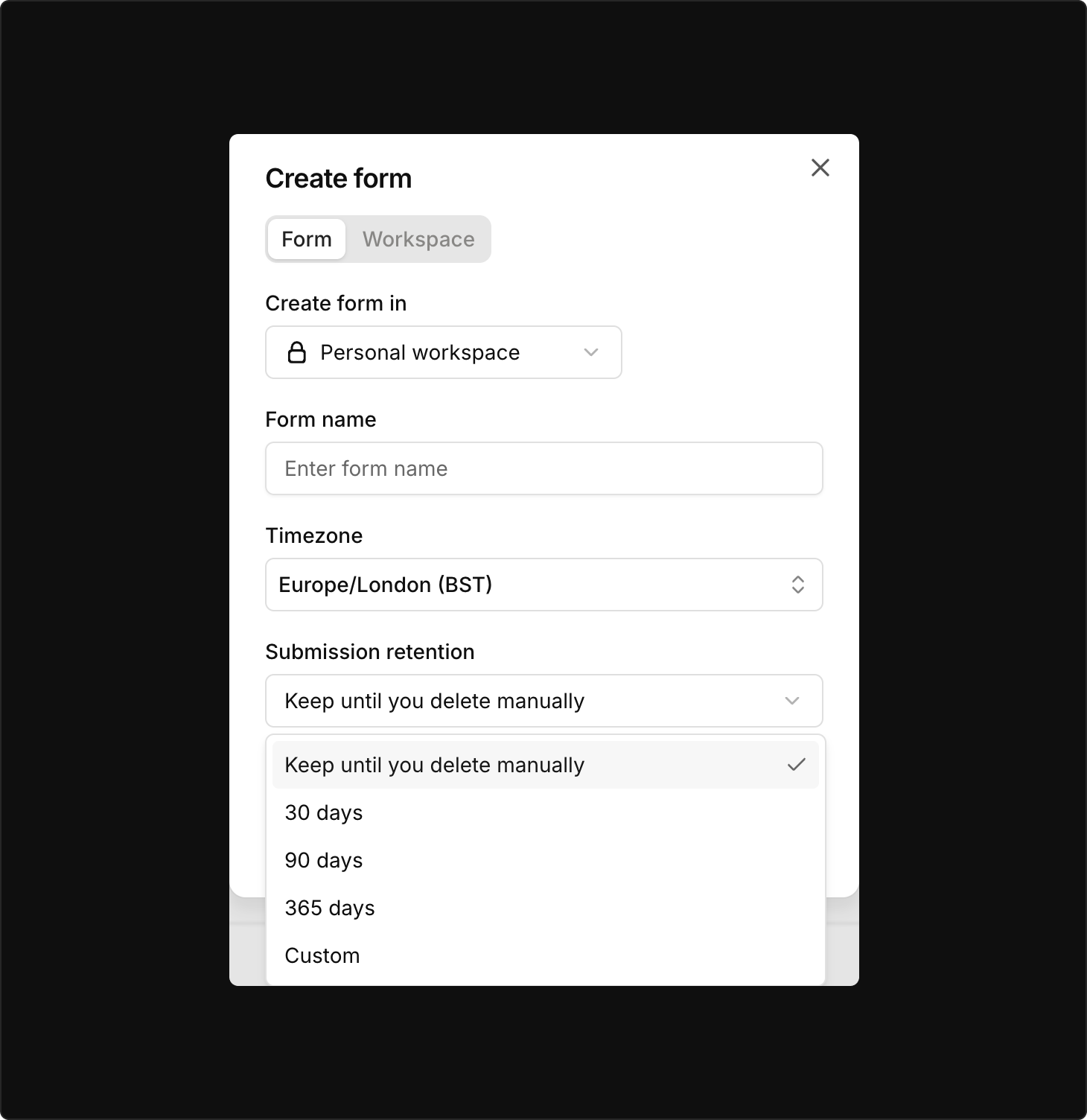
How Submission Retention works
Section titled “How Submission Retention works”The selected retention period:
- Applies to all existing and future submissions
- Applies to submissions in Inbox and Trash
- Is calculated from the date and time each submission was received
- Does not restart when a submission is moved between Inbox and Trash
- Deletes associated uploaded files with the submission
When a submission has a scheduled deletion date, its details page shows how many days remain:
Scheduled for permanent deletion in 365 days.
Expired submissions are permanently deleted during the next scheduled cleanup.
Retention periods
Section titled “Retention periods”| Option | Behavior |
|---|---|
| Until manually deleted | Submissions remain stored until you permanently delete them |
| 30 days | Submissions are deleted 30 days after they are received |
| 90 days | Submissions are deleted 90 days after they are received |
| 365 days | Submissions are deleted 365 days after they are received |
| Custom | Choose your own retention period |
Spam submissions are not affected by this setting. They are always permanently deleted after 30 days.
Set retention when creating a form
Section titled “Set retention when creating a form”- Select Create form from your dashboard
- Find Submission retention
- Choose a retention period
- Create the form
You can change the retention period later from Form Settings.
Change retention for an existing form
Section titled “Change retention for an existing form”- Open the form in your dashboard
- Go to Form Settings
- Find Submission retention
- Choose a new retention period
- Save and confirm the change
Changes apply to all submissions still stored in the form, including submissions received before the setting was changed.
How changes affect existing submissions
Section titled “How changes affect existing submissions”| Change | Result |
|---|---|
| Until manually deleted → retention period | Existing and future submissions become subject to the selected period |
| Longer period → shorter period | Existing submissions older than the new period are deleted during the next cleanup |
| Shorter period → longer period | Stored submissions receive a later deletion deadline based on their original received date |
| Retention period → Until manually deleted | Automatic deletion stops for submissions that are still stored |
Changing or disabling retention cannot restore submissions or files that have already been deleted.
Inbox, Trash and Spam
Section titled “Inbox, Trash and Spam”| Folder | Submission Retention applies |
|---|---|
| Inbox | Yes |
| Trash | Yes |
| Spam | No. Spam uses a fixed 30-day deletion period |
Moving a submission to Trash or restoring it to Inbox does not restart its retention period.
Uploaded files and backups
Section titled “Uploaded files and backups”Uploaded files are deleted from live storage when their associated submission is deleted.
Encrypted backup copies expire within 35 days. Backup data is not restored to live systems except as part of disaster recovery. See the Security page for more on how Forminit stores and deletes data.
Integrations and external copies
Section titled “Integrations and external copies”Submission Retention only controls data stored by Forminit. It does not delete copies previously sent to:
- Email notifications
- Webhooks
- Google Sheets
- Slack or Discord
- Zapier
- Other connected services
- Files or CSV exports downloaded from Forminit
You must manage the retention of those copies separately.
Which plans include Submission Retention?
Section titled “Which plans include Submission Retention?”Submission Retention is available on the Pro plan and higher. On the Free plan, submissions are kept until you delete them manually.
Does the retention period apply to submissions I already received?
Section titled “Does the retention period apply to submissions I already received?”Yes. The selected period applies to every submission still stored in the form, and is calculated from the date and time each submission was received, not from the date you changed the setting.
Does moving a submission to Trash restart its retention period?
Section titled “Does moving a submission to Trash restart its retention period?”No. Retention applies to submissions in both Inbox and Trash, and the period is always calculated from when the submission was received.
Are uploaded files deleted too?
Section titled “Are uploaded files deleted too?”Yes. Files attached to a submission are deleted from live storage together with the submission. Encrypted backup copies expire within 35 days.
What happens to spam submissions?
Section titled “What happens to spam submissions?”Spam submissions are not affected by this setting. They are always permanently deleted after 30 days.
Can I recover submissions deleted by a retention period?
Section titled “Can I recover submissions deleted by a retention period?”No. Permanently deleted submissions and their uploaded files cannot be recovered. Export anything you still need before selecting a shorter period.
Does Submission Retention delete data sent to my integrations?
Section titled “Does Submission Retention delete data sent to my integrations?”No. It only controls data stored by Forminit. Copies already delivered to email, webhooks, Google Sheets, Slack, Discord, Zapier or CSV exports must be managed separately.
Related
Section titled “Related”- File Upload - Upload limits, supported types, and download URLs
- List Submissions API - Retrieve submissions programmatically before they expire
- Webhooks - Forward submissions to your own storage
Was this page helpful?
Thanks for your feedback.