
Form Blocks
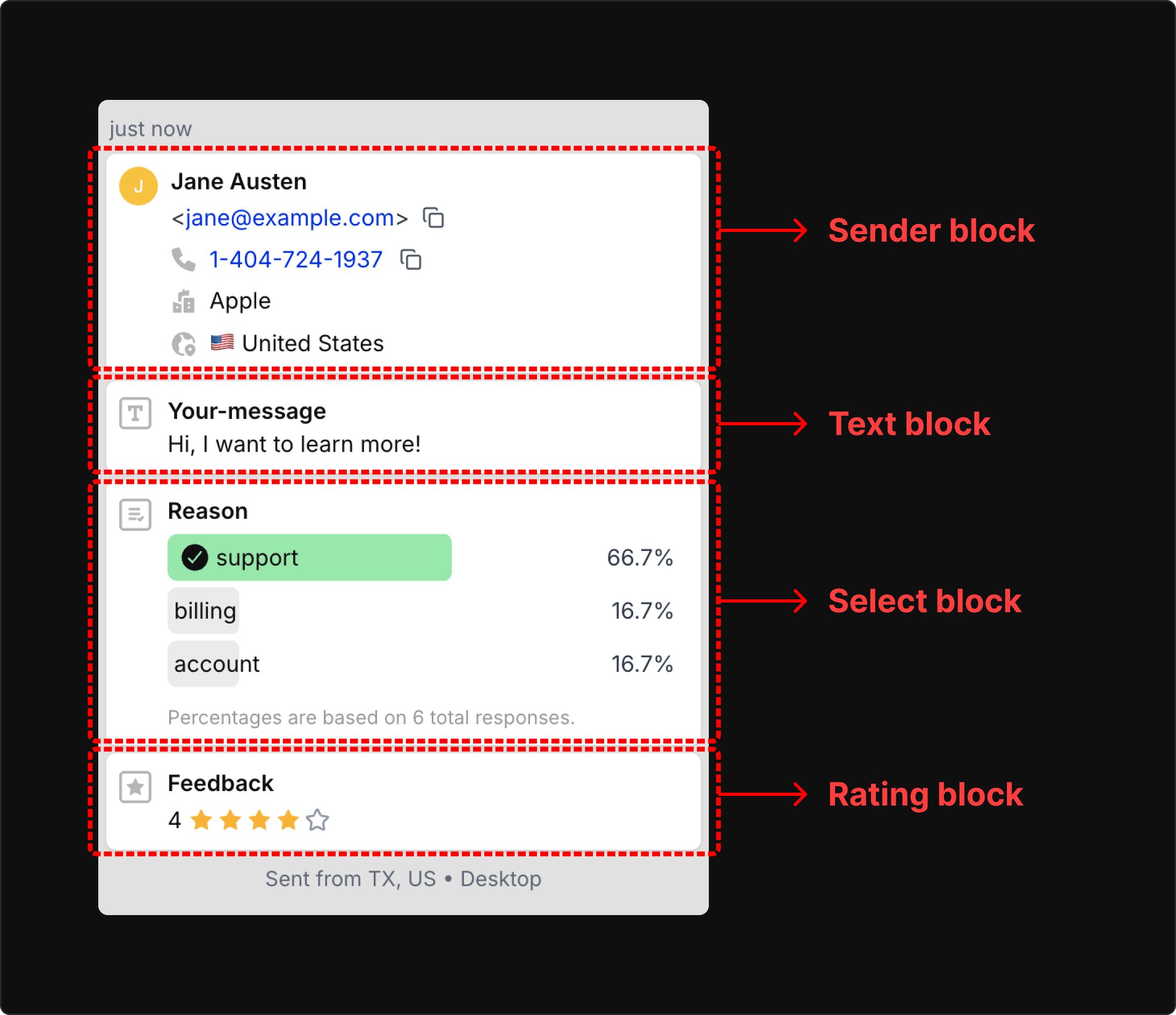
A block is one typed value in a submission. The input name fi-{blockType}-{name} tells Forminit what type the value is, how to validate it and how to show it. There is no field builder: the names in your form are the schema, and the first submission creates it.
- Validation happens on the server.
email,phone,url,country,rating,dateandnumbervalues are checked before anything is stored. A submission that fails validation is rejected with HTTP 400 and never reaches your inbox, emails or webhooks. - Every submission has the same shape. Blocks come back keyed by name in the API, webhooks, Google Sheets rows and email variables, so automations get predictable data.
- Two blocks are built in.
senderidentifies who submitted the form andtrackingholds attribution. The JavaScript SDK fills intrackingfrom the page URL.
Quick reference
Section titled “Quick reference”| Block | Form field name | JSON value | Validated as |
|---|---|---|---|
sender | fi-sender-{property} | object of properties, once per submission | its email, phone and country properties |
tracking | fi-tracking-{property}, or captured by the SDK | object of properties, once per submission | not validated |
text | fi-text-{name} | string | not validated |
number | fi-number-{name} | number | a valid number |
email | fi-email-{name} | string | email format |
phone | fi-phone-{name} | string | E.164, for example +12025550123 |
url | fi-url-{name} | string | URL format |
date | fi-date-{name} | string | ISO 8601 date or date-time |
rating | fi-rating-{name} | integer | 1 to 5 |
select | fi-select-{name} | string, or an array for multi-select | not validated |
radio | fi-radio-{name} | string | not validated |
checkbox | fi-checkbox-{name} | string, boolean, or an array | not validated |
file | fi-file-{name}, or fi-file-{name}[] for several files | not available in JSON | accepted file type, 25 MB per submission |
country | fi-country-{name} | string | ISO 3166-1 alpha-2 code |
Naming rules
Section titled “Naming rules”- Prefix and type. Every stored input is named
fi-{blockType}-{name}, where the type is one of the fourteen above. Inputs with any other name are not stored, so a field that is missing from a submission usually has a typo in its name. Form Settings → Logs shows exactly what each request sent. - Name.
{name}is yours to choose. It cannot contain spaces and must be unique across the form; a duplicate is rejected withFI_FIELD_DUPLICATE_NAME. The name becomes the key for that value everywhere downstream (messagein the API and webhooks,{{text.message}}in emails), so keep it stable. Letters, digits, hyphens and underscores are safe. - Object properties.
senderandtrackinghave fixed property names in camelCase:fi-sender-firstName,fi-tracking-utmSource. - Several values. Checkboxes, or a
selectwith themultipleattribute, that share one name are stored as an array. For several files in one block, add[]to the name and themultipleattribute:fi-file-photos[]. - Not blocks. Spam-protection fields keep their own names and are never stored as blocks: the honeypot (
_gotchaby default),cf-turnstile-response,g-recaptcha-responseandh-captcha-response. - Labels are separate. The dashboard shows a label for each block that you can change in Form Settings → Blocks. Changing the input name itself creates a new block, and earlier submissions keep the old one.
Sending blocks: form fields or JSON
Section titled “Sending blocks: form fields or JSON”POST https://forminit.com/f/{formId} accepts three content types: multipart/form-data, application/x-www-form-urlencoded and application/json. The first two carry fi- named fields; JSON carries a blocks array. Every request needs at least one block with a value, or it is rejected with EMPTY_SUBMISSION. The Submit Form API reference covers authentication, responses and rate limits.
Form fields
Section titled “Form fields”A plain HTML form, or a FormData object passed to the SDK, sends one field per input. This is the only way to upload files, and a native form with a file input needs enctype="multipart/form-data".
<form action="https://forminit.com/f/YOUR_FORM_ID" method="POST" enctype="multipart/form-data">
  <input type="email" name="fi-sender-email" required />
  <textarea name="fi-text-message" required></textarea>
  <label><input type="checkbox" name="fi-checkbox-features" value="api" /> API</label>
  <label><input type="checkbox" name="fi-checkbox-features" value="support" /> Support</label>
  <input type="file" name="fi-file-resume" />
  <button type="submit">Send</button>
</form>Server-side code sends blocks as an array. Field blocks are { type, name, value } objects and object blocks are { type, properties } objects. JSON cannot carry files.
{
  "blocks": [
    { "type": "sender", "properties": { "email": "jane@example.com", "fullName": "Jane Doe" } },
    { "type": "text", "name": "message", "value": "Hello from Forminit!" },
    { "type": "checkbox", "name": "features", "value": ["api", "support"] }
  ]
}
How the two formats map
Section titled “How the two formats map”Each form field has a JSON equivalent:
fi-text-message=Hellobecomes{ "type": "text", "name": "message", "value": "Hello" }fi-sender-email=jane@example.combecomes{ "type": "sender", "properties": { "email": "jane@example.com" } }fi-tracking-utmSource=googlebecomes{ "type": "tracking", "properties": { "utmSource": "google" } }fi-checkbox-features=apitogether withfi-checkbox-features=supportbecomes{ "type": "checkbox", "name": "features", "value": ["api", "support"] }fi-file-resumewith file content has no JSON equivalent; send form fields instead
The JavaScript SDK’s submit() accepts either a FormData object or the JSON blocks object and sends it to the same endpoint; in the browser it also adds the tracking block. The Python SDK sends JSON blocks, with file uploads as form fields.
Object blocks
Section titled “Object blocks”sender
Section titled “sender”Who submitted the form. One per submission. If you include it, at least one of userId, email, phone, firstName, lastName or fullName must have a value. The inbox shows the sender as a contact card, autoresponders are sent to {{sender.email}} and it is the usual Reply-to for notifications, and userId lets you link the submission to an account in your own system.
| Property | Form field | Validation |
|---|---|---|
email | fi-sender-email | Email format |
firstName, lastName | fi-sender-firstName, fi-sender-lastName | None |
fullName | fi-sender-fullName | None; an alternative to first and last name |
title | fi-sender-title | None (Mr, Ms, Dr) |
phone | fi-sender-phone | E.164 format |
company, position | fi-sender-company, fi-sender-position | None |
address, address2, city, postcode | fi-sender-address, fi-sender-address2, fi-sender-city, fi-sender-postcode | None |
country | fi-sender-country | ISO 3166-1 alpha-2 code |
userId | fi-sender-userId | None; your own identifier |
<input type="text" name="fi-sender-fullName" />
<input type="email" name="fi-sender-email" />
<input type="hidden" name="fi-sender-userId" value="user_12345" />
{ "type": "sender", "properties": { "fullName": "Jane Doe", "email": "jane@example.com", "userId": "user_12345" } }tracking
Section titled “tracking”Marketing attribution. One per submission. In the browser, the SDK reads these values from the page URL and adds the block for you; server-side code sets whichever values it has. Each property is named after its URL parameter, except that utm_source and friends become camelCase.
| Property | Form field | Captured by the SDK |
|---|---|---|
utmSource, utmMedium, utmCampaign, utmTerm, utmContent | fi-tracking-utmSource and so on | Yes, from utm_source, utm_medium, utm_campaign, utm_term and utm_content |
gclid, wbraid, gbraid (Google Ads) | fi-tracking-gclid and so on | Yes |
fbclid (Meta) | fi-tracking-fbclid | Yes |
msclkid (Microsoft Ads) | fi-tracking-msclkid | Yes |
ttclid (TikTok) | fi-tracking-ttclid | Yes |
twclid (X) | fi-tracking-twclid | Yes |
li_fat_id (LinkedIn) | fi-tracking-li_fat_id | Yes |
amzclid (Amazon Ads) | fi-tracking-amzclid | Yes |
mc_cid, mc_eid (Mailchimp) | fi-tracking-mc_cid, fi-tracking-mc_eid | Yes |
referrer | fi-tracking-referrer | No, set it yourself |
{ "type": "tracking", "properties": { "utmSource": "google", "utmMedium": "cpc", "utmCampaign": "summer_sale", "gclid": "EAIaIQ..." } }Forminit also records, without any block, the request’s IP address (resolved to country, city and timezone), user agent and referring page. They appear as submission info in the inbox, API and webhooks, and as {{@location}} and {{@referer}} in emails. Server-side code can pass the visitor’s own values with the SDK’s setUserInfo().
Field blocks
Section titled “Field blocks”A submission can carry up to 100 field blocks per submission, up to 50 of the same type, each with its own name.
A free-form string: messages, comments, anything you do not want validated. Workflow conditions can check whether it equals, contains or is one of given values, or is empty.
<textarea name="fi-text-message"></textarea>{ "type": "text", "name": "message", "value": "Hello from Forminit!" }number
Section titled “number”Any numeric value: budgets, quantities, ages. It is stored as a number, so conditions can compare it with greater than or between.
<input type="number" name="fi-number-budget" />{ "type": "number", "name": "budget", "value": 5000 }An email address other than the submitter’s own, such as an invitee or a colleague to copy in. Validated as an email format; an invalid value is rejected with FI_SCHEMA_FORMAT_EMAIL. Conditions can match the domain. For the submitter’s own address use sender.email.
<input type="email" name="fi-email-invitee" />{ "type": "email", "name": "invitee", "value": "colleague@example.com" }A phone number other than the submitter’s own. It must be in E.164 format, a plus sign followed by the country code and number with no spaces; anything else is rejected with FI_RULES_PHONE_INVALID. Conditions can match the country code. For the submitter’s own number use sender.phone.
<input type="tel" name="fi-phone-emergency" placeholder="+12025550123" />{ "type": "phone", "name": "emergency", "value": "+14155550123" }A web address: a website, portfolio or profile. Validated as a URL. Conditions can match the domain.
<input type="url" name="fi-url-website" />{ "type": "url", "name": "website", "value": "https://janedoe.com" }A date or date-time in ISO 8601 format: 2026-01-15 or 2026-01-15T10:30:00Z. A browser’s date input produces the right format. Conditions can check before or after a date.
<input type="date" name="fi-date-appointment" />{ "type": "date", "name": "appointment", "value": "2026-01-15" }rating
Section titled “rating”An integer from 1 to 5, shown as stars in the inbox. Any other value is rejected with FI_SCHEMA_RANGE_RATING.
<input type="range" name="fi-rating-satisfaction" min="1" max="5" step="1" />{ "type": "rating", "name": "satisfaction", "value": 5 }select
Section titled “select”A dropdown choice: a single value, or an array when the select allows several. The inbox and Analytics show how often each option was chosen, and conditions offer the options as a list.
<select name="fi-select-plan">
  <option value="basic">Basic</option>
  <option value="pro">Pro</option>
</select>
{ "type": "select", "name": "plan", "value": "pro" }One choice from a group of radio buttons that share a name. Breakdowns and conditions work as for select.
<label><input type="radio" name="fi-radio-priority" value="low" /> Low</label>
<label><input type="radio" name="fi-radio-priority" value="high" /> High</label>
{ "type": "radio", "name": "priority", "value": "high" }checkbox
Section titled “checkbox”One or more choices. Checkboxes that share a name are stored as an array; a single checkbox stores its value attribute, or a boolean in JSON, which suits consent boxes. Breakdowns and conditions work as for select.
<label><input type="checkbox" name="fi-checkbox-features" value="api" /> API</label>
<label><input type="checkbox" name="fi-checkbox-features" value="support" /> Support</label>
{ "type": "checkbox", "name": "features", "value": ["api", "support"] }An uploaded file. It requires multipart/form-data, which FormData sends by default; JSON cannot carry files. A submission can carry up to 20 file blocks per submission and 25 MB of files combined, across 50+ accepted types. Add [] to the name and the multiple attribute to accept several files in one block. Files appear with download links in the inbox and as objects in webhooks and the API, and conditions can check file count, extension and size. File Upload lists the accepted types and accept attribute examples.
<input type="file" name="fi-file-resume" accept=".pdf,.doc,.docx" />
<input type="file" name="fi-file-photos[]" accept="image/*" multiple />
country
Section titled “country”An ISO 3166-1 alpha-2 code such as US, GB or DE; anything else is rejected with FI_DATA_COUNTRY_INVALID. Conditions pick values from a country list. For the submitter’s own country use sender.country.
<select name="fi-country-shipping">
  <option value="US">United States</option>
  <option value="GB">United Kingdom</option>
</select>
{ "type": "country", "name": "shipping", "value": "GB" }Validation and errors
Section titled “Validation and errors”Validation runs on every request before anything is stored. When a block fails, the whole submission is rejected with HTTP 400 and an error body; nothing is stored and no workflow runs. The SDKs return the same code and message in their error object.
{
  "success": false,
  "error": "EMPTY_SUBMISSION",
  "code": 400,
  "message": "At least one field with a value is required."
}| Error code | Cause |
|---|---|
EMPTY_SUBMISSION | No block had a value |
FI_FIELD_TYPE_MISSING | A JSON block has no type |
FI_FIELD_NAME_MISSING | A field block has no name |
FI_FIELD_DUPLICATE_NAME | Two blocks share a name |
FI_SCHEMA_FORMAT_EMAIL | An email value, or sender.email, is not a valid address |
FI_RULES_PHONE_INVALID | A phone value, or sender.phone, is not in E.164 format |
FI_SCHEMA_RANGE_RATING | A rating is not an integer from 1 to 5 |
FI_DATA_COUNTRY_INVALID | A country value, or sender.country, is not an ISO 3166-1 alpha-2 code |
UNSUPPORTED_CONTENT_TYPE | The request body is not JSON, multipart or URL-encoded (HTTP 415) |
Authentication, form-state and rate-limit errors are listed in the Submit Form API reference.
Limits
Section titled “Limits”| Limit | Value |
|---|---|
Maximum field blocks per submission (sender and tracking don’t count toward this limit) | 100 |
| Maximum blocks of the same type | 50 |
| Maximum file blocks per submission | 20 |
| Maximum upload size per submission (all files combined) | 25 MB |
Built-in blocks per submission (sender, tracking) | 1 each |
Where blocks appear after submit
Section titled “Where blocks appear after submit”| Destination | How blocks appear |
|---|---|
| Inbox | A sender card, then each block with its label. select, radio and checkbox show how often each option was chosen, rating shows stars and file shows download links |
| Email notifications and autoresponders | Variables named {{type.name}}, such as {{text.message}} and {{sender.email}}, inserted from the variable picker, plus constants such as {{@form_name}} and {{@submission_id}} |
| Workflow conditions | Every block can be checked in an If / else step; the comparisons depend on the block type (see below) |
| Webhooks | A data object keyed by block name, with sender as a nested object and each file as a { file, size, name } object |
| REST API | blocks keyed by block name, with uploads listed separately in files and the block name as their label |
| Google Sheets | Each block value maps to a column you name |
| Analytics (Pro and higher) | Counts and percentages per option for select, radio and checkbox, and sources and campaigns from tracking |
| CSV export (Pro and higher) | Every block value is included |
Workflow conditions by block type:
| Block type | Comparisons |
|---|---|
text, select, radio, checkbox, country | Equals, does not equal, contains, is one of (choice fields list their options, country uses a country list) |
| Any block | Is empty, is not empty |
number | Greater than, between |
date | Before, after |
email, url, sender.email | Domain equals, domain is one of |
phone, sender.phone | Country code equals |
file | File count, extension, size |
Editing blocks in the dashboard
Section titled “Editing blocks in the dashboard”After the first submission, your blocks become the form’s schema. From Form Settings → Blocks you can:
- Rename labels so the dashboard reads naturally (for example Budget instead of
fi-number-budget) - Reorder how blocks appear in the submission view
- Hide blocks you don’t want to see
Labels only change how a block is displayed. The input name, and the keys in the API, webhooks and email variables, stay the same.
Every block in one submission
Section titled “Every block in one submission”The example below packs every block type into a single submission, shown four ways: HTML loads the SDK from the CDN (browser, no API key needed), Node.js posts plain fetch with an X-API-KEY header to the submit API (server, no SDK), React uses the npm SDK inside a component, and Python uses the official Python SDK. Each tab runs on its own. Most forms only need a handful of these blocks, so copy the tab you want and delete the ones that don’t apply.
<!-- Load the SDK from the CDN -->
<script src="https://forminit.com/sdk/v1/forminit.js"></script>

<form id="contact-form">

  <input type="text"  name="fi-sender-firstName" placeholder="First name" />
  <input type="text"  name="fi-sender-lastName"  placeholder="Last name" />
  <!-- Single-field alternative to firstName/lastName -->
  <input type="text"  name="fi-sender-fullName"  placeholder="Full name" />
  <input type="email" name="fi-sender-email"     placeholder="Email" />
  <input type="text"  name="fi-sender-phone"     placeholder="Phone" />
  <input type="text"  name="fi-sender-title"     placeholder="Title (Mr., Ms., Dr.)" />
  <input type="text"  name="fi-sender-company"   placeholder="Company" />
  <input type="text"  name="fi-sender-position"  placeholder="Job title" />
  <input type="text"  name="fi-sender-address"   placeholder="Address" />
  <input type="text"  name="fi-sender-address2"  placeholder="Address line 2 (apt, suite, etc.)" />
  <input type="text"  name="fi-sender-city"      placeholder="City" />
  <input type="text"  name="fi-sender-postcode"  placeholder="Postcode / ZIP" />
  <input type="text"  name="fi-sender-country"   placeholder="Country (ISO 3166-1 alpha-2, e.g. US)" />
  <input type="hidden" name="fi-sender-userId"   value="ext_12345" />

  <!-- text: free-form answer, no validation -->
  <textarea name="fi-text-message" placeholder="Message"></textarea>

  <!-- number: any numeric value -->
  <input type="number" name="fi-number-budget" placeholder="Budget" />

  <!-- email: a second email beyond the sender's -->
  <input type="email" name="fi-email-invitee" placeholder="Invitee email" />

  <!-- phone: a second phone beyond the sender's, E.164 format -->
  <input type="text" name="fi-phone-emergency" placeholder="Emergency contact" />

  <!-- url: validated as a URL -->
  <input type="url" name="fi-url-website" placeholder="Your website" />

  <!-- select: single or multi choice -->
  <select name="fi-select-plan">
    <option value="basic">Basic</option>
    <option value="pro">Pro</option>
    <option value="enterprise">Enterprise</option>
  </select>

  <!-- radio: single choice from a group -->
  <label><input type="radio" name="fi-radio-priority" value="low"  /> Low</label>
  <label><input type="radio" name="fi-radio-priority" value="high" /> High</label>

  <!-- checkbox: one or more choices, same name = array -->
  <label><input type="checkbox" name="fi-checkbox-features" value="api" />     API</label>
  <label><input type="checkbox" name="fi-checkbox-features" value="support" /> Support</label>

  <!-- rating: integer between 1 and 5 -->
  <input type="range" name="fi-rating-satisfaction" min="1" max="5" step="1" value="3" />

  <!-- date: ISO 8601 date or date-time -->
  <input type="date" name="fi-date-appointment" />

  <!-- file: requires multipart/form-data (FormData uses it by default) -->
  <input type="file" name="fi-file-resume" />

  <!-- country: ISO 3166-1 alpha-2 code. Full list: https://gist.github.com/ssskip/5a94bfcd2835bf1dea52 -->
  <select name="fi-country-shipping">
    <option value="US">United States</option>
    <option value="GB">United Kingdom</option>
  </select>

  <!-- tracking: auto-captured by the SDK from URL params -->

  <button type="submit">Send</button>
  <p id="form-status"></p>
</form>

<script>
  const forminit = new Forminit();
  const form = document.getElementById('contact-form');
  const status = document.getElementById('form-status');

  form.addEventListener('submit', async (e) => {
    e.preventDefault();
    status.textContent = '';

    const { data, error } = await forminit.submit('YOUR_FORM_ID', new FormData(form));

    if (error) {
      status.textContent = 'Error: ' + error.message;
      return;
    }

    status.textContent = 'Thanks! Your submission was received.';
    form.reset();
  });
</script>
// Plain fetch with X-API-KEY, no SDK
const res = await fetch('https://forminit.com/f/YOUR_FORM_ID', {
method: 'POST',
headers: {
'Content-Type': 'application/json',
'X-API-KEY': process.env.FORMINIT_API_KEY,
},
body: JSON.stringify({
blocks: [
// sender: who's submitting (built-in, max 1 per submission)
{
type: 'sender',
properties: {
firstName: 'Jane',
lastName: 'Doe',
fullName: 'Jane Doe', // alternative to firstName/lastName
email: 'jane@example.com',
phone: '+12025550123', // E.164 format
title: 'Ms.',
company: 'Acme Corp',
position: 'Software Engineer',
address: '350 Fifth Avenue',
address2: 'Suite 200',
city: 'New York',
postcode: '10118',
country: 'US', // ISO 3166-1 alpha-2
userId: 'ext_12345', // your own user identifier
},
},
// tracking: marketing attribution (built-in, max 1; set manually here since no SDK)
{
type: 'tracking',
properties: {
utmSource: 'google',
utmMedium: 'cpc',
utmCampaign: 'summer_sale',
referrer: 'https://google.com/search',
},
},
// text: free-form answer, no validation
{ type: 'text', name: 'message', value: 'Hello from Forminit!' },
// number: any numeric value
{ type: 'number', name: 'budget', value: 5000 },
// email: a second email beyond the sender's
{ type: 'email', name: 'invitee', value: 'colleague@example.com' },
// phone: a second phone beyond the sender's, E.164 format
{ type: 'phone', name: 'emergency', value: '+14155550123' },
// url: validated as a URL
{ type: 'url', name: 'website', value: 'https://janedoe.com' },
// select: single value or array of values
{ type: 'select', name: 'plan', value: 'Pro' },
// radio: single choice
{ type: 'radio', name: 'priority', value: 'high' },
// checkbox: array for multiple selections
{ type: 'checkbox', name: 'features', value: ['api', 'support'] },
// rating: integer between 1 and 5
{ type: 'rating', name: 'satisfaction', value: 5 },
// date: ISO 8601 date or date-time
{ type: 'date', name: 'appointment', value: '2026-01-15' },
// file: NOT supported in JSON. Use multipart/form-data for uploads
// country: ISO 3166-1 alpha-2 code. Full list: https://gist.github.com/ssskip/5a94bfcd2835bf1dea52
{ type: 'country', name: 'shipping', value: 'GB' },
],
}),
});
const result = await res.json();
if (result.success) {
console.log('Submitted! ID:', result.submission.hashId);
} else {
console.error('Error:', result.error, result.message);
}// npm install forminit
import { useState, FormEvent } from 'react';
import { Forminit } from 'forminit';
const forminit = new Forminit();
export function ContactForm() {
const [status, setStatus] = useState<'idle' | 'loading' | 'success' | 'error'>('idle');
const [error, setError] = useState<string | null>(null);
async function handleSubmit(e: FormEvent<HTMLFormElement>) {
e.preventDefault();
const form = e.currentTarget; // keep a reference: currentTarget is cleared after await
setStatus('loading');
const { data, error } = await forminit.submit('YOUR_FORM_ID', new FormData(form));
if (error) {
setStatus('error');
setError(error.message);
return;
}
setStatus('success');
console.log('Submitted! ID:', data.hashId);
form.reset();
}
return (
<form onSubmit={handleSubmit}>
<input type="text" name="fi-sender-firstName" placeholder="First name" />
<input type="text" name="fi-sender-lastName" placeholder="Last name" />
{/* Single-field alternative to firstName/lastName */}
<input type="text" name="fi-sender-fullName" placeholder="Full name" />
<input type="email" name="fi-sender-email" placeholder="Email" />
<input type="text" name="fi-sender-phone" placeholder="Phone" />
<input type="text" name="fi-sender-title" placeholder="Title (Mr., Ms., Dr.)" />
<input type="text" name="fi-sender-company" placeholder="Company" />
<input type="text" name="fi-sender-position" placeholder="Job title" />
<input type="text" name="fi-sender-address" placeholder="Address" />
<input type="text" name="fi-sender-address2" placeholder="Address line 2 (apt, suite, etc.)" />
<input type="text" name="fi-sender-city" placeholder="City" />
<input type="text" name="fi-sender-postcode" placeholder="Postcode / ZIP" />
<input type="text" name="fi-sender-country" placeholder="Country (ISO 3166-1 alpha-2, e.g. US)" />
<input type="hidden" name="fi-sender-userId" value="ext_12345" />
{/* text: free-form answer, no validation */}
<textarea name="fi-text-message" placeholder="Message" />
{/* number: any numeric value */}
<input type="number" name="fi-number-budget" placeholder="Budget" />
{/* email: a second email beyond the sender's */}
<input type="email" name="fi-email-invitee" placeholder="Invitee email" />
{/* phone: a second phone beyond the sender's, E.164 format */}
<input type="text" name="fi-phone-emergency" placeholder="Emergency contact" />
{/* url: validated as a URL */}
<input type="url" name="fi-url-website" placeholder="Your website" />
{/* select: single or multi choice */}
<select name="fi-select-plan">
<option value="basic">Basic</option>
<option value="pro">Pro</option>
<option value="enterprise">Enterprise</option>
</select>
{/* radio: single choice from a group */}
<label><input type="radio" name="fi-radio-priority" value="low" /> Low</label>
<label><input type="radio" name="fi-radio-priority" value="high" /> High</label>
{/* checkbox: one or more choices, same name = array */}
<label><input type="checkbox" name="fi-checkbox-features" value="api" /> API</label>
<label><input type="checkbox" name="fi-checkbox-features" value="support" /> Support</label>
{/* rating: integer between 1 and 5 */}
<input type="range" name="fi-rating-satisfaction" min={1} max={5} step={1} defaultValue={3} />
{/* date: ISO 8601 date or date-time */}
<input type="date" name="fi-date-appointment" />
{/* file: requires multipart/form-data (FormData uses it by default) */}
<input type="file" name="fi-file-resume" />
{/* country: ISO 3166-1 alpha-2 code. Full list: https://gist.github.com/ssskip/5a94bfcd2835bf1dea52 */}
<select name="fi-country-shipping">
<option value="US">United States</option>
<option value="GB">United Kingdom</option>
</select>
{/* tracking: auto-captured by the SDK from URL params */}
<button type="submit" disabled={status === 'loading'}>
{status === 'loading' ? 'Sending...' : 'Send'}
</button>
{status === 'success' && <p>Sent.</p>}
{status === 'error' && <p>Error: {error}</p>}
</form>
);
}# pip install forminit
import os
from forminit import ForminitClient
with ForminitClient(api_key=os.environ["FORMINIT_API_KEY"]) as client:
response = client.submit("YOUR_FORM_ID", {
"blocks": [
# sender: who's submitting (built-in, max 1 per submission)
{
"type": "sender",
"properties": {
"firstName": "Jane",
"lastName": "Doe",
"fullName": "Jane Doe", # alternative to firstName/lastName
"email": "jane@example.com",
"phone": "+12025550123", # E.164 format
"title": "Ms.",
"company": "Acme Corp",
"position": "Software Engineer",
"address": "350 Fifth Avenue",
"address2": "Suite 200",
"city": "New York",
"postcode": "10118",
"country": "US", # ISO 3166-1 alpha-2
"userId": "ext_12345", # your own user identifier
},
},
# tracking: marketing attribution (built-in, max 1; set manually server-side)
{
"type": "tracking",
"properties": {
"utmSource": "google",
"utmMedium": "cpc",
"utmCampaign": "summer_sale",
"referrer": "https://google.com/search",
},
},
# text: free-form answer, no validation
{"type": "text", "name": "message", "value": "Hello from Forminit!"},
# number: any numeric value
{"type": "number", "name": "budget", "value": 5000},
# email: a second email beyond the sender's
{"type": "email", "name": "invitee", "value": "colleague@example.com"},
# phone: a second phone beyond the sender's, E.164 format
{"type": "phone", "name": "emergency", "value": "+14155550123"},
# url: validated as a URL
{"type": "url", "name": "website", "value": "https://janedoe.com"},
# select: single value or array of values
{"type": "select", "name": "plan", "value": "Pro"},
# radio: single choice
{"type": "radio", "name": "priority", "value": "high"},
# checkbox: array for multiple selections
{"type": "checkbox", "name": "features", "value": ["api", "support"]},
# rating: integer between 1 and 5
{"type": "rating", "name": "satisfaction", "value": 5},
# date: ISO 8601 date or date-time
{"type": "date", "name": "appointment", "value": "2026-01-15"},
# file: NOT supported in JSON blocks. For uploads use flat form data:
# {"fi-file-resume": ("resume.pdf", open("resume.pdf", "rb"), "application/pdf")}
# country: ISO 3166-1 alpha-2 code. Full list: https://gist.github.com/ssskip/5a94bfcd2835bf1dea52
{"type": "country", "name": "shipping", "value": "GB"},
]
})
if response.get("error"):
print("Error:", response["error"]["message"])
else:
print("Submitted! ID:", response["data"]["hashId"])Why is a field missing from my submission?
Section titled “Why is a field missing from my submission?”Only inputs named fi-{blockType}-{name} with one of the fourteen block types are stored; any other input name is dropped. Check the spelling of the prefix and the type, then open Form Settings → Logs to see exactly what the request sent.
Do I have to send a sender block?
Section titled “Do I have to send a sender block?”No. A submission only needs one block with a value; without any it is rejected with EMPTY_SUBMISSION. The sender block is worth including because it becomes the contact card in the inbox and sender.email is where autoresponders go. If you include it, at least one of userId, email, phone, firstName, lastName or fullName must have a value.
How do I send several values for one field?
Section titled “How do I send several values for one field?”Give the inputs the same name. Checkboxes or a select with the multiple attribute that share a name are stored as an array. For several files in one block, add [] to the name and the multiple attribute, for example fi-file-photos[]. In JSON, send an array as the value.
Can I rename a field after collecting submissions?
Section titled “Can I rename a field after collecting submissions?”Rename its label in Form Settings → Blocks; the dashboard then shows the new label everywhere. Changing the input name in your form creates a new block, and earlier submissions keep the old one.
Can I add required or custom validation rules?
Section titled “Can I add required or custom validation rules?”Forminit validates the format of each value by its block type: email, phone, URL, country, rating, date and number. Required fields, length limits and other rules are enforced in your frontend, for example with the required attribute, and Workflow conditions can route or mark as spam any submission based on the values it contains.
Can I upload files with a JSON request?
Section titled “Can I upload files with a JSON request?”No. Files need multipart/form-data, which FormData sends by default. Name the input fi-file-{name}; a submission can carry up to 20 file blocks and 25 MB of files combined.
Was this page helpful?
Thanks for your feedback.