
AI Classify
AI Classify is a step in your form’s Workflow. When a submission arrives, it sends the parts of the submission you choose to AI, asks the questions you set up, and saves one answer per question on the submission. Steps placed after it use those answers to route, filter or enrich the submission.
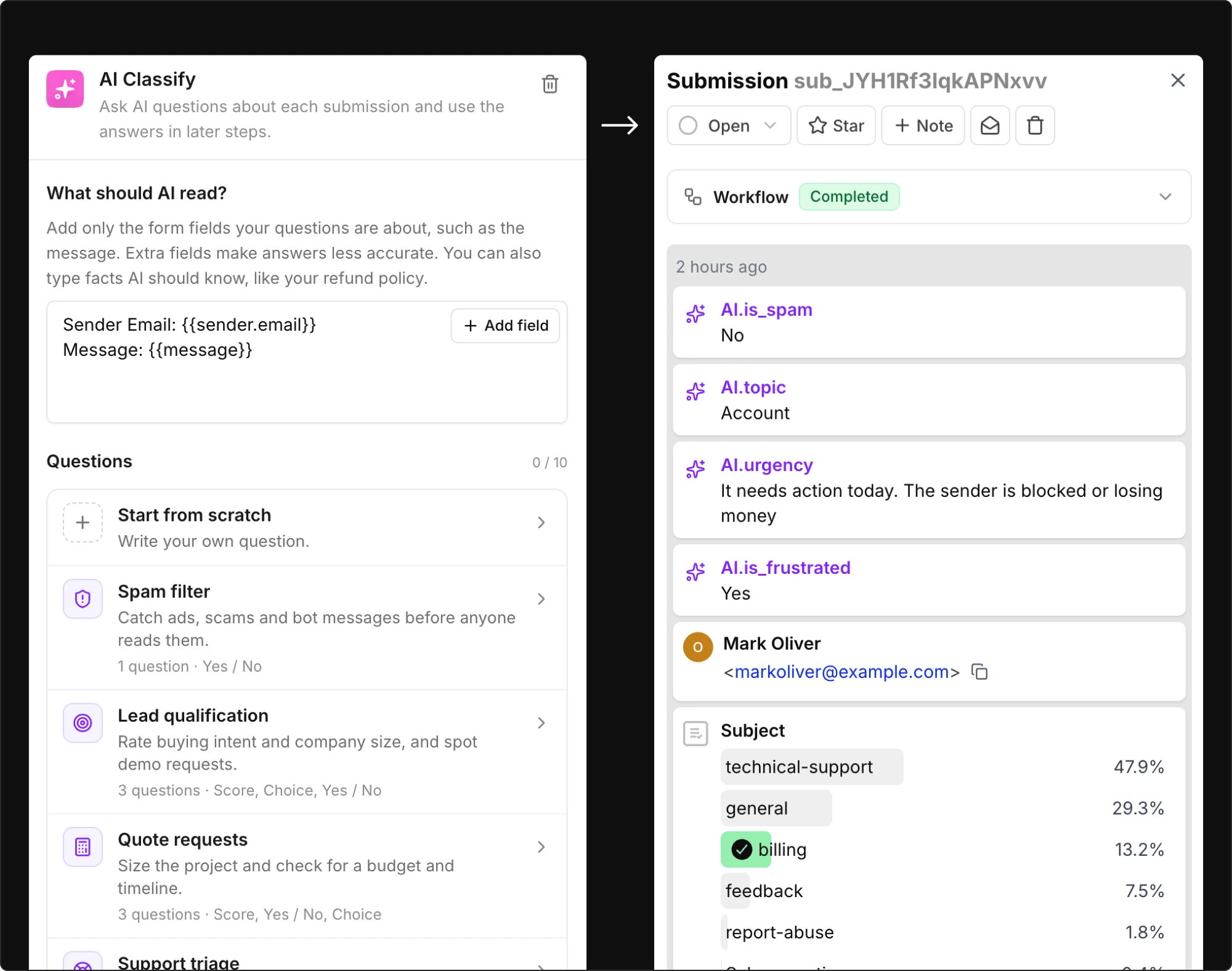
Use Cases: Filtering spam before anyone reads it, qualifying leads by buying intent and company size, triaging support requests by topic and urgency, routing each request to the right team, spotting refunds, cancellations, bug reports and churn risk.
              ╭───────────────────────╮
              │  Submission received  │
              ╰───────────┬───────────╯
              ╭───────────▼───────────╮
              │      AI Classify      │
              │     Is this spam?     │
              ╰───────────┬───────────╯
              ╭───────────▼───────────╮
              │       If / else       │
              │  is_spam equals true  │
              ╰───────────┬───────────╯
             ╭────────────┴────────────╮
             │ If                      │ Else
  ╭──────────▼──────────╮   ╭──────────▼──────────╮
  │     Mark as spam    │   │      Send email     │
  ╰─────────────────────╯   │     notification    │
                            ╰─────────────────────╯
You decide what AI reads and what it answers. Forminit stores the answers with the submission, shows them in the dashboard and makes them available to every later step as variables.
How AI Classify works
Section titled “How AI Classify works”Each AI Classify step has two parts: a text that tells AI what to read, and a list of questions. For each submission, AI reads the text, answers every question and Forminit saves one answer per question under its Question ID.
 What should AI read?       Questions                   Answers
 ────────────────────────   ─────────────────────────   ─────────────────────────────
 Company: Northwind Ltd     Is this submission spam?    ai.classify.is_spam = false
 Message: Can we book a  →  Which team should handle →  ai.classify.team = sales
 demo for a team of 40?     this request?
                            How ready is the sender     ai.classify.buying_intent = 2
                            to buy?
A later If / else step can then check ai.classify.team, an email subject can include {{ai.classify.buying_intent}}, and a Google Sheets step can write is_spam to a column.
Three things to know before you start:
- Answers have a type. A question is a Choice (one option from a list), a Score (a number on a scale you define) or Yes / No (
trueorfalse). The type decides which comparisons later steps offer. - Order matters. Only steps placed after AI Classify on the same path can use its answers. Put it before the If / else that should route on them.
- Nothing happens until you publish. Like every workflow step, AI Classify runs for new submissions only after you select Publish.
Add AI Classify to a workflow
Section titled “Add AI Classify to a workflow”-
In your Forminit dashboard, open your form and select Workflow in the form header.
-
Select + where the step should run, usually straight beneath Submission received, then choose AI Classify from the AI group of the action list.
-
Select the step to open its settings and fill in What should AI read?. Use Add field to insert the form fields your questions are about.
-
Select Add question. Choose Start from scratch for an empty question, or pick a ready-made question set and edit it.
-
For each question, write the Question, pick an Answer type and check the Question ID.
-
Add the steps that should use the answers after AI Classify: an If / else to route on them, an email that includes them, a Google Sheets column that records them.
-
Select Publish. Submit your form with a sample message, then open the submission to see the answers.
The rest of this page explains each setting, how to use the answers and what to expect when the step runs.
What should AI read?
Section titled “What should AI read?”This text box tells AI what to look at for each submission. It is the only part of the submission AI receives.
- Select Add field to insert a form field as a labelled line, for example
Message: {{message}}. When the workflow runs,{{message}}is replaced with that submission’s value. - Besides form fields, Add field offers Submitter Country, the two-letter country code of the submitter’s IP address, and the answers of any earlier AI Classify step on the same path.
- Type fixed facts AI should know, such as what your company sells, your refund policy or the roles you are hiring for. Keep questions out of this box. They have their own section below.
A lead form might read:
Company: {{company}}
Job title: {{job_title}}
Message: {{message}}
What we sell: Project management software for teams
Keep these rules in mind:
- Add only the fields your questions are about. Extra fields make answers less accurate.
- A field that a submission does not include is read as empty text.
- If every field is empty for a submission, AI is not asked. All answers are empty and the result shows No input.
- The text can be up to 8,000 characters. A longer text cannot be published. Forminit never shortens it silently.
Questions
Section titled “Questions”Each step has 1 to 10 questions. A question has three parts:
| Part | What it is |
|---|---|
| Question | What you want to know, in plain words. AI reads it literally, so ask one clear thing and name exactly what to look at. |
| Answer type | Choice, Score or Yes / No. See below. |
| Question ID | A short name in snake_case, for example is_spam. It names the answer for later steps. AI never sees it. |
Answer types
Section titled “Answer types”| Answer type | What AI does | Answer value |
|---|---|---|
| Choice | Picks one option from a list of 2 to 10 options. Each option has a name and an optional description of when to pick it. | The name of the chosen option, for example sales. |
| Score | Rates the submission on 2 to 10 ordered levels, lowest first. Levels are numbered from 0. | A number from 0 to the top level. It can be fractional, for example 1.4. Empty when AI is less sure than the Minimum confidence. |
| Yes / No | Decides whether something is true. You can describe what Yes and No mean, both or neither. | true or false. It is true only when AI’s confidence reaches the Yes threshold. |
Choice
Section titled “Choice”Use Choice to sort submissions into categories: which team, which topic, which language.
Give each option a short snake_case name and a one-line description of when to pick it. The description is what AI reads, so make it concrete.
| Option | Description |
|---|---|
sales | Pricing, demos, buying or upgrading |
support | Help using the product or a problem with it |
billing | Invoices, payments and refunds |
other | Anything that fits none of the options above |
A Choice question always produces one option, so include an option such as other or not_stated when a submission may fit none of the others. Without it, AI has to force every submission into a category.
Use Score when the answer is a matter of degree: urgency, buying intent, sentiment, severity.
Describe each level as a situation rather than a degree. “It needs action today. The sender is blocked or losing money” gives AI something to check. “Very urgent” does not.
| Level | Description |
|---|---|
| 0 | It can wait. Nothing is blocked for the sender |
| 1 | It should be handled soon. The sender is slowed down |
| 2 | It needs action today. The sender is blocked or losing money |
The answer is a number from 0 to the top level. It can be fractional, such as 1.4, when a submission sits between two levels. In an If / else condition, compare a Score with greater than or equal, less than or between rather than equals.
When AI is less sure than the Minimum confidence (80% by default), the answer is left empty and the submission shows Needs review. Route these submissions with a does not exist condition, for example to a human inbox.
Yes / No
Section titled “Yes / No”Use Yes / No for a single check: is this spam, does the sender want a demo, does the report include steps to reproduce.
Phrase the question so that Yes is the case you want to catch, and avoid negatives such as “free of”. “Is the sender asking for money back?” works. “Is this message free of refund requests?” does not.
You can describe what Yes and No mean:
| Description | |
|---|---|
| Yes means | The sender asks for a refund, a chargeback or money back |
| No means | Any other request, including questions about the refund policy |
The answer is true only when AI’s confidence reaches the Yes threshold (80% by default). Otherwise it is false.
- Raise the threshold when a wrong Yes is costly. Marking a real customer’s message as spam is worse than reading one more spam message.
- Lower the threshold when a missed case is costly. The ready-made Property maintenance set uses 50% for possible emergencies, because a false alarm costs a phone call and a missed gas leak costs much more.
Confidence settings
Section titled “Confidence settings”Two answer types have a confidence slider, and they behave differently:
| Setting | Applies to | Default | When AI’s confidence is below it |
|---|---|---|---|
| Minimum confidence | Score | 80% | The answer is empty and the submission shows Needs review |
| Yes threshold | Yes / No | 80% | The answer is false |
Choice questions have no confidence setting. AI always picks an option.
Write questions AI can answer
Section titled “Write questions AI can answer”- Ask one thing per question. Split “Is this urgent and is the sender upset?” into two questions.
- Name what to look at. “How well does the applicant’s experience match the role they applied for?” tells AI to compare two fields. “Is this a good candidate?” leaves it guessing.
- Give AI the facts it needs. If the answer depends on your pricing, policy or service area, put that in What should AI read? as a fixed line.
- Describe options and levels as situations. AI matches the submission against your descriptions, so the better they describe real submissions, the better the answers.
- Start from a ready-made set. The sets below are written this way. Edit one rather than starting blank.
Ready-made question sets
Section titled “Ready-made question sets”Add question opens a menu. Start from scratch adds one empty question. Every other entry adds a ready-made set of questions that you can edit, reorder or remove afterwards. When you choose a set, the What should AI read? placeholder suggests matching fields from your form.
A set can be added only when the step has enough free question slots. Each step holds up to 10 questions.
Every set is listed with its questions, options and levels in the reference at the end of this page.
Use the answers in later steps
Section titled “Use the answers in later steps”Each answer is a variable named ai.classify.<question ID>. A question with the ID is_spam produces {{ai.classify.is_spam}}.
Only steps placed after the AI Classify step on the same path can use its answers. A step on another branch, or above the AI step, does not see them.
| Step | How it uses the answers |
|---|---|
| If / else | AI answers are listed first in the field menu, tagged AI. Comparisons depend on the answer type, see the table below. |
| Send email notification, Send autoresponder email | Insert answers into the subject or body with the variable picker. An answer cannot be used as an email address. |
| Send webhook | The payload includes the answers under ai.classify, keyed by Question ID. |
| Send Slack notification, Send Discord notification | Messages can include the answers. |
| Send to Google Sheets | Map an answer to a column. An empty answer leaves the cell empty. |
| AI Classify (a later step) | Add an earlier step’s answers to What should AI read? with Add field. |
A webhook payload carries the answers like this:
"ai": {
  "classify": {
    "is_spam": false,
    "team": "sales",
    "urgency": 1.4
  }
}
Conditions by answer type
Section titled “Conditions by answer type”| Answer type | Comparisons in If / else |
|---|---|
| Choice | Equals, does not equal, is one of, is not one of |
| Score | Equals, does not equal, greater than, greater than or equal, less than, less than or equal, between |
| Yes / No | Equals true or false |
| All types | Exists, does not exist |
Use does not exist to route answers that are empty: a Score below the Minimum confidence, a submission with No input, or a step skipped for Plan required.
              ╭────────────────────────────╮
              │        AI Classify         │
              │      urgency (Score)       │
              ╰──────────────┬─────────────╯
              ╭──────────────▼─────────────╮
              │         If / else          │
              ╰──────────────┬─────────────╯
                             │
         ╭───────────────────┼───────────────────╮
         │ If: urgency       │ Else if: urgency  │ Else
         │ does not exist    │ >= 2              │
╭────────▼────────╮ ╭────────▼────────╮ ╭────────▼────────╮
│   Email triage  │ │   Notify Slack  │ │   Email support │
│      inbox      │ │                 │ │                 │
╰─────────────────╯ ╰─────────────────╯ ╰─────────────────╯
Put the does not exist branch first. Otherwise an empty answer fails every comparison and falls through to Else, where it is easy to miss.
Several AI Classify steps
Section titled “Several AI Classify steps”On Pro and higher, a workflow can hold up to 5 AI Classify steps, with up to 3 on one path. The Free plan allows one. A later step can read an earlier step’s answers in its What should AI read? text, for example to ask a follow-up question only about submissions that were not spam.
If two earlier AI Classify steps use the same Question ID, the step that uses the answer asks you to pick which one it means.
Rename a Question ID
Section titled “Rename a Question ID”Renaming a Question ID does not update steps that already use the old name. When you select Publish, Forminit lists the broken references so you can point each one at the new name.
Example workflows
Section titled “Example workflows”Filter spam and route the rest to a team
Section titled “Filter spam and route the rest to a team”Available on all plans.
Use one contact form for sales, support and general enquiries. This example adds the Spam filter and Route to a team sets to one AI Classify step, then routes on both answers with a single If / else.
-
Add AI Classify after Submission received.
-
In What should AI read?, use Add field to insert the sender’s name, email and message.
-
Select Add question, then Spam filter. Select Add question again, then Route to a team. The step now has two questions:
is_spam(Yes / No) andteam(Choice). -
Add If / else after AI Classify and configure its branches using the table.
-
On the If branch, add Mark as spam. On each other branch, add Send email notification and set its recipient.
-
Select Publish, then submit one sample enquiry for each route and one obvious spam message.
| Branch | Condition | Action |
|---|---|---|
| If | is_spam equals true | Mark as spam |
| Else if | team equals sales | Email sales@example.com |
| Else if | team equals support | Email support@example.com |
| Else | No earlier branch matched | Email hello@example.com |
                              ╭───────────────────────╮
                              │  Submission received  │
                              ╰───────────┬───────────╯
                              ╭───────────▼───────────╮
                              │      AI Classify      │
                              │    is_spam · team     │
                              ╰───────────┬───────────╯
                              ╭───────────▼───────────╮
                              │       If / else       │
                              ╰───────────┬───────────╯
         ╭─────────────────────┬──────────┴──────────┬─────────────────────╮
         │ If: is_spam         │ Else if: team       │ Else if: team       │ Else
         │ equals true         │ equals sales        │ equals support      │
╭────────▼────────╮   ╭────────▼────────╮   ╭────────▼────────╮   ╭────────▼────────╮
│   Mark as spam  │   │      Email      │   │      Email      │   │      Email      │
╰─────────────────╯   │      sales@     │   │     support@    │   │      hello@     │
                      ╰─────────────────╯   ╰─────────────────╯   ╰─────────────────╯
The spam check comes first, so a spam message never reaches a team inbox. Billing questions fall through to Else, because the billing option has no branch of its own. Add an Else if for it when your billing team wants its own inbox.
Forminit’s own spam protection runs before the workflow, so this step sees only submissions that passed it. AI Classify adds a second layer for messages that look legitimate to filters but not to a reader: SEO offers, link requests, vendor pitches.
Qualify leads and alert sales
Section titled “Qualify leads and alert sales”Requires Pro or higher for the Google Sheets and Slack steps.
Use a lead form with company, job title and message fields. This example records every lead in Google Sheets, then alerts sales in Slack only for leads who are ready to buy or ask for a demo.
-
Add Send to Google Sheets after Submission received and map the lead’s name, email and company to columns.
-
Add AI Classify after the Google Sheets step. In What should AI read?, insert the company, job title and message fields, then add a line describing what you sell.
-
Select Add question, then Lead qualification. The set adds
buying_intent(Score, levels 0 to 2),company_size(Choice) andwants_demo(Yes / No). -
Add If / else after AI Classify. Set the If branch to Match any with two conditions:
buying_intentgreater than or equal2, andwants_demoequalstrue. -
On the If branch, add Send Slack notification for your sales channel and include
{{ai.classify.company_size}}in the message. -
On the Else branch, add Send email notification for your general enquiries inbox.
-
Select Publish and submit sample leads: one that mentions a budget and timeline, one asking for a demo, and one that is only browsing.
                ╭───────────────────────╮
                │  Submission received  │
                ╰───────────┬───────────╯
                ╭───────────▼───────────╮
                │ Send to Google Sheets │
                ╰───────────┬───────────╯
                ╭───────────▼───────────╮
                │      AI Classify      │
                │     buying_intent     │
                │       wants_demo      │
                ╰───────────┬───────────╯
                ╭───────────▼───────────╮
                │       If / else       │
                │  buying_intent >= 2   │
                │  or wants_demo true   │
                ╰───────────┬───────────╯
              ╭─────────────┴─────────────╮
              │ If                        │ Else
  ╭───────────▼───────────╮   ╭───────────▼───────────╮
  │      Notify sales     │   │     Email general     │
  │        in Slack       │   │       enquiries       │
  ╰───────────────────────╯   ╰───────────────────────╯
A message that mentions a budget and a start date scores 2 and reaches Slack. A message asking about pricing scores around 1 and goes to the general inbox. If AI is less sure than the Minimum confidence, buying_intent is empty and the lead follows Else as well, so nobody is lost.
Google Sheets runs before AI Classify, so every lead is recorded even when classification fails. To record the answers too, place the Google Sheets step after AI Classify and map buying_intent and company_size to columns.
Where results appear
Section titled “Where results appear”| Where | What you see |
|---|---|
| Submission detail | One block per question with its answer, above the sender details. While AI is working it shows Classifying…. |
| Submission Workflow section | The AI Classify step with its status and answers. When it failed, a Retry button. |
| Settings > Logs | Entries labelled AI Classify: completed, no input, skipped, retry scheduled or held. |
| Form Analytics | For each AI Classify question, how many of the form’s submissions got each answer. Pro and higher. |
The submissions table does not show AI columns. Open a submission to see its answers, or open the form’s Analytics page for totals across all of its submissions, such as how many were spam or how many leads asked for a demo.
A submission’s AI block shows one of these states:
| State | Meaning |
|---|---|
| Classifying… | AI is working on this submission. Later steps wait for it. |
| Needs review | A Score answer was below the Minimum confidence. That answer is empty. |
| No input | Every field in What should AI read? was empty for this submission. AI was not asked. |
| Failed | AI could not be reached or returned an error. The workflow stopped at this step. See failures and retries. |
| Plan required | The step was skipped because the form’s plan does not include it. See Plans. |
How it runs
Section titled “How it runs”AI Classify runs when a submission arrives, before any step placed after it. The workflow waits for the answers, so later steps always see them.
Test is a dry run
Section titled “Test is a dry run”The workflow’s Test button never calls AI. In a test, the AI Classify step shows AI not run, and branches that depend on AI answers are not predicted. AI runs only for real submissions. To check your questions, publish the workflow and submit a few sample messages.
Failures and retries
Section titled “Failures and retries”If AI fails, for example because the AI service is busy or unreachable, the submission is kept and the workflow stops at the AI Classify step. Steps before it have already run. Steps after it have not.
╭─────────────────────────╮
│  Send to Google Sheets  │  ✓ ran before AI Classify, not run again
╰────────────┬────────────╯
┏━━━━━━━━━━━━▼━━━━━━━━━━━━┓
┃       AI Classify       ┃  ✗ failed, the workflow stops here
┗━━━━━━━━━━━━┯━━━━━━━━━━━━┛  ↻ Retry continues from this step
             │
╭────────────▼────────────╮
│ Send email notification │  runs once AI Classify succeeds
╰─────────────────────────╯
Forminit retries automatically when the failure is temporary. You can also select Retry in the submission’s Workflow section. The workflow then continues from the AI step: it classifies the submission and runs the steps after it. Steps that already ran, such as an email that was already sent, do not run again.
Old submissions
Section titled “Old submissions”Submissions received before you added the step are never classified automatically, including after an upgrade. Only an explicit Retry reruns a failed step, and only for that submission.
What is sent to AI
Section titled “What is sent to AI”For each submission, Forminit sends the text produced by What should AI read?, together with your questions, options and descriptions, to an AI service, and stores the answers with the submission.
Nothing outside that text is sent. A form field you did not add is not included, and neither are Question IDs or submissions caught by Forminit’s spam protection, which never reach the workflow. To keep a field such as the sender’s email out of AI’s view, leave it out of What should AI read?.
AI Classify is off until you add it. Forms whose workflow has no AI Classify step send nothing to the AI service, and a new step runs only for submissions received after you publish it. The AI service processes the text in the United States and does not use it to train models. It is listed with the other subprocessors on the GDPR page.
Limits
Section titled “Limits”| Limit | Value |
|---|---|
| AI Classify steps per workflow | 5 on Pro and higher, 1 on Free |
| AI Classify steps on one path | 3 |
| Questions per step | 1 to 10 |
| Options per Choice question | 2 to 10 |
| Levels per Score question | 2 to 10 |
| What should AI read? text | 8,000 characters |
| All questions, options and descriptions in one step | 8,000 characters |
A workflow that exceeds a limit cannot be published. Forminit points to the step that needs fixing.
AI Classify is available on all plans, including Free. The Free plan allows one AI Classify step per workflow. Adding another asks you to upgrade to Pro, which allows up to 5. For forms in a workspace, the workspace owner’s plan applies. See pricing for plan details.
Answer counts on the form’s Analytics page need Pro or higher, like the rest of Analytics. On Free, the answers still appear on each submission and work in later steps.
After a downgrade, AI Classify steps that your new plan does not include stay in the workflow but are skipped. Their answers are empty, the rest of the workflow still runs, and the submission shows Plan required. Conditions on their answers then behave as if the answer does not exist. The steps run again for new submissions after an upgrade.
Troubleshooting
Section titled “Troubleshooting”| Problem | What to check |
|---|---|
| The answers do not appear in an If / else field menu | The AI Classify step must be before the If / else on the same path. Move it, then publish. |
| A submission shows No input | Every field in What should AI read? was empty for it. Check that the inserted fields match the names your form sends, and add the fields your questions are about. |
| A Score answer is empty or shows Needs review | AI was less sure than the Minimum confidence. Route empty answers with does not exist, make the level descriptions more distinct, or lower the slider. |
A Yes / No answer is false when it should be true | Phrase the question so Yes is the case you want to catch, describe what Yes means, and lower the Yes threshold if missed cases cost more than false alarms. |
| A Choice answer is often wrong | Add a one-line description to each option, include an other option, and remove fields the question is not about from What should AI read?. |
| Publish reports the text is too long | What should AI read?, and all questions with their options and descriptions, must each stay within 8,000 characters. Remove fields or shorten fixed facts. |
| Publish lists broken references | A Question ID was renamed. Point each listed step at the new name. |
| You cannot add another AI Classify step | The Free plan allows one AI Classify step per workflow. Pro and higher allow up to 5, with up to 3 on one path. |
| Test shows AI not run | Expected. Test is a dry run. Publish and submit a sample to see real answers. |
| The step shows Failed | Open the submission’s Workflow section for the error. Forminit retries temporary failures automatically, or select Retry. |
| The step shows Plan required | The form’s plan, or the workspace owner’s plan, does not include this step, for example a second AI Classify step on the Free plan. Upgrade to run it for new submissions. |
| Old submissions have no answers | Submissions received before the step was published are never classified automatically. |
Which plans include AI Classify?
Section titled “Which plans include AI Classify?”AI Classify is available on all plans, including Free. The Free plan allows one AI Classify step per workflow, and Pro and higher allow up to 5. For forms in a workspace, the workspace owner’s plan applies.
Does AI Classify run on submissions I already received?
Section titled “Does AI Classify run on submissions I already received?”No. The step runs only for submissions that arrive after you publish it. Old submissions are never classified automatically, and only an explicit Retry reruns a failed step.
What does AI see?
Section titled “What does AI see?”Only the text produced by What should AI read?, together with your questions, options and descriptions. Question IDs are never sent, and neither is any form field you did not add to that text.
Can I test AI Classify without a real submission?
Section titled “Can I test AI Classify without a real submission?”No. The workflow’s Test button is a dry run that never calls AI. The AI step shows AI not run, and branches that depend on its answers are not predicted. Publish the workflow and submit a sample to see real answers.
Why is a Score answer empty?
Section titled “Why is a Score answer empty?”AI was less sure than the question’s Minimum confidence, so the answer was left empty and the submission shows Needs review. Route these submissions with a does not exist condition, or lower the slider if you prefer an answer over a review.
Can a Score answer be a decimal?
Section titled “Can a Score answer be a decimal?”Yes. A Score is a number from 0 to the top level and can be fractional, such as 1.4, when a submission sits between two levels. Compare it with greater than or equal, less than or between rather than equals.
Where can I use the answers?
Section titled “Where can I use the answers?”In every step placed after AI Classify on the same path: If / else conditions, email notification and autoresponder subjects and bodies, webhook payloads, Slack and Discord messages, Google Sheets columns, and the What should AI read? text of a later AI Classify step. An answer cannot be used as an email address.
Can I see how many submissions got each answer?
Section titled “Can I see how many submissions got each answer?”Yes, on Pro and higher. The form’s Analytics page counts the answers to each AI Classify question across all submissions in the form, for example how many submissions were spam or how many leads asked for a demo.
What happens if AI fails?
Section titled “What happens if AI fails?”The submission is kept and the workflow stops at the AI Classify step. Forminit retries automatically when the failure is temporary, and you can select Retry in the submission’s Workflow section. The workflow then continues from the AI step, and steps that already ran do not run again.
Ready-made question sets reference
Section titled “Ready-made question sets reference”Every set as it ships in the product, with its questions, answer types, Question IDs, options and levels. Add a set from the Add question menu, then edit, reorder or remove its questions like any other.
- The suggested What should AI read? text uses placeholders such as
{{message}}. When you add a set, the placeholder suggests matching fields from your form. Select Add field to insert your own fields in their place, and keep any fixed facts the set relies on, such as what you sell. - Every Score question uses a Minimum confidence of 80% and every Yes / No question uses a Yes threshold of 80%, except where noted.
- A set can be added only when the step has enough free question slots. Each step holds up to 10 questions.
| Set | Use it to | Question IDs |
|---|---|---|
| Spam filter | Catch ads, scams and bot messages before anyone reads them | is_spam |
| Lead qualification | Rate buying intent and company size, and spot demo requests | buying_intent, company_size, wants_demo |
| Quote requests | Size the project and check for a budget and timeline | project_size, budget_stated, timeline |
| Support triage | Sort requests by topic and urgency, and flag upset customers | topic, urgency, is_frustrated |
| Route to a team | Send each submission to sales, support or billing | team |
| Refunds and cancellations | Spot refund and cancellation requests so you can act fast | refund_requested, cancellation_requested |
| Job applications | Rate role fit and seniority, and check for work samples | role_fit, seniority, has_work_samples |
| Customer feedback | Measure sentiment, sort feedback and find who wants a reply | sentiment, feedback_type, wants_reply |
| Churn risk | Find unhappy customers who may leave, and why | churn_risk, mentions_competitor, main_reason |
| Bug reports | Rate severity and check that the report can be reproduced | severity, has_steps |
| Business inquiries | Separate sales leads from partners, press, recruiters and vendors | inquiry_type |
| Agency enquiries | Tell new projects apart from client support, partners and sales pitches | enquiry_type |
| Onboarding answers | Check that a client’s written answer really answers your question | answer_complete |
| Safety check | Flag abusive messages and sensitive personal data | is_abusive, has_sensitive_data |
| Orders and returns | Sort shop messages into order status, returns, damage and cancellations | order_request, has_order_number |
| Real estate inquiries | Tell buyers, sellers and renters apart and see how soon they move | client_type, move_timeline, financing_ready |
| Legal intake | Find the practice area and flag matters with a close deadline | practice_area, is_time_sensitive |
| Insurance claims | Sort claims by type and catch reports with missing details | claim_type, details_missing |
| Nonprofit inquiries | Route donors, volunteers, event guests and people asking for help | contact_reason |
| Renovation and installation | Sort jobs by service and intent, and spot descriptions that need more detail | service_category, request_intent, description_ready |
| Print, signage and manufacturing | Find the product, spot who needs design help and check the job can be priced | product, needs_design_help, spec_clear |
| Property maintenance | Send repairs to the right trade and flag possible emergencies for review | trade, possibly_urgent |
| Catering and events | Route by event type and tell catering-only requests from full service | event_type, service_level |
| Language routing | Detect the language so the right person replies | language |
| Appointment requests | Tell new bookings apart from changes, cancellations and questions | request_type |
The first 14 sets are listed under General in the menu, the rest under Industry.
General
Section titled “General”Spam filter
Section titled “Spam filter”Catch ads, scams and bot messages before anyone reads them.
Suggested What should AI read? text:
Name: {{name}}
Email: {{email}}
Message: {{message}}- Is this submission spam? Yes / No,
is_spam- Yes means: Unsolicited advertising, scams, SEO or link offers, or automated junk
- No means: A real person writing about something relevant to us
Forminit’s own spam protection runs before the workflow, so this set sees only submissions that passed it. Use it for messages that pass filters but a reader would still bin.
Lead qualification
Section titled “Lead qualification”Rate buying intent and company size, and spot demo requests.
Suggested What should AI read? text:
Company: {{company}}
Job title: {{job_title}}
Message: {{message}}
What we sell: Project management software for teams
Replace the last line with what your company sells. AI uses it to judge whether the sender is a fit.
- How ready is the sender to buy? Score,
buying_intent- 0: Just browsing or researching. No plans or needs mentioned
- 1: Interested. Asks about features, pricing or fit
- 2: Ready to buy. Mentions a budget, a timeline or a purchase decision
- How big is the sender’s company, based on what they wrote? Choice,
company_sizeindividual: A freelancer or a single personsmall: A small team of up to about 50 peoplemid_market: A company of about 50 to 1,000 peopleenterprise: A large organization with more than 1,000 peoplenot_stated: The submission doesn’t say
- Is the sender asking for a demo or a sales call? Yes / No,
wants_demo
Quote requests
Section titled “Quote requests”Size the project and check for a budget and timeline.
Suggested What should AI read? text:
Service needed: {{service}}
Project details: {{details}}
Start date: {{start_date}}- How big is the project the sender describes? Score,
project_size- 0: A small one-off task or a quick fix
- 1: A defined project of a few days or weeks
- 2: A large or ongoing project with several parts
- Does the sender mention a budget or price range? Yes / No,
budget_stated - When does the sender want the work to start? Choice,
timelineasap: Right away or within two weeksthis_quarter: Within the next three monthslater: More than three months awaynot_stated: The submission doesn’t say
Support triage
Section titled “Support triage”Sort requests by topic and urgency, and flag upset customers.
Suggested What should AI read? text:
Subject: {{subject}}
Message: {{message}}
Plan: {{plan}}- What is the request mainly about? Choice,
topicaccount: Signing in, passwords or account settingsbilling: Invoices, payments, plans or refundsbug: Something isn’t working as expectedhow_to: A question about how to use the productfeature_request: A request for something the product doesn’t do yetother: Anything that fits none of the options above
- How urgent is this request? Score,
urgency- 0: It can wait. Nothing is blocked for the sender
- 1: It should be handled soon. The sender is slowed down
- 2: It needs action today. The sender is blocked or losing money
- Is the sender upset or frustrated? Yes / No,
is_frustrated
Route to a team
Section titled “Route to a team”Send each submission to sales, support or billing.
Suggested What should AI read? text:
Subject: {{subject}}
Message: {{message}}- Which team should handle this request? Choice,
teamsales: Pricing, demos, buying or upgradingsupport: Help using the product or a problem with itbilling: Invoices, payments and refundsother: Anything that fits none of the options above
Refunds and cancellations
Section titled “Refunds and cancellations”Spot refund and cancellation requests so you can act fast.
Suggested What should AI read? text:
Order number: {{order_number}}
Message: {{message}}
Refund policy: Refunds are possible within 30 days of purchase.
Replace the policy line with your own. It helps AI tell a refund request from a question about the policy.
- Is the sender asking for money back? Yes / No,
refund_requested- Yes means: The sender asks for a refund, a chargeback or money back
- No means: Any other request, including questions about the refund policy
- Does the sender want to cancel a subscription, order or booking? Yes / No,
cancellation_requested
Job applications
Section titled “Job applications”Rate role fit and seniority, and check for work samples.
Suggested What should AI read? text:
Role applied for: {{position}}
Experience: {{experience}}
Portfolio: {{portfolio_url}}
Role requirements: 3+ years of React and TypeScript
Replace the requirements line with the role’s own. The role fit score compares the application against it.
- How well does the applicant’s experience match the role they applied for? Score,
role_fit- 0: No relevant experience is mentioned
- 1: Some related experience, but key skills are missing
- 2: Relevant experience that covers most key skills
- 3: Strong, directly relevant experience across all key skills
- What seniority level does the applicant describe? Choice,
seniorityentry: Student, intern or less than 2 years of experiencemid: About 2 to 5 years of experiencesenior: More than 5 years, or a lead or management rolenot_stated: The application doesn’t say
- Does the application include a link to a portfolio, GitHub or work samples? Yes / No,
has_work_samples
Customer feedback
Section titled “Customer feedback”Measure sentiment, sort feedback and find who wants a reply.
Suggested What should AI read? text:
Rating: {{rating}}
Feedback: {{feedback}}- How does the sender feel about their experience? Score,
sentiment- 0: Very unhappy. Angry or complaining
- 1: Disappointed or somewhat unhappy
- 2: Neutral or mixed
- 3: Satisfied
- 4: Delighted. Full of praise
- What kind of feedback is this? Choice,
feedback_typepraise: Positive comments about the product or servicecomplaint: A problem or something the sender is unhappy withsuggestion: An idea for an improvementquestion: The sender mainly wants an answerother: Anything that fits none of the options above
- Does the sender ask for a reply or a follow-up? Yes / No,
wants_reply
Churn risk
Section titled “Churn risk”Find unhappy customers who may leave, and why.
Suggested What should AI read? text:
Plan: {{plan}}
How likely to recommend us (0 to 10): {{score}}
Comment: {{comment}}- How likely is the sender to stop using our product or service? Score,
churn_risk- 0: Happy and plans to keep using it
- 1: Has complaints but no sign of leaving
- 2: Is considering leaving or downgrading
- 3: Says they are leaving or have already cancelled
- Does the sender mention switching to or comparing us with another company? Yes / No,
mentions_competitor - What is the main reason for the sender’s feedback? Choice,
main_reasonprice: Cost, pricing or value for moneyquality: Bugs, reliability or product qualitysupport: The help or service they receivedease_of_use: The product is hard to use or learnmissing_feature: Something they need is missingother: Anything that fits none of the options above
Bug reports
Section titled “Bug reports”Rate severity and check that the report can be reproduced.
Suggested What should AI read? text:
Page or feature: {{page}}
What happened: {{description}}
Steps to reproduce: {{steps}}- How severe is the reported issue? Score,
severity- 0: Cosmetic. No impact on how things work
- 1: A feature is broken or slow, but there is a workaround
- 2: Blocking. There is no workaround
- Does the report explain the steps to reproduce the problem? Yes / No,
has_steps
Business inquiries
Section titled “Business inquiries”Separate sales leads from partners, press, recruiters and vendors.
Suggested What should AI read? text:
Company: {{company}}
Message: {{message}}- What kind of inquiry is this? Choice,
inquiry_typesales: A potential customer interested in buyingpartnership: A proposal to partner, integrate or resellpress: A journalist, podcast or media requestjob_seeker: Someone asking about jobs or sending a CVvendor_pitch: Someone trying to sell us a product or serviceother: Anything that fits none of the options above
Agency enquiries
Section titled “Agency enquiries”Tell new projects apart from client support, partners and sales pitches.
Suggested What should AI read? text:
Company: {{company}}
Message: {{message}}
About us: We design, build and maintain websites for small businesses
Replace the last line with a sentence about your agency.
- What is the sender getting in touch about? Choice,
enquiry_typenew_project: A potential client who wants a new website, app or design workclient_support: An existing client asking for changes, fixes or help with their sitepartnership: A proposal to partner, refer clients or white-label worksales_pitch: Someone trying to sell us a product, service or leadsjob_seeker: Someone asking about jobs or offering to freelanceother: Anything that fits none of the options above
Onboarding answers
Section titled “Onboarding answers”Check that a client’s written answer really answers your question.
Suggested What should AI read? text:
Question asked: What makes your business different from competitors?
Answer: {{answer}}
Replace the first line with the question your form asks. Use one AI Classify step per question you want checked, up to the limits above.
- How well does the answer respond to the question asked? Score,
answer_complete- 0: It doesn’t answer the question or is off topic
- 1: It partly answers it. Key points are missing or vague
- 2: It answers the question clearly and specifically
Safety check
Section titled “Safety check”Flag abusive messages and sensitive personal data.
Suggested What should AI read? text:
Message: {{message}}- Is the message abusive toward a person? Yes / No,
is_abusive- Yes means: Insults, threats or harassment aimed at someone
- No means: Polite, neutral or critical messages that don’t attack anyone
- Does the submission include sensitive personal data, like ID numbers, card numbers or health details? Yes / No,
has_sensitive_data
Industry
Section titled “Industry”Orders and returns
Section titled “Orders and returns”Sort shop messages into order status, returns, damage and cancellations.
Suggested What should AI read? text:
Order number: {{order_number}}
Message: {{message}}- What does the customer want help with? Choice,
order_requestorder_status: Where an order is, or when it will arrivereturn_or_exchange: Sending an item back, or swapping it for anotherdamaged_or_wrong: An item arrived damaged, broken, wrong or missingcancel_order: Cancelling an order before it shipsproduct_question: A question about a product before buyingother: Anything that fits none of the options above
- Does the message include an order number? Yes / No,
has_order_number
Real estate inquiries
Section titled “Real estate inquiries”Tell buyers, sellers and renters apart and see how soon they move.
Suggested What should AI read? text:
Message: {{message}}
Preferred area: {{area}}
Budget: {{budget}}- What does the sender want to do with a property? Choice,
client_typebuy: Buy a home or propertysell: Sell a home or property they ownrent: Rent a place to live or worklandlord: Rent out a property they ownother: Anything that fits none of the options above
- When does the sender want to buy, sell or move? Choice,
move_timelinewithin_30_days: Within the next monthwithin_3_months: In one to three monthslater: More than three months awaynot_stated: The submission doesn’t say
- Does the sender say they have mortgage pre-approval or cash ready? Yes / No,
financing_ready
Legal intake
Section titled “Legal intake”Find the practice area and flag matters with a close deadline.
Suggested What should AI read? text:
Your matter: {{message}}
Our practice areas: Family, employment and immigration law
Replace the last line with the areas your firm handles.
- Which area of law is the sender’s matter about? Choice,
practice_areafamily: Divorce, custody, child support or adoptioncriminal: Arrests, charges or criminal defensepersonal_injury: Accidents, injuries or medical negligenceemployment: Work disputes, dismissal or discriminationimmigration: Visas, residency or citizenshipbusiness: Contracts, companies or commercial disputesproperty: Real estate, leases or landlord disputesother: Anything that fits none of the options above
- Does the sender mention a deadline, court date or arrest in the coming days? Yes / No,
is_time_sensitive
Insurance claims
Section titled “Insurance claims”Sort claims by type and catch reports with missing details.
Suggested What should AI read? text:
Policy number: {{policy_number}}
Date of incident: {{incident_date}}
What happened: {{description}}- What kind of insurance claim is this? Choice,
claim_typevehicle: Car, motorcycle or other vehicle damageproperty: Damage to a home, building or belongingshealth: Medical treatment or health coststravel: Trip cancellation, delays or lost luggageliability: Damage or injury the sender caused to someone elseother: Anything that fits none of the options above
- Is the report missing when, where or how the incident happened? Yes / No,
details_missing
Nonprofit inquiries
Section titled “Nonprofit inquiries”Route donors, volunteers, event guests and people asking for help.
Suggested What should AI read? text:
Name: {{name}}
Message: {{message}}- What is the sender reaching out about? Choice,
contact_reasondonation: Giving money, goods or a recurring donationvolunteering: Offering their time or skillsevent: Attending, hosting or asking about an eventrequest_help: Asking for support from our programspartnership: A company or group proposing to work togetherother: Anything that fits none of the options above
Renovation and installation
Section titled “Renovation and installation”Sort jobs by service and intent, and spot descriptions that need more detail.
Suggested What should AI read? text:
Project details: {{message}}
Postcode: {{postcode}}
Our services: Kitchens, bathrooms, flooring, windows, doors and roofing
Replace the last line with the services you offer.
- Which kind of work is the customer asking about? Choice,
service_categorykitchen: Kitchen cabinets, worktops or a full kitchenbathroom: Bathrooms, showers, tiling or toiletsflooring: Floors, carpets or laminatewindows_doors: Windows, doors or glazingroofing: Roofs, gutters or chimneysextension: Extensions, loft conversions or structural changesother: Anything that fits none of the options above
- What does the customer want from us next? Choice,
request_intentquote: A price or an estimatesite_visit: Someone to visit and look at the jobquestion: An answer to a general questionother: Anything that fits none of the options above
- Does the description say what work is needed and where in the property? Yes / No,
description_ready
Print, signage and manufacturing
Section titled “Print, signage and manufacturing”Find the product, spot who needs design help and check the job can be priced.
Suggested What should AI read? text:
What you need: {{message}}
Quantity: {{quantity}}
Our products: Business cards, flyers, signs, banners and packaging
Replace the last line with the products you make.
- Which product or service is the customer asking for? Choice,
productbusiness_cards: Business cards or stationeryflyers_brochures: Flyers, leaflets, brochures or posterssigns_banners: Signs, banners, displays or window graphicsvehicle_graphics: Vehicle wraps, decals or letteringpackaging: Boxes, labels or custom packagingcustom_manufacturing: A custom part, product or prototypeother: Anything that fits none of the options above
- Does the customer need help creating the design or artwork? Yes / No,
needs_design_help- Yes means: They have no artwork yet or ask us to design it
- No means: They have print-ready artwork or only need printing
- Does the request give enough detail to price the job, such as size, quantity or material? Yes / No,
spec_clear
Property maintenance
Section titled “Property maintenance”Send repairs to the right trade and flag possible emergencies for review.
Suggested What should AI read? text:
Property address: {{address}}
Problem: {{message}}- Which trade is needed to fix the reported problem? Choice,
tradeplumbing: Leaks, blocked drains, taps, toilets or water pressureelectrical: Power, sockets, lights, switches or the fuse boxheating: Boilers, radiators, hot water or air conditioningstructural: Roofs, walls, ceilings, windows, doors or dampappliances: Ovens, fridges, washing machines or other appliancespests: Insects, rodents or other pestsother: Anything that fits none of the options above
- Does the report describe a possible safety risk or damage that is happening now? Yes / No,
possibly_urgent- Yes means: For example a leak, a gas smell, sparks, exposed wiring, no heating in cold weather or a door that won’t lock
- No means: A problem that can wait for a normal appointment
- Yes threshold: 50%. This question is tuned to catch possible emergencies, so it accepts more false alarms than the other sets. Route a
trueanswer to someone who can check quickly, not to an automatic callout.
Catering and events
Section titled “Catering and events”Route by event type and tell catering-only requests from full service.
Suggested What should AI read? text:
Event date: {{event_date}}
Number of guests: {{guests}}
About your event: {{message}}- What kind of event is the customer planning? Choice,
event_typewedding: A wedding, engagement or rehearsal dinnercorporate: A business meeting, conference, launch or office partyprivate_party: A birthday, anniversary or other private celebrationother: Anything that fits none of the options above
- How much does the customer want us to provide? Choice,
service_levelcatering_only: Food and drinks onlyfull_service: Food plus staff, setup, decoration or event planningnot_stated: The submission doesn’t say
Language routing
Section titled “Language routing”Detect the language so the right person replies.
Suggested What should AI read? text:
Message: {{message}}- Which language is the submission written in? Choice,
languageenglishspanishgermanfrenchportugueseturkishother: Any other language
Add or rename options to match the languages your team answers in. Pair it with Submitter Country in What should AI read? when the message is too short to tell.
Appointment requests
Section titled “Appointment requests”Tell new bookings apart from changes, cancellations and questions.
Suggested What should AI read? text:
Preferred date: {{date}}
Message: {{message}}
Opening hours: Monday to Friday, 9:00 to 17:00
Replace the last line with your own opening hours.
- What does the sender want to do about an appointment? Choice,
request_typenew_booking: Book a new appointmentreschedule: Move an existing appointment to another timecancel: Cancel an existing appointmentquestion: Ask a question without changing a bookingother: Anything that fits none of the options above
Related
Section titled “Related”- Workflow - Build the workflow, route with If / else, publish and retry
- Email Notifications - Include answers in notification subjects and bodies
- Webhooks - Receive answers in the webhook payload
- Google Sheets - Record answers as spreadsheet columns
Was this page helpful?
Thanks for your feedback.