
Handle form submissions with FastAPI
Learn how to handle form submissions in FastAPI using the Forminit Python SDK with async support.
Prerequisites
Section titled “Prerequisites”- Create a Forminit account at forminit.com
- Create a form in your dashboard
- Set authentication mode to Protected in Form Settings
- Create an API token from Account → API Tokens
1. Install Dependencies
Section titled “1. Install Dependencies”pip install forminit fastapi uvicorn python-dotenv2. Set Authentication Mode to Protected
Section titled “2. Set Authentication Mode to Protected”Set authentication to Protected for server-side integrations. This enables higher rate limits and requires the x-api-key header.
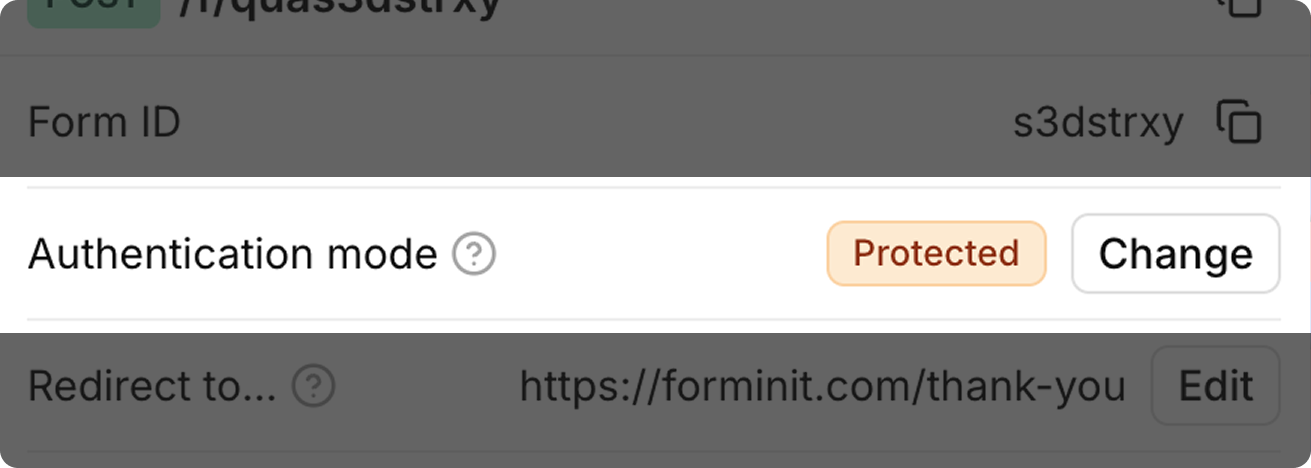
3. Create an API Token and Add to Environment
Section titled “3. Create an API Token and Add to Environment”Generate your secret API token from Account → API Tokens in the Forminit dashboard.
# .env
FORMINIT_API_KEY="fi_your_secret_api_key"4. Project Structure
Section titled “4. Project Structure”my-fastapi-app/
├── main.py
└── .env5. Create the FastAPI App
Section titled “5. Create the FastAPI App”Forminit uses a block-based system to structure form data. Each submission contains an array of blocks representing different field types.
For complete documentation on all available blocks, field naming conventions, and validation rules, see the Form Blocks Reference.
FastAPI works best with the AsyncForminitClient for non-blocking I/O. Use a lifespan context manager to manage the client lifecycle:
# main.py
import os
from contextlib import asynccontextmanager
from fastapi import FastAPI, Form, Request, HTTPException
from fastapi.responses import HTMLResponse
from forminit import AsyncForminitClient
from dotenv import load_dotenv

load_dotenv()

FORM_ID = "YOUR_FORM_ID"
forminit_client: AsyncForminitClient = None


@asynccontextmanager
async def lifespan(app: FastAPI):
    global forminit_client
    forminit_client = AsyncForminitClient(api_key=os.environ["FORMINIT_API_KEY"])
    yield
    await forminit_client.close()


app = FastAPI(lifespan=lifespan)


@app.get("/", response_class=HTMLResponse)
async def index():
    return """
    <form action="/submit" method="POST">
      <input type="text" name="fullName" placeholder="Name" required />
      <input type="email" name="email" placeholder="Email" required />
      <textarea name="message" placeholder="Message" required></textarea>
      <button type="submit">Send</button>
    </form>
    """


@app.post("/submit")
async def submit(
    request: Request,
    fullName: str = Form(...),
    email: str = Form(...),
    message: str = Form(...),
):
    # Pass user info for geolocation and attribution tracking
    forminit_client.set_user_info(
        ip=request.headers.get("x-forwarded-for", request.client.host),
        user_agent=request.headers.get("user-agent"),
        referer=request.headers.get("referer"),
    )

    response = await forminit_client.submit(FORM_ID, {
        "blocks": [
            {
                "type": "sender",
                "properties": {
                    "email": email,
                    "fullName": fullName,
                },
            },
            {
                "type": "text",
                "name": "message",
                "value": message,
            },
        ],
    })

    if response.get("error"):
        raise HTTPException(status_code=400, detail=response["error"]["message"])

    return {"success": True, "submissionId": response["data"]["hashId"]}
6. Run
Section titled “6. Run”uvicorn main:app --reloadFastAPI automatically generates interactive API docs at http://localhost:8000/docs.
JSON Submission with Pydantic Models
Section titled “JSON Submission with Pydantic Models”Use Pydantic models for type-safe JSON request bodies:
from pydantic import BaseModel


class ContactSubmission(BaseModel):
    email: str
    firstName: str | None = None
    lastName: str | None = None
    message: str
    plan: str | None = None


@app.post("/api/direct-submit")
async def direct_submit(request: Request, payload: ContactSubmission):
    forminit_client.set_user_info(
        ip=request.headers.get("x-forwarded-for", request.client.host),
        user_agent=request.headers.get("user-agent"),
        referer=request.headers.get("referer"),
    )

    response = await forminit_client.submit(FORM_ID, {
        "blocks": [
            {
                "type": "sender",
                "properties": {
                    "email": payload.email,
                    "firstName": payload.firstName,
                    "lastName": payload.lastName,
                },
            },
            {
                "type": "text",
                "name": "message",
                "value": payload.message,
            },
            {
                "type": "select",
                "name": "plan",
                "value": payload.plan,
            },
        ],
    })

    if response.get("error"):
        raise HTTPException(status_code=400, detail=response["error"]["message"])

return {"success": True, "submissionId": response["data"]["hashId"]}Flat Form Data Submission
Section titled “Flat Form Data Submission”You can also submit using flat fi- prefixed keys:
@app.post("/submit-flat")
async def submit_flat(request: Request):
    form_data = await request.form()
    flat_data = dict(form_data)

    forminit_client.set_user_info(
        ip=request.headers.get("x-forwarded-for", request.client.host),
        user_agent=request.headers.get("user-agent"),
        referer=request.headers.get("referer"),
    )

    response = await forminit_client.submit(FORM_ID, flat_data)

    if response.get("error"):
        raise HTTPException(status_code=400, detail=response["error"]["message"])

    return {"success": True, "submissionId": response["data"]["hashId"]}
With an HTML form using fi- prefixed field names:
<form action="/submit-flat" method="POST">
  <input type="text" name="fi-sender-fullName" placeholder="Name" required />
  <input type="email" name="fi-sender-email" placeholder="Email" required />
  <textarea name="fi-text-message" placeholder="Message" required></textarea>
  <button type="submit">Send</button>
</form>
Response Structure
Section titled “Response Structure”Success Response
Section titled “Success Response”{
"data": {
"hashId": "7LMIBoYY74JOCp1k",
"date": "2026-01-01 21:10:24",
"blocks": {
"sender": {
"firstName": "John",
"lastName": "Doe",
"email": "john@example.com"
},
"message": "Hello world"
}
},
"redirectUrl": "https://forminit.com/thank-you"
}| Field | Type | Description |
|---|---|---|
data.hashId | str | Unique submission identifier |
data.date | str | Submission timestamp (YYYY-MM-DD HH:mm:ss) |
data.blocks | dict | All submitted field values |
redirectUrl | str | Thank you page URL |
Error Response
Section titled “Error Response”{
"error": {
"error": "FI_SCHEMA_FORMAT_EMAIL",
"code": 400,
"message": "Invalid email format"
}
}Error Handling
Section titled “Error Handling”@app.post("/submit")
async def submit(
request: Request,
fullName: str = Form(...),
email: str = Form(...),
message: str = Form(...),
):
forminit_client.set_user_info(
ip=request.headers.get("x-forwarded-for", request.client.host),
user_agent=request.headers.get("user-agent"),
referer=request.headers.get("referer"),
)
response = await forminit_client.submit(FORM_ID, {
"blocks": [
{
"type": "sender",
"properties": {"email": email, "fullName": fullName},
},
{
"type": "text",
"name": "message",
"value": message,
},
],
})
if response.get("error"):
error = response["error"]
error_code = error.get("error")
if error_code == "FI_SCHEMA_FORMAT_EMAIL":
raise HTTPException(status_code=400, detail="Invalid email address")
elif error_code == "FI_RULES_PHONE_INVALID":
raise HTTPException(status_code=400, detail="Invalid phone number format")
elif error_code == "TOO_MANY_REQUESTS":
raise HTTPException(status_code=429, detail="Please wait before submitting again")
else:
raise HTTPException(status_code=400, detail=error.get("message"))
return {"success": True, "submissionId": response["data"]["hashId"]}Common Error Codes
Section titled “Common Error Codes”| Error Code | HTTP Status | Description |
|---|---|---|
FORM_NOT_FOUND | 404 | Form ID doesn’t exist or was deleted |
FORM_DISABLED | 403 | Form is disabled by owner |
MISSING_API_KEY | 401 | API key required but not provided |
EMPTY_SUBMISSION | 400 | No fields with values submitted |
FI_SCHEMA_FORMAT_EMAIL | 400 | Invalid email format |
FI_RULES_PHONE_INVALID | 400 | Invalid phone number format |
FI_SCHEMA_RANGE_RATING | 400 | Rating not between 1-5 |
FI_DATA_COUNTRY_INVALID | 400 | Invalid country code |
TOO_MANY_REQUESTS | 429 | Rate limit exceeded |
Security Best Practices
Section titled “Security Best Practices”- Store API keys in environment variables — Never hardcode keys in source code
- Use
.gitignore— Exclude.envfiles from version control - Use Pydantic models — Validate request payloads automatically
- Use HTTPS — Always use secure connections in production
- Use lifespan context manager — Ensures the HTTP client is properly managed
- Call
set_user_info()— Pass the real user’s IP, user agent, and referer for accurate tracking
Related Documentation
Section titled “Related Documentation”- Python SDK Reference — Full API reference for the Python SDK
- Python Introduction — General Python setup and usage
- Form Blocks Reference — Complete reference for all block types
- File Uploads — Detailed file upload guide
- API Reference — Full REST API documentation
Was this page helpful?
Thanks for your feedback.