Forminit is a headless form backend that receives submissions, validates fields, blocks spam, stores files, and sends notifications. Works on any stack.
REST API List and read submissions programmatically.
Full control over every submission
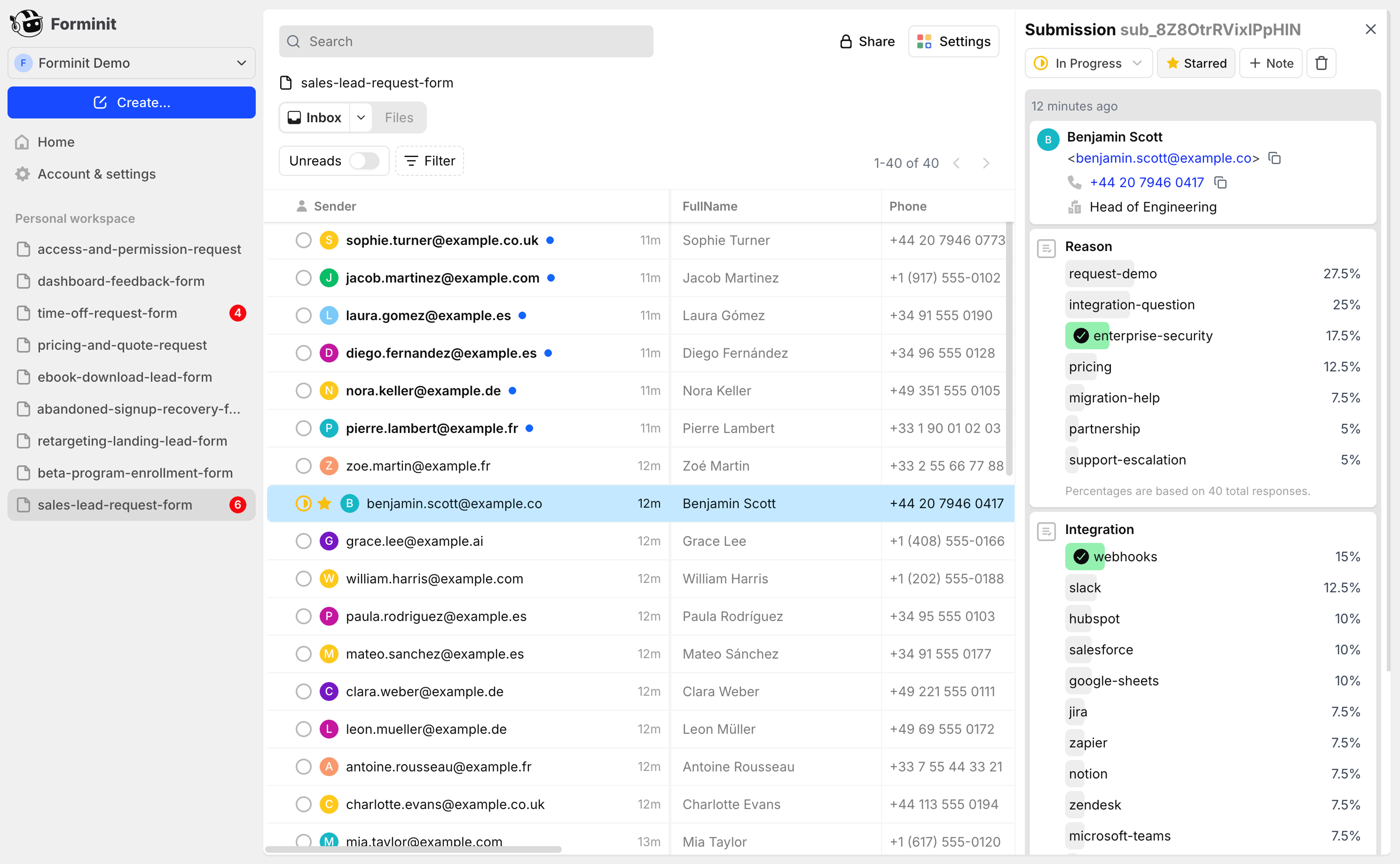
A fast, centralized inbox where every submission lives. See everything in
one place, use built in analytics, and manage all your submissions without
email chaos.
Frequently asked questions
What is Forminit?
Forminit is a headless form backend API. You design your own form UI in any framework or language, then send submissions to Forminit's API endpoint. Forminit handles everything after submit: receiving data, server-side validation, storage, email notifications, file uploads (up to 25 MB), webhooks, spam protection, and integrations with tools like Zapier, Slack, and Discord. Formerly known as Getform.io, Forminit rebranded in January 2026.
What is a headless form backend and how does it work?
A headless form backend is an API service that processes and stores form submissions without providing any frontend UI. You build your own form (HTML, React, Vue, Svelte, mobile app, or anything that can send an HTTP request), point it at the Forminit API endpoint (POST https://forminit.com/f/{formId}), and Forminit takes care of data validation, storage, notifications, file handling, and integrations. This gives you complete design freedom while offloading backend infrastructure.
How do I start collecting form submissions with Forminit?
Sign up for a free Forminit account, create a new form to get your unique endpoint URL, and add it as the action attribute in your HTML form or use the Forminit JavaScript SDK (npm install forminit or the 2 KB CDN script). Every submission sent to your endpoint instantly appears in the Forminit dashboard where you can view, filter, star, set statuses, add internal notes, and export to CSV.
Is Forminit free to get started?
Yes. The Free plan includes 100 submissions per month with a 30-day submission archive — no credit card required. This lets you collect real submissions and see how Forminit fits your workflow. Paid plans start at $19/month (Pro) with 3,000 submissions, file uploads, webhooks, CSV export, REST API, and analytics. The Business plan at $49/month adds autoresponder, custom SMTP, and workspaces. Yearly billing saves you two months.
Do I need to know how to code to use Forminit?
No coding knowledge is required to start collecting submissions. Create a form in your Forminit dashboard, copy your unique endpoint URL, and paste it into your website's form action attribute. Forminit provides ready-made setup guides for HTML, WordPress, Webflow, Squarespace, Ghost, and more. You can receive and manage all submissions from the dashboard without writing backend code.
Who is Forminit for?
Forminit is built for developers, agencies, freelancers, startups, and AI/vibe coders who want full control over their form design while offloading backend complexity. It's also used by Webflow, WordPress, Squarespace, and no-code platform users who need powerful form handling without plugins. Any platform that can send an HTTP request - websites, mobile apps, spreadsheets, CLI tools, AI agents - can connect to Forminit.
What can I use Forminit for?
Forminit handles any use case where you need to collect structured data: contact forms, lead generation forms, order forms, booking requests, feedback and survey forms, registration forms, file upload forms (resumes, documents, images up to 25 MB), newsletter signups, support ticket forms, and custom data collection for any product. It also supports marketing attribution with automatic UTM parameter and ad click ID capture (Google, Facebook, Microsoft, TikTok, X, LinkedIn).
How does Forminit validate form data?
Forminit uses a block-based data model with typed fields and built-in server-side validation. Each field type has specific validation rules: email fields validate format, phone fields validate E.164 format, URL fields check valid URL structure, date fields verify ISO format, rating fields enforce range limits, and country fields check ISO country codes. Field names follow the convention fi-{blockType}-{name} (e.g., fi-email-contact, fi-text-message, fi-file-resume). This means invalid data is rejected before it reaches your dashboard.
Does Forminit have an API? Can I access submissions programmatically?
Yes. Forminit provides a full REST API for listing, reading, and managing submissions programmatically on paid plans (Pro and above). You can also use webhooks to forward every new submission to any URL in real time - your own backend, a CRM, a database, or any service that accepts HTTP requests. Webhooks are available on all paid plans.
Does Forminit have a JavaScript SDK?
Yes. Forminit provides an official JavaScript SDK available via npm (npm install forminit) or CDN (forminit.com/sdk/v1/forminit.js) - it's only 2 KB. The SDK automatically captures UTM parameters, ad platform click IDs (gclid, fbclid, msclkid, ttclid, twclid), referrer, and geolocation. It also provides built-in proxy handlers for Next.js (createForminitProxy) and Nuxt.js (createForminitNuxtHandler) to protect your API key on the server side.
Can I use Forminit with Next.js?
Yes. Forminit has a dedicated Next.js integration with a built-in createForminitProxy server handler. This lets you proxy form submissions through your Next.js API routes, keeping your Forminit API key secure on the server side and never exposed in client-side code. Install the SDK with npm install forminit and follow the Next.js setup guide in the documentation.
Can I use Forminit with React, Vue, Svelte, or Angular?
Yes. Forminit works with any JavaScript framework. Since it's a simple HTTP API endpoint, you can submit forms using fetch, axios, or the Forminit JavaScript SDK from React, Vue, Svelte, Angular, Solid, Qwik, or any other framework. The SDK is only 2 KB and handles UTM tracking, file uploads, and error handling automatically.
Can I use Forminit with HTML, WordPress, Webflow, Squarespace, or Ghost?
Yes. Forminit works with any platform that can send an HTTP request. For plain HTML, simply set your form's action attribute to your Forminit endpoint. For WordPress, Webflow, Squarespace, and Ghost, Forminit provides dedicated setup guides. For no-code platforms like Bubble, FlutterFlow, Retool, and Framer, you can connect via HTTP request blocks. No plugins or server-side code required.
Can I use Forminit with Astro, Nuxt.js, or static site generators?
Yes. Forminit works perfectly with Astro, Nuxt.js, Hugo, Jekyll, Eleventy, Gatsby, and any static site generator. For Nuxt.js, there's a dedicated createForminitNuxtHandler for server-side API key protection. For purely static sites, you can use Forminit in public mode (no API key needed, 1 request per 5 seconds) or the CDN-hosted SDK script - no build step required.
Can I use Forminit with mobile apps or AI agents?
Yes. Forminit's API works with any client that can send an HTTP POST request - iOS apps (Swift/Objective-C), Android apps (Kotlin/Java), React Native, Flutter, and any AI agent or LLM tool that supports HTTP actions (including ChatGPT custom actions, AI coding tools like Lovable or Cursor, and automation platforms). Use protected mode with an API key header for server-to-server communication at up to 5 requests per second.
What is the difference between Forminit and FormSubmit?
FormSubmit is an email-forwarding service with a critical security flaw: your email address is exposed directly in HTML source code (action="https://formsubmit.co/your@email.com"), making it harvestable by spam bots and a GDPR liability. Forminit uses Form IDs instead - your email never appears in source code. Forminit also provides a full submission dashboard, server-side validation, file uploads up to 25 MB, webhooks, REST API, Zapier integration, UTM auto-capture, and GDPR-compliant data storage on AWS servers in Ireland (EU).
What is the difference between Forminit and EmailJS?
EmailJS is an email delivery service - it sends form data to your inbox but does not store submissions. There is no dashboard, no search, no API access, no webhooks, no server-side validation, and file uploads are limited to email attachment sizes. Forminit is a complete form backend: it stores all submissions in a searchable dashboard with star, status tracking, and internal notes. It provides 25 MB file uploads, a REST API, webhooks on paid plans, server-side validation with typed fields, and automatic UTM and attribution tracking.
What is the difference between Forminit and Netlify Forms?
Netlify Forms is locked to the Netlify hosting platform - if you move to Vercel, Cloudflare, AWS, or any other host, your forms break. File uploads are limited to 10 MB and webhooks are only available on paid plans. Forminit is hosting-independent and works with any platform. It offers 25 MB file uploads, webhooks on paid plans, a full REST API, server-side validation with typed fields, UTM auto-capture, and an inbox-style dashboard with status tracking and internal notes.
What is the difference between Forminit and Formspree?
Both are form backends, but they differ in architecture and security. Formspree only provides public endpoints with no API key authentication - every endpoint is open to anyone on the internet. Forminit offers two modes: Public (no key, 1 req/5s) and Protected (API key via X-API-KEY header, 5 req/s) with built-in server-side proxy handlers for Next.js and Nuxt.js to keep keys secure. Forminit also uses typed blocks with built-in validation (email, E.164 phone, ISO country codes, URL, date, rating), while Formspree uses flat key-value pairs. Forminit includes a 2 KB SDK with auto UTM capture, an inbox-style dashboard with status tracking and internal notes, 25 MB file uploads with 50+ MIME types, and webhooks on paid plans.
How does spam protection work in Forminit?
Forminit provides multiple layers of spam protection. Built-in spam filtering automatically reduces unwanted submissions. You can also enable reCAPTCHA v3 (invisible, score-based), hCaptcha (visible or invisible), or honeypot fields for additional security. These options can be combined, so you choose the level of protection that fits your use case - from invisible background checks to visible challenge widgets.
Does Forminit support file uploads?
Yes. Forminit supports file uploads up to 25 MB per submission with over 50 supported MIME types including images (PNG, JPG, GIF, WebP, SVG), documents (PDF, DOC, DOCX, XLS, XLSX), archives (ZIP), and more. Uploaded files are stored securely and accessible via direct download URLs in your dashboard. Use the fi-file-{name} field type in your form to enable file uploads.
What integrations does Forminit support?
Forminit integrates with Zapier (connecting to 5,000+ apps), Make (formerly Integromat), Slack (incoming webhooks for channel notifications), Discord (webhook notifications), and custom webhooks that forward submissions to any URL. You can also use the REST API to build custom integrations with any service. Webhooks and integrations are available on all paid plans (Pro and above).
Can I send email notifications and autoresponders?
Yes. Forminit sends customizable email notifications to one or multiple recipients whenever a new submission arrives. You can choose from three editor modes for templates. The Business plan also includes autoresponder emails - automated replies sent directly to the person who submitted the form, with support for up to 5 file attachments (25 MB total). On the Business plan, you can connect your own SMTP server (Gmail, Microsoft 365, Amazon SES, etc.) to send from your custom domain email address.
Does Forminit track UTM parameters and marketing attribution?
Yes. Forminit's JavaScript SDK automatically captures UTM parameters (utm_source, utm_medium, utm_campaign, utm_term, utm_content) and ad platform click IDs including Google (gclid), Facebook (fbclid), Microsoft (msclkid), TikTok (ttclid), X/Twitter (twclid), LinkedIn, Amazon, and Mailchimp. It also records referrer URL and geolocation (country, city, timezone) from the submitter's IP. No extra code needed - the SDK handles attribution tracking out of the box.
Can I share form access with my teammates?
Yes. Forminit supports workspaces with role-based access control. You can invite teammates as Owner, Admin, or Member and collaborate on forms and submissions together. The Business plan includes up to 5 workspace seats. All team members can view, manage, filter, and export submissions from the shared dashboard.
Is Forminit GDPR-compliant? Where is my data stored?
Yes. Forminit fully complies with both UK GDPR and EU GDPR. The company (UXPLUS LTD, Company #11357429) is registered in the UK and with the UK Information Commissioner's Office (ICO). All submission data is stored on AWS servers in Ireland (EU), keeping your data within the European Economic Area. Forminit provides a Data Processing Agreement (DPA) and documents all data handling practices transparently.
Can I export my form submissions to CSV?
Yes. Submissions can be exported in CSV format directly from the Forminit dashboard on paid plans (Pro and above). This makes it easy to analyze data in Excel, Google Sheets, or import into other tools. You can also access submissions programmatically via the REST API for automated data processing.
How do I send form data to email without a backend server?
Use Forminit as your form backend. Point your HTML form's action attribute to your Forminit endpoint (POST https://forminit.com/f/{formId}) and Forminit will handle receiving the submission, validating data, storing it in your dashboard, and sending email notifications to your chosen recipients - all without any server-side code on your end. This works for static sites hosted on GitHub Pages, Netlify, Vercel, Cloudflare Pages, or any other static host.
How do I add a contact form to a static website without a server?
Create a standard HTML form, set the action attribute to your Forminit endpoint URL, and add input fields using Forminit's naming convention (fi-sender-email for email, fi-text-message for message, fi-sender-name for name). When a visitor submits the form, Forminit validates the data, stores the submission, and sends you an email notification. No server, no backend code, no database setup - works with any static site including HTML, Jekyll, Hugo, Eleventy, Astro, and GitHub Pages.
How much does Forminit cost?
Forminit offers three plans: Free ($0, 100 submissions/month, 30-day archive), Pro ($19/month, 5 forms, 3,000 submissions/month, 1 GB storage), and Business ($49/month, 15 forms, 10,000 submissions/month, 5 GB storage). Yearly billing gives you 2 months free. The Pro plan includes file uploads, webhooks, CSV export, REST API, and analytics. The Business plan adds autoresponder emails, custom SMTP, workspaces with 5 seats, and branding removal.
Can I upgrade, downgrade, or cancel my plan at any time?
Yes. You can change your subscription plan or billing cycle at any time from your account settings. Unused portions of your current plan are prorated toward your next billing cycle. You can also cancel anytime - there are no long-term contracts or cancellation fees.
What happens if I exceed my plan's submission limit?
When you reach the submission limit on your current plan, your forms will be automatically paused and will not collect new submissions until you upgrade to a higher plan. You won't lose any existing data - all previously collected submissions remain accessible in your dashboard.
How many forms can I create on Forminit?
The number of forms depends on your plan: Pro allows 5 forms and Business allows 15 forms. The Free plan lets you test with submissions but has limited features. What's limited is the number of active form endpoints and monthly submissions. You can create, archive, and manage forms from your dashboard at any time.
Can I migrate from FormSubmit, EmailJS, Netlify Forms, or Formspree to Forminit?
Yes. Migrating to Forminit is straightforward: create a new form endpoint in your Forminit dashboard, update your frontend form's action URL or API call to point to your new Forminit endpoint, and submissions will start flowing immediately. No data migration scripts needed - your new submissions are stored and managed in Forminit's dashboard from day one. If you need help during the transition, contact info@forminit.com.
Is Forminit secure? How are API keys and data protected?
Yes. Forminit offers two authentication modes: public mode (no API key, rate-limited to 1 request per 5 seconds, ideal for static sites) and protected mode (API key via X-API-KEY header, 5 requests per second, for server-side use). For frameworks like Next.js and Nuxt.js, Forminit provides built-in proxy handlers so your API key stays on the server and is never exposed in client-side code. All data is stored on encrypted AWS servers in Ireland (EU) and the platform is GDPR-compliant.
Can I restrict which domains can submit to my form?
Yes. Forminit supports authorized domains, which restrict form submissions to only come from domains you explicitly allow. This prevents unauthorized websites from sending data to your form endpoint and adds an extra layer of security against abuse.
What happens if my payment fails?
After the first failed payment, Forminit will notify you via email and automatically retry the payment over the following week. Your forms remain active during this retry period so you don't lose any submissions.
Can I transfer ownership of a workspace?
Yes. Send a transfer request to info@forminit.com from the email address registered to the workspace. The Forminit team will handle the ownership transfer for you.
What was Getform.io? Is Forminit the same as Getform?
Yes. Forminit is the new name for Getform.io. The platform rebranded from Getform to Forminit in January 2026. All features, accounts, and data carried over - the service is the same, with a new name and continued improvements. Forminit has been operating since October 2015 and is used by companies including Burger King, Volkswagen, Toyota, Lidl, and CodeAcademy.





 Powering Forms Since 2015

 Phone
Phone
 Address


 Under $5,000 72.7%
 Utm source
 via Google Ads