
Form blocks
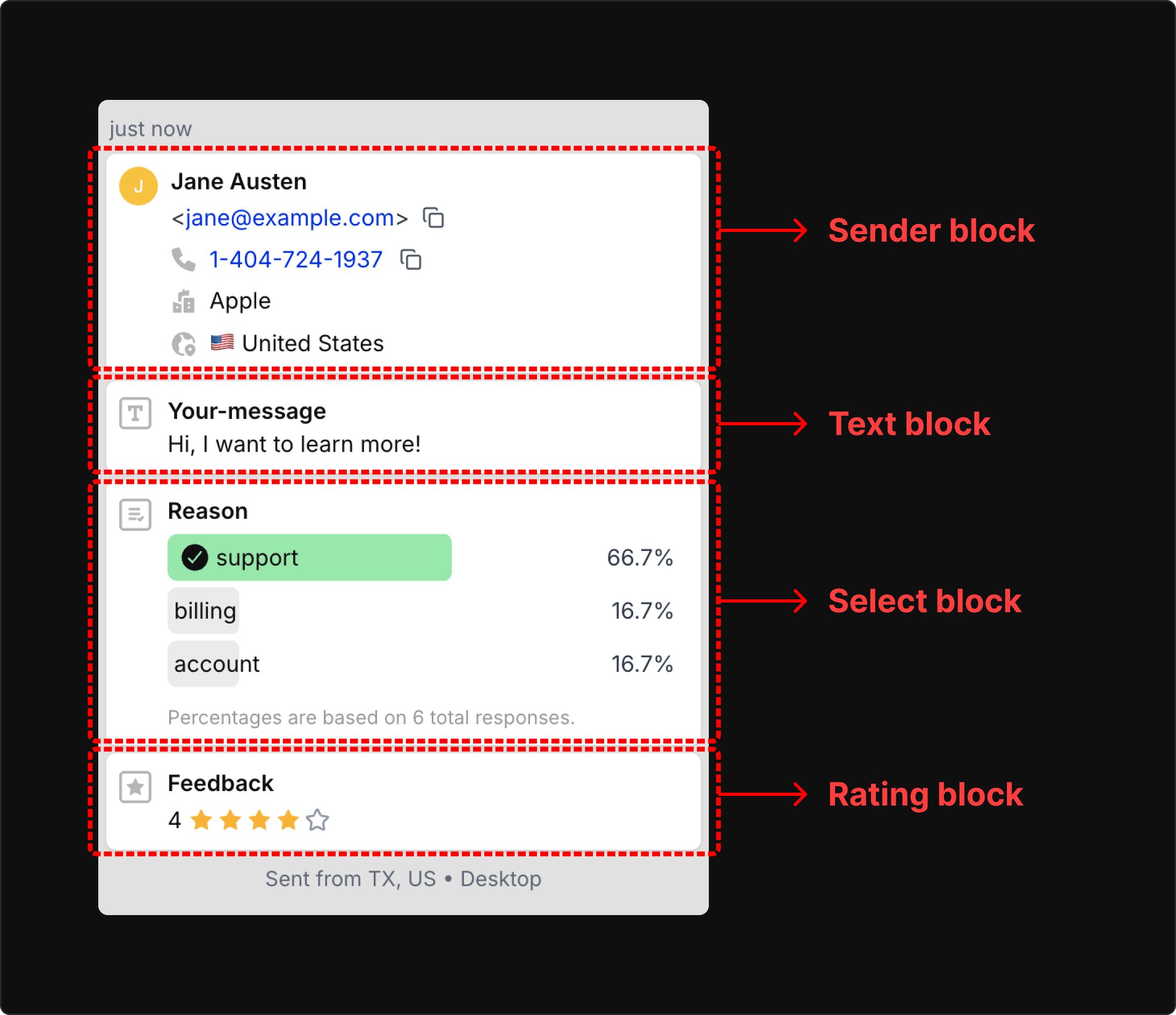
Form Blocks are the building blocks of Forminit submissions. Each block represents a specific type of data you can collect from your forms.
- Build your form with Form Blocks. Combine different block types to create any form structure you need.
- Built-in server-side validation. Blocks like
phone,email, andcountryautomatically validate data on the server. No setup required. - Use the Sender block. For the best Forminit experience, always include a
senderblock to identify who submitted the form. - Clear submission schema. Form Blocks give you a well-defined, consistent structure for every submission.
Block Types
Section titled “Block Types”Forminit supports two categories of blocks:
| Category | Description | Examples |
|---|---|---|
| Object Blocks | Complex data structures with multiple properties. Can only appear once per submission. | sender, tracking |
| Field Blocks | Individual fields identified by a unique name. Can have multiple instances with different names. | text, email, rating, etc. |
Field Naming Convention
Section titled “Field Naming Convention”How you name fields depends on your submission format:
| Format | Object Block Pattern | Field Block Pattern |
|---|---|---|
| FormData | fi-{blockType}-{property} | fi-{blockType}-{name} |
| JSON | { type, properties: {...} } | { type, name, value } |
Examples:
FormData: fi-sender-email, fi-text-message, fi-rating-satisfaction
JSON: { type: "sender", properties: { email: "..." } }
JSON: { type: "text", name: "message", value: "..." }
Object Blocks
Section titled “Object Blocks”Sender Block
Section titled “Sender Block”Collects information about the person submitting the form. Can only appear once per submission.
At least one of the following properties is required: userId, email, phone, firstName, lastName, or fullName.
| Property | Type | FormData Field | Description | Validation |
|---|---|---|---|---|
email | string | fi-sender-email | Submitter’s email address | Valid email format |
firstName | string | fi-sender-firstName | Submitter’s first name | - |
lastName | string | fi-sender-lastName | Submitter’s last name | - |
fullName | string | fi-sender-fullName | Submitter’s full name | - |
phone | string | fi-sender-phone | Submitter’s phone number | E.164 format |
title | string | fi-sender-title | Title (Mr, Mrs, Dr, Prof) | - |
userId | string | fi-sender-userId | User ID from your system | - |
address | string | fi-sender-address | Street address | - |
city | string | fi-sender-city | City name | - |
country | string | fi-sender-country | Country | ISO 3166-1 alpha-2 |
company | string | fi-sender-company | Company or organization | - |
position | string | fi-sender-position | Job title or position | - |
FormData Example:
<input type="text" name="fi-sender-firstName" placeholder="First name" />
<input type="text" name="fi-sender-lastName" placeholder="Last name" />
<input type="email" name="fi-sender-email" placeholder="Email" />
<input type="tel" name="fi-sender-phone" placeholder="Phone" />
JSON Example:
{
  "type": "sender",
  "properties": {
    "email": "john@example.com",
    "firstName": "John",
    "lastName": "Doe",
    "phone": "+12025550123",
    "company": "Acme Corp",
    "position": "Software Engineer"
  }
}
Field Blocks
Section titled “Field Blocks”Each field block requires a unique name identifier. You can have multiple instances of the same block type with different names.
Free-form text field for messages, comments, or any string input.
| Property | Value |
|---|---|
| Type | text |
| Value Type | string |
| FormData Pattern | fi-text-{name} |
| Validation | None |
<textarea name="fi-text-message" placeholder="Your message"></textarea>
<input type="text" name="fi-text-subject" placeholder="Subject" />
{ "type": "text", "name": "message", "value": "Hello from Forminit!" }Number
Section titled “Number”Numeric input field for quantities, amounts, or any numerical data.
| Property | Value |
|---|---|
| Type | number |
| Value Type | number |
| FormData Pattern | fi-number-{name} |
| Validation | Must be a valid number |
<input type="number" name="fi-number-quantity" placeholder="Quantity" />
<input type="number" name="fi-number-budget" placeholder="Budget" />
{ "type": "number", "name": "budget", "value": 5000 }Email address field with format validation. Use for collecting additional emails beyond the sender’s email.
| Property | Value |
|---|---|
| Type | email |
| Value Type | string |
| FormData Pattern | fi-email-{name} |
| Validation | Valid email format |
<input type="email" name="fi-email-invitee" placeholder="Invitee email" />
<input type="email" name="fi-email-backup" placeholder="Backup email" />
{ "type": "email", "name": "invitee", "value": "colleague@example.com" }Note: For the submitter’s primary email, use
fi-sender-emailinstead.
Phone number field with E.164 format validation. Use for collecting additional phone numbers beyond the sender’s phone.
| Property | Value |
|---|---|
| Type | phone |
| Value Type | string |
| FormData Pattern | fi-phone-{name} |
| Validation | E.164 format (e.g., +12025550123) |
<input type="tel" name="fi-phone-emergency" placeholder="Emergency contact" />
<input type="tel" name="fi-phone-work" placeholder="Work phone" />
{ "type": "phone", "name": "emergency", "value": "+14155550123" }Note: For the submitter’s primary phone, use
fi-sender-phoneinstead.
URL field with format validation for websites and links.
| Property | Value |
|---|---|
| Type | url |
| Value Type | string |
| FormData Pattern | fi-url-{name} |
| Validation | Valid URL format |
<input type="url" name="fi-url-website" placeholder="Your website" />
<input type="url" name="fi-url-linkedin" placeholder="LinkedIn profile" />
{ "type": "url", "name": "website", "value": "https://johndoe.com" }Select
Section titled “Select”Selection field for dropdown menus. Supports both single and multi-select.
| Property | Value |
|---|---|
| Type | select |
| Value Type | string or string[] |
| FormData Pattern | fi-select-{name} |
| Validation | None |
Single Select:
<select name="fi-select-plan">
  <option value="Basic">Basic</option>
  <option value="Pro">Pro</option>
  <option value="Enterprise">Enterprise</option>
</select>
{ "type": "select", "name": "plan", "value": "Pro" }Multi-Select:
<select name="fi-select-services" multiple>
  <option value="web-design">Web Design</option>
  <option value="seo">SEO</option>
  <option value="marketing">Marketing</option>
</select>
{ "type": "select", "name": "services", "value": ["web-design", "seo"] }Radio button field for single-choice selection from a group of options.
| Property | Value |
|---|---|
| Type | radio |
| Value Type | string |
| FormData Pattern | fi-radio-{name} |
| Validation | None |
<input type="radio" name="fi-radio-priority" value="low" /> Low
<input type="radio" name="fi-radio-priority" value="medium" /> Medium
<input type="radio" name="fi-radio-priority" value="high" /> High
{ "type": "radio", "name": "priority", "value": "high" }Checkbox
Section titled “Checkbox”Checkbox field for single or multi-choice selection. Single checkbox returns a string, multiple checkboxes with the same name return an array.
| Property | Value |
|---|---|
| Type | checkbox |
| Value Type | string or string[] |
| FormData Pattern | fi-checkbox-{name} |
| Validation | None |
Single Checkbox:
<input type="checkbox" name="fi-checkbox-newsletter" value="yes" /> Subscribe to newsletter{ "type": "checkbox", "name": "newsletter", "value": "yes" }Multiple Checkboxes:
<input type="checkbox" name="fi-checkbox-features" value="api" /> API Access
<input type="checkbox" name="fi-checkbox-features" value="support" /> Priority Support
<input type="checkbox" name="fi-checkbox-features" value="analytics" /> Analytics
{ "type": "checkbox", "name": "features", "value": ["api", "support"] }Rating
Section titled “Rating”Rating input for satisfaction scores, reviews, or any 1-5 scale rating.
| Property | Value |
|---|---|
| Type | rating |
| Value Type | integer |
| FormData Pattern | fi-rating-{name} |
| Validation | Integer between 1 and 5 |
<input type="number" name="fi-rating-satisfaction" min="1" max="5" />{ "type": "rating", "name": "satisfaction", "value": 5 }Date/time field with ISO 8601 format validation.
| Property | Value |
|---|---|
| Type | date |
| Value Type | string |
| FormData Pattern | fi-date-{name} |
| Validation | ISO 8601 format |
Accepted Formats:
- Date only:
2025-01-15 - Date and time:
2025-01-15T10:30:00Z
<input type="date" name="fi-date-appointment" />
<input type="datetime-local" name="fi-date-meeting" />
{ "type": "date", "name": "appointment", "value": "2025-01-15T10:30:00Z" }File upload field. Requires multipart/form-data content type.
| Property | Value |
|---|---|
| Type | file |
| Value Type | binary |
| FormData Pattern | fi-file-{name} |
| Validation | Must use FormData |
<input type="file" name="fi-file-resume" />
<input type="file" name="fi-file-attachments" multiple />Country
Section titled “Country”Country selector using ISO 3166-1 alpha-2 codes. Use for shipping, billing, or any country selection beyond the sender’s country.
| Property | Value |
|---|---|
| Type | country |
| Value Type | string |
| FormData Pattern | fi-country-{name} |
| Validation | ISO 3166-1 alpha-2 code |
<select name="fi-country-shipping">
  <option value="US">United States</option>
  <option value="GB">United Kingdom</option>
  <option value="CA">Canada</option>
  <option value="DE">Germany</option>
  <!-- ... -->
</select>
{ "type": "country", "name": "shipping", "value": "GB" }Common Country Codes:
| Code | Country |
|---|---|
US | United States |
GB | United Kingdom |
CA | Canada |
DE | Germany |
FR | France |
AU | Australia |
JP | Japan |
TR | Türkiye |
For a complete list of ISO 3166-1 alpha-2 country codes, see: Country Codes Reference
Tracking Block
Section titled “Tracking Block”Captures marketing attribution and UTM parameters at submission time. Can only appear once per submission.
| Property | Type | FormData Field | Description |
|---|---|---|---|
utmSource | string | fi-tracking-utmSource | Campaign traffic source (e.g., google, newsletter) |
utmMedium | string | fi-tracking-utmMedium | Marketing medium (e.g., cpc, email) |
utmCampaign | string | fi-tracking-utmCampaign | Campaign name or identifier |
utmTerm | string | fi-tracking-utmTerm | Paid keyword or search term |
utmContent | string | fi-tracking-utmContent | Ad/content variant identifier |
referrer | string | fi-tracking-referrer | Previous page URL |
gclid | string | fi-tracking-gclid | Google Ads click identifier |
wbraid | string | fi-tracking-wbraid | Google Web to App conversion identifier |
gbraid | string | fi-tracking-gbraid | Google App to Web conversion identifier |
fbclid | string | fi-tracking-fbclid | Facebook click identifier |
msclkid | string | fi-tracking-msclkid | Microsoft Ads click identifier |
ttclid | string | fi-tracking-ttclid | TikTok click identifier |
twclid | string | fi-tracking-twclid | Twitter/X click identifier |
li_fat_id | string | fi-tracking-li_fat_id | LinkedIn click identifier |
amzclid | string | fi-tracking-amzclid | Amazon Ads click identifier |
mc_cid | string | fi-tracking-mc_cid | Mailchimp campaign ID |
mc_eid | string | fi-tracking-mc_eid | Mailchimp subscriber ID |
JSON Example:
{
  "type": "tracking",
  "properties": {
    "utmSource": "google",
    "utmMedium": "cpc",
    "utmCampaign": "summer_sale",
    "referrer": "https://google.com/search",
    "gclid": "CjwKCAjw..."
  }
}
Complete Example
Section titled “Complete Example”Here’s a complete form submission using JSON format with multiple block types:
{
  "blocks": [
    {
      "type": "sender",
      "properties": {
        "email": "john@example.com",
        "firstName": "John",
        "lastName": "Doe",
        "phone": "+12025550123",
        "company": "Acme Corp"
      }
    },
    {
      "type": "tracking",
      "properties": {
        "utmSource": "google",
        "utmMedium": "cpc",
        "utmCampaign": "summer_sale"
      }
    },
    {
      "type": "text",
      "name": "message",
      "value": "I would like to learn more about your services."
    },
    {
      "type": "number",
      "name": "budget",
      "value": 5000
    },
    {
      "type": "select",
      "name": "plan",
      "value": "Enterprise"
    },
    {
      "type": "radio",
      "name": "priority",
      "value": "high"
    },
    {
      "type": "checkbox",
      "name": "features",
      "value": ["api", "support"]
    },
    {
      "type": "rating",
      "name": "urgency",
      "value": 4
    },
    {
      "type": "date",
      "name": "preferred_date",
      "value": "2025-01-15"
    },
    {
      "type": "country",
      "name": "shipping",
      "value": "US"
    }
  ]
}
Validation Summary
Section titled “Validation Summary”| Block Type | Validation Rule |
|---|---|
sender.email | Valid email format |
sender.phone | E.164 format (+12025550123) |
sender.country | ISO 3166-1 alpha-2 code |
email | Valid email format |
phone | E.164 format (+12025550123) |
url | Valid URL format |
rating | Integer 1-5 |
date | ISO 8601 date/time |
country | ISO 3166-1 alpha-2 code |
number | Valid number |
file | FormData only |
Limits
Section titled “Limits”| Limit | Value |
|---|---|
| Maximum field blocks per submission | 30 |
| Maximum blocks of same type | 20 |
| Object blocks per type | 1 |
Editing Form Blocks
Section titled “Editing Form Blocks”After you submit your first submission, your form blocks become your form schema.
You can manage your blocks from Form Settings → Blocks:
- Change labels. Rename blocks for better understanding in the dashboard.
- Reorder blocks. Change the display order of your blocks.
- Hide blocks. Hide blocks you don’t want to see in the submissions view.
Was this page helpful?
Thanks for your feedback.