

Formspree Alternative: Forminit vs Formspree (2026)
Forminit is a Formspree alternative for teams that want more control over their forms. Choose Public or Protected submission modes, understand every response, and manage follow-up in a fast, inbox-style dashboard.
Summary
Forminit and Formspree both handle submissions from forms you build yourself. Forminit adds a visual Workflow that chains several actions per submission, routes each one with If / else conditions and lets you retry any failed step, alongside Public or Protected endpoints, field analytics and an inbox-style dashboard. Formspree's actions run in parallel for every submission, without branching.
On this page
Forminit and Formspree are mature form backends with more than 10 years of experience in the market. Forminit began as Getform.io in 2015 and adopted its current name in January 2026. Formspree’s product history also goes back to 2015. Both let you build your own frontend and leave submission handling to the service.
Forminit brings collection, analytics and follow-up together. You can see what people select, where leads come from and what your team needs to do next, all from the same dashboard.
It also costs less for the same tools. Forminit Pro at $19/month includes what Formspree starts on its $30/month Professional plan. Forminit Business billed yearly is $594 with 6 months free, against $720 a year for Formspree Business.
Pricing comparison
Here are the plans and key capabilities in one place. Prices are USD, billed monthly, before tax. Submission allowances renew monthly; storage is total file capacity. Plans are paired by what they include, not by price: autoresponses, webhooks, API access and submission export start on Forminit Pro and on Formspree Professional.
| Plan or capability | Forminit | Formspree |
|---|---|---|
| Free | 100 submissions/month, 1 form, 100 MB file storage | 50 submissions/month, unlimited forms, no file uploads, 30-day history |
| Autoresponses, webhooks, API and export | Pro: $19/month: 5,000 submissions, 10 forms, 1 GB storage, plus analytics, Google Sheets and Zapier | Professional: $30/month: 2,000 submissions, unlimited forms, 5 GB storage, 2 team members, plus submission search and premium integrations such as Zapier |
| Teams and custom email | Business: $99/month, or $594/year with 6 months free ($49.50/month): 50,000 submissions, unlimited forms, 10 GB storage, unlimited workspaces and collaborators, custom SMTP | Business: $90/month, or $720/year ($60/month): 20,000 submissions, unlimited forms, 10 GB storage, unlimited team members, custom templates and sender domains |
| Authentication mode | Public or Protected: accept submissions without a key, or require a valid X-API-KEY header | Public submission endpoint; no equivalent Protected mode documented |
| Data model and validation | Typed Form Blocks: the input name sets the type, and email, phone (E.164), URL, country (ISO), rating, date and number values are validated server-side with no setup | Validation rules added per field in the Workflow tab: required, length, value range and file type |
| Analytics and attribution | Built-in field response breakdowns, UTM reports and ad click sources on Pro+ | JavaScript callbacks for connecting external analytics |
| Submission management | Inbox, full-text search, filters, notes, stars, read/unread and statuses | Submission dashboard and spam management; search on Professional and higher |
| Team collaboration | Business: unlimited workspaces and collaborators, with Owner, Admin, Editor and Guest roles; $594/year billed yearly | 1 team member on Free and Personal, 2 on Professional, unlimited on Business at $720/year billed yearly |
| Notification recipients | Unlimited To, CC and BCC recipients on Pro and Business, with no verification step for each address | One To address on Free; multiple To addresses on paid plans, and every address must be verified (auto-verification on Custom only) |
| Email customization | Visual notification editor; autoresponses from Pro at $19/month, custom SMTP on Business | Autoresponses from Professional at $30/month; custom templates and sender domains on Business |
| Automation workflow | Yes, visual workflow on every plan: chain email, webhook, Slack, Discord, Google Sheets and status actions, route with If / Else if / Else, retry any failed action | Basic, no branching: Workflow tab runs actions in parallel for every submission; Form Rules on Business send an email, tag spam or redirect from one field condition |
| Signed webhooks | HMAC-SHA256 signing on Pro, from $19/month | Signature verification supported; webhooks on Professional, from $30/month |
| File uploads | Included on Free; 25 MB combined per submission | Paid plans; 25 MB per file, 100 MB per request |
| Submission retention | Unlimited on every plan, including Free. Configurable per form on Pro+: keep until deleted, or auto-delete after 30, 90 or 365 days or a custom period to meet data-protection rules | 30 days on Free; unlimited on paid plans; no documented per-form retention setting |
Plan sources: Forminit pricing and Formspree pricing. Formspree’s JavaScript library, dashboard overview, upload limits and webhook signatures document the corresponding features.
Forminit Pro gives you Formspree Professional’s toolset for $11 less per month. Autoresponses, webhooks, API access, CSV export and Zapier start at $30/month on Formspree; on Forminit they are all in Pro at $19/month, along with field analytics and campaign attribution. Pro also includes 2.5 times the monthly submissions: 5,000 versus 2,000. Formspree Professional offers unlimited forms, 5 GB of file storage and a second team member, which can suit projects with many low-volume forms or large uploads; Forminit Pro includes 10 forms and 1 GB.
Billed yearly, Forminit Business costs $126 less than Formspree Business and includes 2.5 times the submissions. Forminit Business is 50% off on yearly billing, 6 months free: $594 a year, or $49.50/month. Formspree Business is $720 a year, or $60/month. You get 50,000 monthly submissions versus 20,000, with unlimited forms, workspaces and collaborators. Billed monthly, Forminit Business is $99 and Formspree Business is $90.
Annual billing is paid upfront: Forminit Pro $190/year (2 months free) and Business $594/year (6 months free); Formspree Professional $240/year ($20/month) and Business $720/year ($60/month). Billed yearly, Forminit Pro costs $50 less than Formspree Professional, and Forminit Business costs $126 less than Formspree Business.
Authentication mode: Public or Protected
Forminit lets you decide whether your submission endpoint requires authentication. Choose the mode that fits your form:
- Public: Accept submissions without an API key, directly from a browser or through your backend. Ideal for contact forms, landing pages and static sites. Public describes access to the submission endpoint; your stored submissions remain private.
- Protected: Turn your form into an authenticated submission API. Every request must include a valid
X-API-KEYheader; missing or invalid keys are rejected. Submit from your backend, Worker or internal service, and keep the key out of browser code.
Keep your backend’s checks in control. For a customer support form, your server can verify a login and attach a trusted customer ID before forwarding the request. Protected mode prevents submissions without a valid key from bypassing that path. The key authenticates your integration; your application handles the customer’s login.
Change access without changing your form. Protected-mode API keys can be scoped, rotated and revoked independently of the form ID. If a key is compromised, revoke it, issue a replacement and update your backend. Your form, endpoint and submission history stay in place. Public form IDs are visible by design; with Protected mode, knowing the form ID alone is not enough to submit.
Both modes work with backend code. Choose Protected when you need Forminit to enforce authenticated submissions. See Forminit’s authentication guide.
Formspree’s documented submission setup uses a public endpoint. Its separate API for retrieving submissions requires authentication; that is different from requiring a key to submit a form.
Typed Form Blocks: clean data from the first submission
In Forminit, the input name sets the data type and the validation. Every field follows one pattern, fi-{blockType}-{name}: fi-sender-email, fi-phone-emergency, fi-rating-satisfaction. Forminit reads the type from the name and checks the value on the server before it is stored, with no rules to set up in the dashboard:
- Email must be a valid address, phone must be in E.164 format (
+12025550123) and URL must be a valid URL. - Country must be an ISO 3166-1 alpha-2 code such as
USorGB, rating an integer from 1 to 5, date an ISO 8601 date or date-time and number a valid number. - Text, select, radio, checkbox and file blocks cover messages, choices and uploads.
Invalid values are rejected instead of landing in your inbox, notifications or webhooks.
Two built-in blocks give every submission the same shape. The sender block holds who submitted the form: name, email, phone, company, job title, address, country and your own userId to link a submission to an account in your app. The tracking block holds UTM parameters, the referrer and ad click IDs, and the browser SDK fills it in automatically. Because every submission follows the same schema, CSV exports, webhooks, Google Sheets rows and API responses keep a consistent structure that automations can rely on.
Compose the form you need. A submission can carry up to 100 custom blocks, up to 50 of the same type and up to 20 file blocks, with 25 MB of uploads combined. The same endpoint handles a two-field contact form, a long survey or an upload portal. After the first submission, rename block labels, reorder them or hide them in Form Settings → Blocks, so the dashboard reads Budget instead of fi-number-budget.
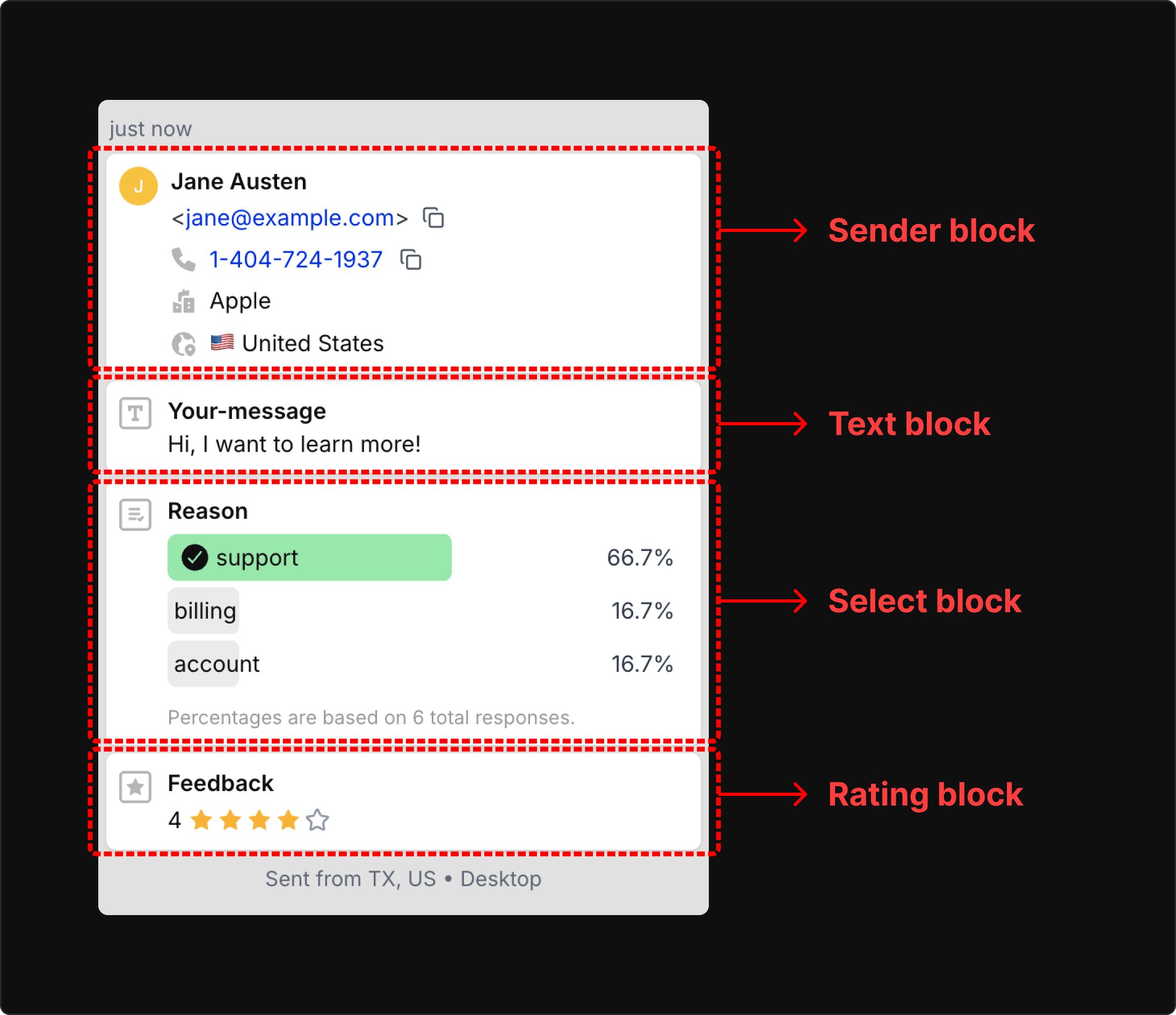
Formspree also validates submissions on all plans. Its Workflow tab lets you add a rule for each field by name: required, minimum and maximum length, minimum and maximum value, and allowed file types for text, number, email, URL, date, file and phone inputs. Each rule is configured in the dashboard, and its documentation does not describe a built-in contact or attribution schema. See Forminit’s Form Blocks reference.
See what people choose and where leads come from
Forminit’s field analytics turn responses into counts and percentages. Use select blocks for dropdowns, radio blocks for single choices and checkbox blocks for multiple choices. Forminit shows how often each option is selected, so you can spot popular services, common support requests or customer preferences without building a spreadsheet.
See these field breakdowns in submission details and on the Analytics page. For example, a service dropdown can show how many people chose “Website design” and its share of responses.
Attribution reports show how many submissions came from each source, medium and campaign, using UTM parameters and supported ad click IDs such as Google gclid, Meta fbclid and Microsoft msclkid. The browser SDK captures those values when available and keeps them with the submission. You can connect an individual lead to its source and compare campaign totals in Analytics.

Form Analytics is available on Pro and higher, alongside location and device breakdowns.
A fast inbox built for getting work done
Forminit’s dashboard gives your team a practical workflow for every submission. Use full-text search to find a name, email or detail quickly, then narrow the inbox with filters for status, date, starred items or unread submissions.
Add internal notes, star important leads, mark submissions as read or unread, and track work with To do, In progress, Done and Closed statuses. Keep context alongside each response so the next person knows what has happened and what needs attention. Read about submission management.
Workspaces for clients and teams
Forminit workspaces help agencies, freelancers and businesses organize forms by client, project or department, with separate API keys and SMTP settings.
Owners control the workspace and ownership. Admins manage forms, settings and members. Editors handle submissions, statuses, stars and notes. Guests have read-only access. Give clients visibility, let colleagues handle follow-up, and keep configuration with the people responsible for it.
The Business plan includes unlimited workspaces and unlimited collaborators, with no per-seat pricing. Add a workspace for every client and invite everyone who works on it. On Formspree, team members are limited to 1 on Personal and 2 on Professional; unlimited members start on its Business plan at $90/month or $720/year. Forminit Business billed yearly is $594, with 6 months free.
Emails you can make your own
Compose notification emails in a visual WYSIWYG editor, with formatting and form variables. Control recipients through To, CC and BCC, and set Reply-to so replies reach the right person.
Add as many recipients as you need on Pro and Business, with no verification step. Copy in a client, a sales alias and a manager on the same notification without each person confirming their address first. On Formspree, multiple To addresses require a paid plan and each address must be verified; skipping verification is a Custom-plan feature.
On Pro and higher, build personalized autoresponse templates in the editor, add attachments and choose the reply address. On Business, connect custom SMTP to send from your own domain. Each form can have its own message, whether that is a client inquiry, application confirmation or download delivery.
Automate follow-up with Workflow
Build the follow-up once and every submission runs it. Forminit’s Workflow is a visual canvas for what happens after submit. Start from Submission received, chain the actions you need and branch with If / else steps.
- Several actions in one flow. Notify your team, send an autoresponse, post to Slack or Discord, add a row to Google Sheets, call your webhook, change the submission status, or move it to Spam or Trash. Steps before a branch run for every submission; steps on a branch run only for matching ones.
- Routing on real answers. Conditions read form fields, sender details and tracking data such as UTM parameters. Compare text, numbers, dates, email and URL domains, phone country codes or uploaded files, combine conditions with Match all or Match any, and add Else if branches for each route.
- Full visibility when something fails. Each submission shows which actions ran and the error behind any failure. Filter results by status and action in Settings → Logs, then retry just the failed action instead of the whole workflow. Spam you restore to the inbox can be processed with Run workflow.
- Safe changes. Edits stay in a draft until you Publish, and a new webhook must pass a test before it goes live.
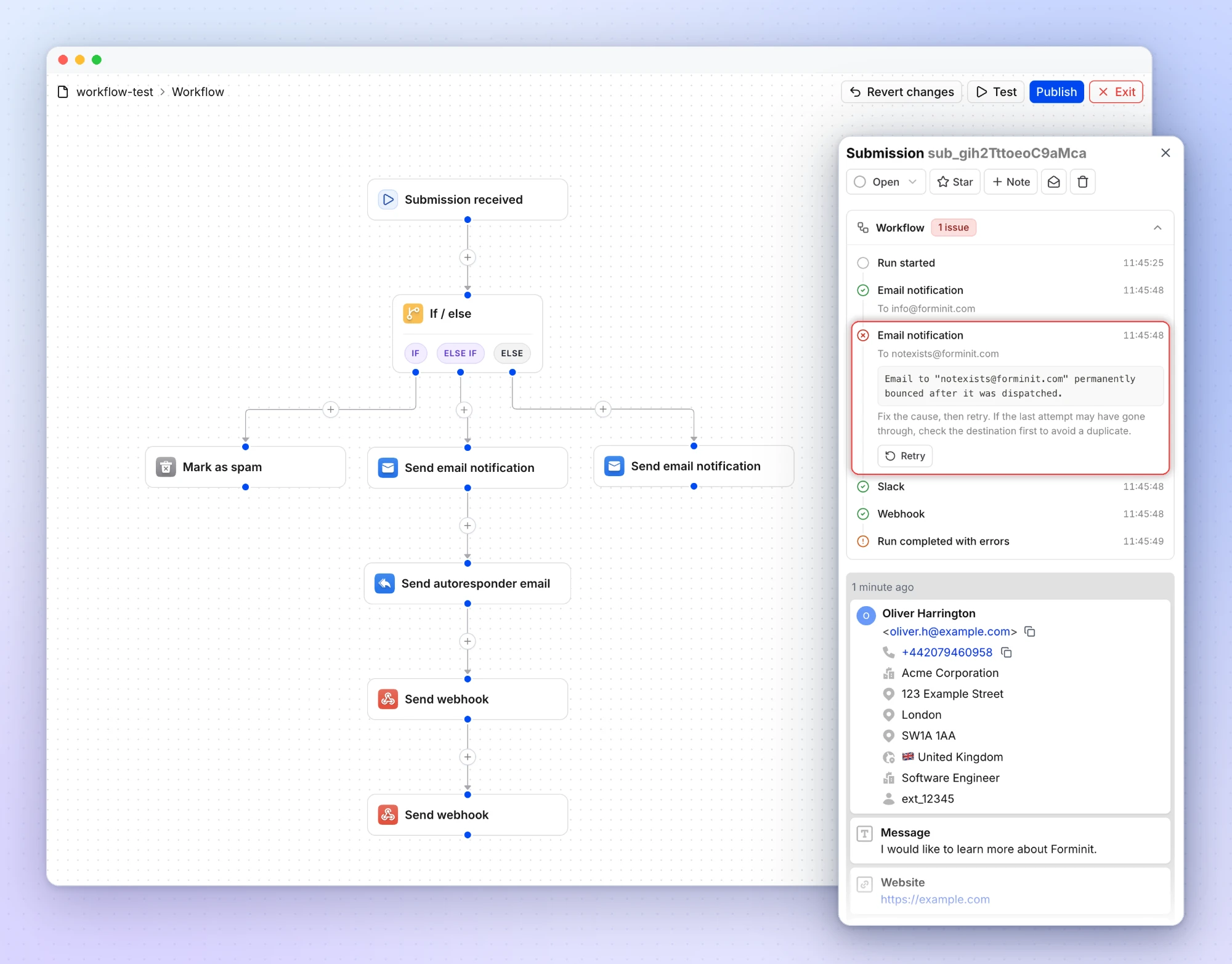
Email notifications, conditions and status actions work on every plan, including Free. Autoresponses, webhooks, Slack, Discord and Google Sheets start on Pro.
Formspree’s Workflow tab validates data and then runs its actions in parallel for every submission, with automatic retries for integrations. Conditional delivery comes from Form Rules on the Business plan: each rule checks one field (empty, not empty, contains or doesn’t contain a keyword) and sends an email, tags the submission as spam or redirects. Its documentation does not describe branching, combined conditions or a per-action log with retries.
Signed webhooks and detailed activity logs
Forminit’s signed webhooks let your server verify who sent a request before processing it. HMAC-SHA256 signatures, timestamps and event IDs support authenticity checks, replay protection and duplicate detection. Webhooks start on Pro.
Detailed logs give you a timeline of form activity, submission events and errors. Review webhook delivery attempts under Form Settings → Logs and enable failure alerts for error details and failure counts. Your team can investigate what happened directly from the dashboard.
Free uploads and control over your data
Start collecting attachments on Forminit’s free plan, with 100 MB of file storage. Typed Form Blocks validate supported field formats before storage, and form data is hosted in AWS Ireland.
Every plan keeps submissions with no time limit, including Free. Formspree keeps 30 days of history on Free. When a regulation or your own privacy policy says data must not be kept longer than needed, you decide per form: on Pro and higher, set a retention period and Forminit deletes submissions and their files automatically after 30, 90 or 365 days, or a custom number of days. Leave it at Until manually deleted and nothing expires. Formspree does not document a setting for automatic deletion.
Migrating from Formspree
Keep your existing form design. Create a Forminit form in Public mode, replace the endpoint and map input names to Form Blocks:
<form action="https://forminit.com/f/YOUR_FORM_ID" method="POST">
  <label>Email <input type="email" name="fi-sender-email" required /></label>
  <label>Message <textarea name="fi-text-message" required></textarea></label>
  <button type="submit">Send</button>
</form>
Recreate your notifications, redirects and integrations, then test a submission before switching traffic. If you use JavaScript to submit, update that handler too. Follow the HTML guide or the framework-agnostic SDK guide for automatic attribution and custom submission flows.
FAQ
Can I keep my existing form design?
Yes. Keep your HTML, CSS and layout. Update the submission endpoint and field names, then recreate your notifications and integrations in Forminit. Its framework-agnostic SDK also supports custom JavaScript forms.
Does Forminit include form analytics?
Yes, on Pro and higher. See counts and percentages for select, radio and checkbox responses, plus submission trends, UTM campaigns and ad click sources. The browser SDK captures supported attribution data automatically when it is available.
What happens to my existing Formspree submissions?
The new endpoint receives future submissions. Export your existing Formspree records before switching; changing the endpoint does not move historical submissions or files. Formspree offers CSV and JSON export on Professional and Business.
How many team members can I add?
Forminit Business includes unlimited workspaces and unlimited collaborators, with Owner, Admin, Editor and Guest roles. Formspree includes 1 team member on Free and Personal, 2 on Professional and unlimited members on Business. Billed yearly, Forminit Business costs $594 (6 months free) and Formspree Business costs $720.
About this comparison
Published by Forminit. Competitor details checked against the linked official sources on 17 September 2026; pricing, plan limits, plan features, team members, workflow and validation on 7 October 2026. Features and prices may change. Suggest a correction.