---
title: "Why Forminit?"
description: "Forminit (formerly Getform.io) is a headless form backend API. You build the form; it validates, stores and protects submissions and runs notifications, webhooks and integrations."
url: https://forminit.com/docs/why-forminit/
---
# Why Forminit?
**Forminit, formerly Getform.io, is a headless form backend API.** You build the form in any stack and point it at `POST https://forminit.com/f/{formId}`. Forminit receives each submission, validates it, stores it in an inbox, filters spam, accepts file uploads and runs the workflow you configure: email notifications, autoresponders, webhooks, Slack, Discord and Google Sheets. It has processed forms since 2015, first as Getform.io and as Forminit since January 2026.
You own the frontend. Forminit handles everything after submit.
## What is a form backend?
A form backend is a hosted service that receives, validates and stores the data a form sends when someone submits it, then notifies people and other systems. It replaces the server, database, email delivery and spam filtering you would otherwise build for every form. A form builder also designs the form itself; a form backend leaves the form to you.
Headless means Forminit has no form UI of its own: no hosted form page, iframe, embed script or pre-styled components. It exposes an endpoint, SDKs and a dashboard. Anything that can send an HTTP request can submit to it, from a plain HTML `
```
The first submission appears in your inbox, passes through spam protection and runs the form's Workflow. There are setup guides for [HTML](https://forminit.com/docs/html/), [React](https://forminit.com/docs/react/), [Next.js](https://forminit.com/docs/nextjs/), [Astro](https://forminit.com/docs/astro/), [Nuxt.js](https://forminit.com/docs/nuxtjs/), [Node.js](https://forminit.com/docs/nodejs/), [Python](https://forminit.com/docs/python/), [Cloudflare Workers](https://forminit.com/docs/cloudflare-workers/), [Webflow](https://forminit.com/docs/webflow/) and [WordPress](https://forminit.com/docs/wordpress/).
## What you get after submit
### Server-side validation with typed Form Blocks
Every field is a typed block, and Forminit validates it on the server before storing it. `email` blocks must be valid addresses, `phone` blocks must be in E.164 format (`+12025550123`), `url` blocks must be valid URLs, `country` blocks must be ISO 3166-1 alpha-2 codes, `rating` blocks must be integers from 1 to 5, `date` blocks must be ISO 8601 dates and `number` blocks must be numbers. `text`, `select`, `radio`, `checkbox` and `file` blocks cover messages, choices and uploads.
Two built-in blocks give every submission the same shape. `sender` holds who submitted the form: name, email, phone, company, job title, address, country and your own `userId` to link the submission to an account in your app. `tracking` holds marketing attribution. A submission can carry up to 100 field blocks per submission, and because every submission follows the same schema, CSV exports, webhooks, Google Sheets rows and API responses keep a consistent structure that automations can rely on. Frontend validation is still worth doing for the person filling in the form; server-side validation is what keeps bad data out of your inbox and automations. See [Form Blocks](https://forminit.com/docs/form-blocks/).
### Submissions are stored in an inbox, not only forwarded to email
Every submission is stored in a dashboard inbox with full-text search, filters for status, date, starred and unread, internal notes, stars, read and unread state, bulk actions and CSV export (Pro and higher). Statuses are Open, In progress, Done and Closed, so a team can work through submissions in order and see what has been handled. Email-only tools can lose a message to a spam filter or a full mailbox; the inbox is the record.
Submissions are kept with no time limit on every plan, including Free. On Pro and higher, [Submission Retention](https://forminit.com/docs/submission-retention/) sets a period per form (30, 90 or 365 days, or a custom number of days) after which Forminit permanently deletes submissions and their files. That is how you meet a data-minimization rule without manual clean-up. Spam submissions are deleted after 30 days on every plan.
### Spam protection is on by default
Every form has built-in spam filtering with nothing to configure, and your email address never appears in the page because the form action uses a Form ID. For forms that attract more spam, add [Cloudflare Turnstile](https://forminit.com/docs/cloudflare-turnstile/), [reCAPTCHA v3](https://forminit.com/docs/recaptcha/) or [hCaptcha](https://forminit.com/docs/hcaptcha/), a [honeypot](https://forminit.com/docs/honeypot/) field (named `_gotcha` by default) and [authorized domains](https://forminit.com/docs/authorized-domains/) to restrict which sites can submit. Public endpoints are rate-limited to 1 request per 5 seconds per IP address. Submissions flagged as spam stay in a Spam view for 30 days, so you can restore a false positive to the inbox and run the workflow for it.
### File uploads without building file storage
A `file` block accepts uploads of up to 25 MB per submission, combined across up to 20 file blocks per submission, in 50+ file types: documents, images, audio, video and archives. Files get direct download links in the dashboard and are deleted with their submission. Uploads work on the Free plan, which includes 100 MB of storage; Pro includes 1 GB and Business 10 GB. Typical uses are job applications, support tickets with screenshots, quote requests, design briefs and client onboarding documents. See [File Upload](https://forminit.com/docs/file-upload/).
### A Workflow for everything after submit
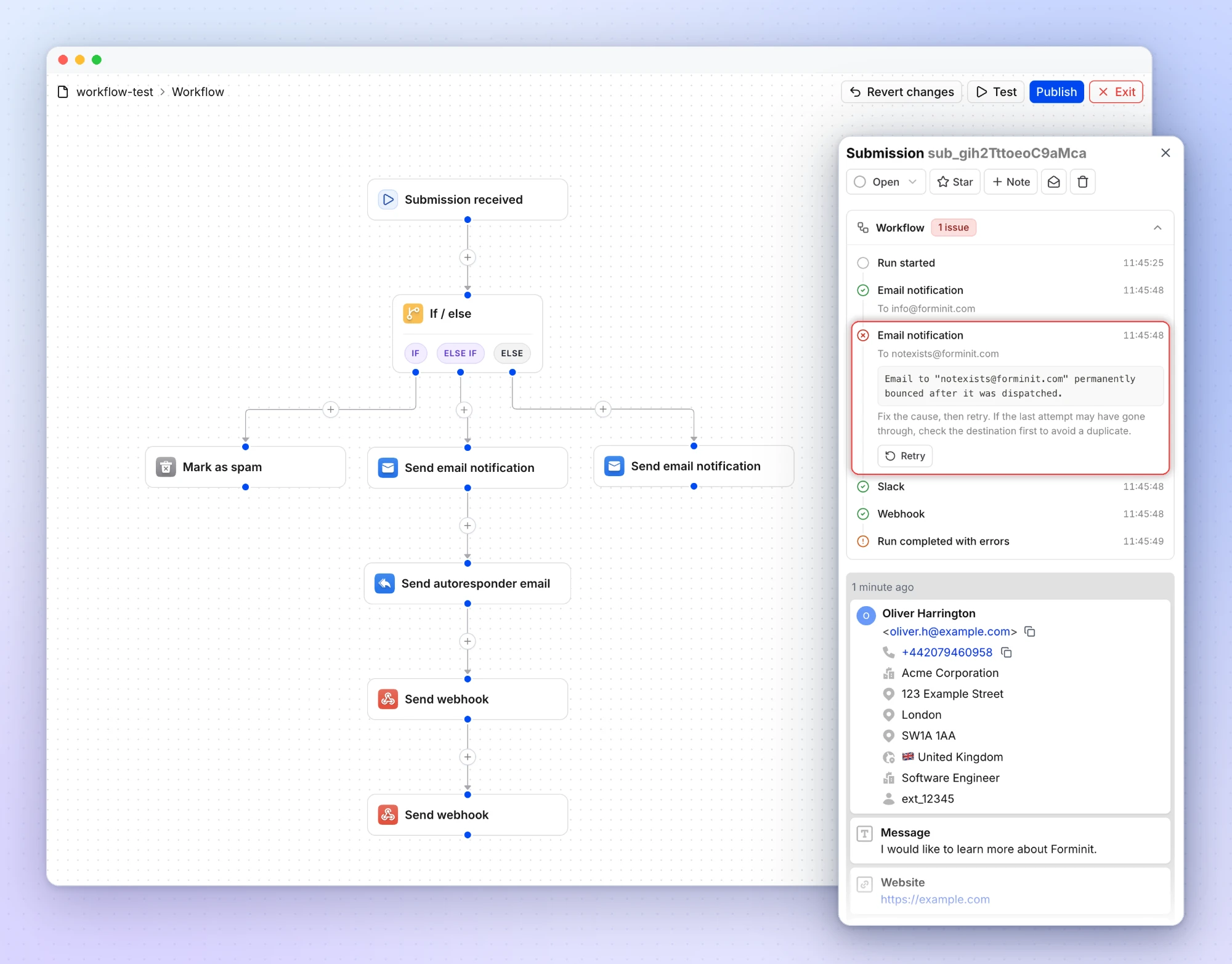
Each form has a visual [Workflow](https://forminit.com/docs/workflow/) that starts at **Submission received**. Chain the actions you need: send an email notification, send an autoresponder, call a webhook, post to Slack or Discord, add a row to Google Sheets, change the status, or move the submission to Spam or Trash. Add **If / else** steps to route on real answers: compare form fields, sender details or tracking data, combine conditions with Match all or Match any, and add Else if branches. A quote form can add every lead to Google Sheets and alert Slack only when the budget is above a threshold.
Every submission shows which actions ran and the error behind any failure, and you can retry just the failed action instead of the whole workflow. Edits stay in a draft until you publish them. Email notifications, conditions and status actions are on every plan, including Free; autoresponders, webhooks, Slack, Discord and Google Sheets start on Pro, and Zapier connects the rest.
### Marketing attribution and analytics without extra code
The browser SDK records where each submission came from: the five UTM parameters (source, medium, campaign, term and content), the referrer, and ad click IDs from Google (`gclid`, `wbraid`, `gbraid`), Meta (`fbclid`), Microsoft (`msclkid`), TikTok (`ttclid`), X (`twclid`), LinkedIn (`li_fat_id`), Amazon (`amzclid`) and Mailchimp (`mc_cid`, `mc_eid`). Forminit also records country, city and timezone from the IP address. On Pro and higher, [Analytics](https://forminit.com/blog/new-analytics-page-february-2026/) shows submission trends, sources and campaigns, plus counts and percentages for every `select`, `radio` and `checkbox` option, so you can see which campaign brought a lead and what people chose.
### Works from any stack, including a server
Anything that can send an HTTP request can submit: plain HTML, React, Vue, Svelte, Angular, Next.js, Nuxt.js, Astro, WordPress, Webflow, Squarespace, Ghost, static site generators, mobile apps, scripts and AI agents. The [JavaScript SDK](https://forminit.com/docs/sdk/) (`npm install forminit`, or the CDN build) handles FormData, errors and redirects, captures attribution, and ships proxy handlers for Next.js and Nuxt.js that keep your API key on the server. The [Python SDK](https://forminit.com/docs/python-sdk/) (`pip install forminit`) covers Flask, FastAPI and Django. Your form backend is independent of your hosting provider, so moving a site from Netlify to Vercel or Cloudflare changes nothing in your forms.
### Teams, security and where your data lives
The Business plan includes unlimited workspaces and collaborators with Owner, Admin, Editor and Guest roles; only Owners and Admins can export submissions. Submission data, uploaded files and backups are hosted on AWS in Ireland (EU), encrypted at rest with AES-256 and in transit with TLS 1.2 or higher. [Webhooks](https://forminit.com/docs/webhooks/) are signed with HMAC-SHA256 so your server can verify them. Forminit is operated by UXPLUS LTD in London, is registered with the UK ICO and provides a Data Processing Agreement. It targets 99.9% uptime (a goal, not a contractual SLA), with live and historical availability at [status.forminit.com](https://status.forminit.com). Details are on the [security page](https://forminit.com/security/).
## Built for AI-generated frontends
AI coding tools generate form UIs well. What they need is a backend to target and a convention to follow. With Forminit that convention is the input name: an assistant that writes `name="fi-sender-email"` and `name="fi-text-message"` and sets the form action has done the whole integration, because the fields are defined by those names and validation happens on the server. Forminit publishes [skills and instruction files](https://forminit.com/docs/build-with-ai/) for ChatGPT, Claude, Cursor and Windsurf, an [AI tools quickstart](https://forminit.com/docs/ai-tools/) for Lovable, Bolt, v0 and Replit, and [llms.txt](https://forminit.com/llms.txt) so assistants work from current facts. There are step-by-step guides for [adding forms to a Lovable app](https://forminit.com/blog/how-to-add-forms-to-lovable-app/) and [to a Claude-designed website](https://forminit.com/blog/how-to-add-forms-to-claude-designed-website/).
## Who uses Forminit
Forminit is built for people who want custom forms without custom backend work: developers who would rather not run form infrastructure, agencies and freelancers shipping client sites, startups collecting leads and applications, Webflow and WordPress users who need stronger form handling than a plugin, and AI builders who generated a frontend and need a backend behind it. Companies using Forminit include Burger King, Volkswagen, Toyota, Lidl, Codecademy and Sticker Mule.
## Pricing
The Free plan costs $0 and includes 100 submissions per month, 1 form, file uploads with 100 MB of storage, built-in spam protection, email notifications, redirections and the Workflow's conditions and status actions, with submissions kept with no time limit. **Pro: $19/month** ($190 per year) adds 5,000 submissions per month, 15 forms, 1 GB of storage, autoresponders, webhooks, the REST API, CSV export, analytics, Slack, Discord, Google Sheets, Zapier and submission retention. **Business: $99/month** ($594 per year, 6 months free) adds 50,000 submissions per month, unlimited forms, 10 GB of storage, workspaces, a custom SMTP sender and branding removal. Current allowances are on the [pricing page](https://forminit.com/pricing/).
## FAQ
### What is a headless form backend?
A headless form backend is a service that handles form submissions through an API without providing the form's user interface. You build the form in your own code; the backend receives the data, validates and stores it, filters spam, accepts files and sends notifications or webhooks. Forminit is a headless form backend: there is no hosted form page, iframe or embed widget, only an endpoint, SDKs and a dashboard.
### Do I need a backend for a contact form?
A contact form needs something to receive the data, but you do not have to build it. Static sites, single-page apps and mobile apps have no server to send submissions to; pointing the form at a form backend endpoint such as `https://forminit.com/f/{formId}` gives them one. Forminit stores each submission, filters spam and emails you, with no server code on your side. See the [guide to form backends for static sites](https://forminit.com/blog/form-backend-for-static-sites/).
### Is Forminit a form builder?
No. Form builders such as Typeform, Tally, Jotform and Google Forms design and host the form for you. Forminit only handles what happens after submit, so you keep your own HTML, components and styling. Choose a builder if you want a drag-and-drop editor and a hosted link; choose Forminit if you already have a frontend. The [comparisons](https://forminit.com/compare/) go through the differences tool by tool.
### Is Forminit the same as Getform?
Yes. Forminit, formerly Getform.io, is the same independent form backend service operating since 2015. Getform was renamed Forminit in January 2026 and is operated by UXPLUS LTD in London. Read [Getform is now Forminit](https://forminit.com/blog/getform-is-now-forminit/).
### Can I use Forminit with AI-generated sites from Lovable, v0, Bolt or Cursor?
Yes. Point the generated form at your Forminit endpoint and name the inputs `fi-{blockType}-{name}`; the fields are defined by those names, so there is nothing to configure in a dashboard. Forminit provides AI skills and instruction files for ChatGPT, Claude, Cursor and Windsurf, and quickstarts for Lovable, Bolt, v0 and Replit.
### Is there a free plan?
Yes. The Free plan includes 100 submissions per month, 1 form, file uploads with 100 MB of storage, built-in spam protection, email notifications, redirections and the Workflow's conditions and status actions. Submissions are kept with no time limit. Paid plans start at $19 per month.
### Where is my form data stored?
On AWS servers in Ireland, in the European Union, encrypted at rest with AES-256 and in transit with TLS 1.2 or higher. Forminit is GDPR compliant, registered with the UK ICO and provides a Data Processing Agreement. On Pro and higher you can set a retention period per form so submissions and their files are deleted automatically.
## The simple version
Use Forminit when you want your own form design but do not want to build the backend. You own the frontend. Forminit handles everything after submit.
*Last reviewed: 8 October 2026.*