---
title: "Add forms to FastAPI"
description: "Add a form backend to your FastAPI application. Forminit handles submissions, validation, file uploads, and notifications."
url: https://forminit.com/docs/fastapi/
---
# Add forms to FastAPI
Learn how to handle form submissions in FastAPI using the Forminit Python SDK with async support.
---
## Prerequisites
1. **Create a Forminit account** at [forminit.com](https://forminit.com)
2. **Create a form** in your dashboard
3. **Set authentication mode to Protected** in Form Settings
4. **Create an API token** from **Account → API Tokens**
---
## 1. Install Dependencies
```bash
pip install forminit fastapi uvicorn python-dotenv
```
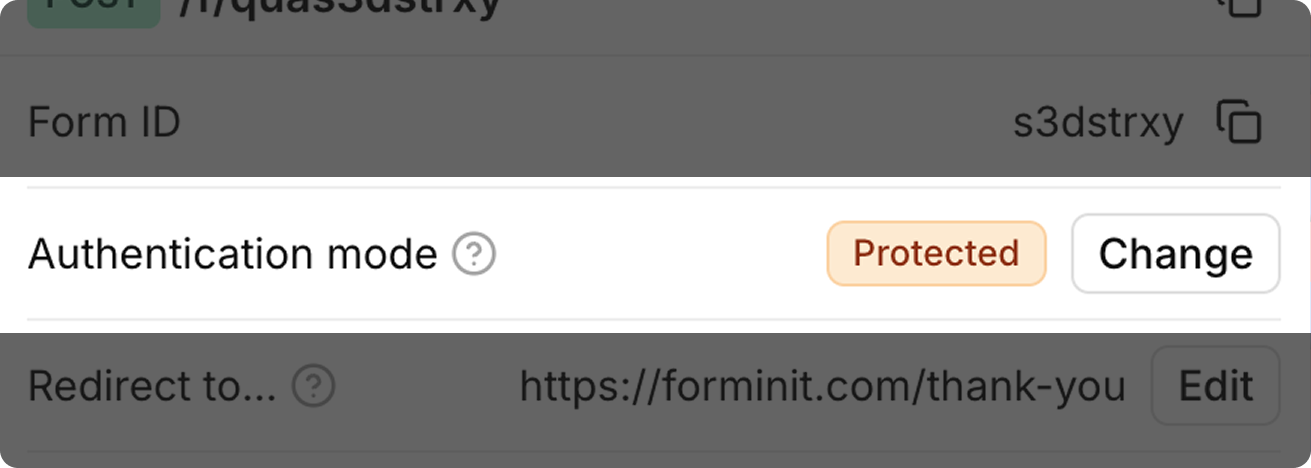
## 2. Set Authentication Mode to Protected
Set authentication to Protected for server-side integrations. This enables higher rate limits and requires the `x-api-key` header.
 ## 3. Create an API Token and Add to Environment
Generate your secret API token from **Account → API Tokens** in the Forminit dashboard.
```bash
# .env
FORMINIT_API_KEY="fi_your_secret_api_key"
```
> **Caution**
>
> Never commit API keys to version control. Add `.env` to your `.gitignore` file.
## 4. Project Structure
```
my-fastapi-app/
├── main.py
└── .env
```
## 5. Create the FastAPI App
Forminit uses a block-based system to structure form data. Each submission contains an array of blocks representing different field types.
For complete documentation on all available blocks, field naming conventions, and validation rules, see the [Form Blocks Reference](https://forminit.com/docs/form-blocks/).
FastAPI works best with the `AsyncForminitClient` for non-blocking I/O. Use a lifespan context manager to manage the client lifecycle:
```python
# main.py
import os
from contextlib import asynccontextmanager
from fastapi import FastAPI, Form, Request, HTTPException
from fastapi.responses import HTMLResponse
from forminit import AsyncForminitClient
from dotenv import load_dotenv
load_dotenv()
FORM_ID = "YOUR_FORM_ID"
forminit_client: AsyncForminitClient = None
@asynccontextmanager
async def lifespan(app: FastAPI):
global forminit_client
forminit_client = AsyncForminitClient(api_key=os.environ["FORMINIT_API_KEY"])
yield
await forminit_client.close()
app = FastAPI(lifespan=lifespan)
@app.get("/", response_class=HTMLResponse)
async def index():
return """
"""
@app.post("/submit")
async def submit(
request: Request,
fullName: str = Form(...),
email: str = Form(...),
message: str = Form(...),
):
# Pass user info for geolocation and attribution tracking
forminit_client.set_user_info(
ip=request.headers.get("x-forwarded-for", request.client.host),
user_agent=request.headers.get("user-agent"),
referer=request.headers.get("referer"),
)
response = await forminit_client.submit(FORM_ID, {
"blocks": [
{
"type": "sender",
"properties": {
"email": email,
"fullName": fullName,
},
},
{
"type": "text",
"name": "message",
"value": message,
},
],
})
if response.get("error"):
raise HTTPException(status_code=400, detail=response["error"]["message"])
return {"success": True, "submissionId": response["data"]["hashId"]}
```
## 6. Run
```bash
uvicorn main:app --reload
```
FastAPI automatically generates interactive API docs at `http://localhost:8000/docs`.
---
## JSON Submission with Pydantic Models
Use Pydantic models for type-safe JSON request bodies:
```python
from pydantic import BaseModel
class ContactSubmission(BaseModel):
email: str
firstName: str | None = None
lastName: str | None = None
message: str
plan: str | None = None
@app.post("/api/direct-submit")
async def direct_submit(request: Request, payload: ContactSubmission):
forminit_client.set_user_info(
ip=request.headers.get("x-forwarded-for", request.client.host),
user_agent=request.headers.get("user-agent"),
referer=request.headers.get("referer"),
)
response = await forminit_client.submit(FORM_ID, {
"blocks": [
{
"type": "sender",
"properties": {
"email": payload.email,
"firstName": payload.firstName,
"lastName": payload.lastName,
},
},
{
"type": "text",
"name": "message",
"value": payload.message,
},
{
"type": "select",
"name": "plan",
"value": payload.plan,
},
],
})
if response.get("error"):
raise HTTPException(status_code=400, detail=response["error"]["message"])
return {"success": True, "submissionId": response["data"]["hashId"]}
```
> **Caution**
>
> JSON submissions do not support file uploads. Use flat form data for forms with file fields.
---
## Flat Form Data Submission
You can also submit using flat `fi-` prefixed keys:
```python
@app.post("/submit-flat")
async def submit_flat(request: Request):
form_data = await request.form()
flat_data = dict(form_data)
forminit_client.set_user_info(
ip=request.headers.get("x-forwarded-for", request.client.host),
user_agent=request.headers.get("user-agent"),
referer=request.headers.get("referer"),
)
response = await forminit_client.submit(FORM_ID, flat_data)
if response.get("error"):
raise HTTPException(status_code=400, detail=response["error"]["message"])
return {"success": True, "submissionId": response["data"]["hashId"]}
```
With an HTML form using `fi-` prefixed field names:
```html
```
---
## Response Structure
### Success Response
```python
{
"data": {
"hashId": "7LMIBoYY74JOCp1k",
"date": "2026-01-01 21:10:24",
"blocks": {
"sender": {
"firstName": "John",
"lastName": "Doe",
"email": "john@example.com"
},
"message": "Hello world"
}
},
"redirectUrl": "https://forminit.com/thank-you"
}
```
| Field | Type | Description |
|-------|------|-------------|
| `data.hashId` | str | Unique submission identifier |
| `data.date` | str | Submission timestamp (YYYY-MM-DD HH:mm:ss) |
| `data.blocks` | dict | All submitted field values |
| `redirectUrl` | str | Thank you page URL |
### Error Response
```python
{
"error": {
"error": "FI_SCHEMA_FORMAT_EMAIL",
"code": 400,
"message": "Invalid email format"
}
}
```
---
## Error Handling
```python
@app.post("/submit")
async def submit(
request: Request,
fullName: str = Form(...),
email: str = Form(...),
message: str = Form(...),
):
forminit_client.set_user_info(
ip=request.headers.get("x-forwarded-for", request.client.host),
user_agent=request.headers.get("user-agent"),
referer=request.headers.get("referer"),
)
response = await forminit_client.submit(FORM_ID, {
"blocks": [
{
"type": "sender",
"properties": {"email": email, "fullName": fullName},
},
{
"type": "text",
"name": "message",
"value": message,
},
],
})
if response.get("error"):
error = response["error"]
error_code = error.get("error")
if error_code == "FI_SCHEMA_FORMAT_EMAIL":
raise HTTPException(status_code=400, detail="Invalid email address")
elif error_code == "FI_RULES_PHONE_INVALID":
raise HTTPException(status_code=400, detail="Invalid phone number format")
elif error_code == "TOO_MANY_REQUESTS":
raise HTTPException(status_code=429, detail="Please wait before submitting again")
else:
raise HTTPException(status_code=400, detail=error.get("message"))
return {"success": True, "submissionId": response["data"]["hashId"]}
```
### Common Error Codes
| Error Code | HTTP Status | Description |
|------------|-------------|-------------|
| `FORM_NOT_FOUND` | 404 | Form ID doesn't exist or was deleted |
| `FORM_DISABLED` | 403 | Form is disabled by owner |
| `MISSING_API_KEY` | 401 | API key required but not provided |
| `EMPTY_SUBMISSION` | 400 | No fields with values submitted |
| `FI_SCHEMA_FORMAT_EMAIL` | 400 | Invalid email format |
| `FI_RULES_PHONE_INVALID` | 400 | Invalid phone number format |
| `FI_SCHEMA_RANGE_RATING` | 400 | Rating not between 1-5 |
| `FI_DATA_COUNTRY_INVALID` | 400 | Invalid country code |
| `TOO_MANY_REQUESTS` | 429 | Rate limit exceeded |
---
## Security Best Practices
1. **Store API keys in environment variables** — Never hardcode keys in source code
2. **Use `.gitignore`** — Exclude `.env` files from version control
3. **Use Pydantic models** — Validate request payloads automatically
4. **Use HTTPS** — Always use secure connections in production
5. **Use lifespan context manager** — Ensures the HTTP client is properly managed
6. **Call `set_user_info()`** — Pass the real user's IP, user agent, and referer for accurate tracking
---
## Related Documentation
- [Python SDK Reference](https://forminit.com/docs/python-sdk/) — Full API reference for the Python SDK
- [Python Introduction](https://forminit.com/docs/python/) — General Python setup and usage
- [Form Blocks Reference](https://forminit.com/docs/form-blocks/) — Complete reference for all block types
- [File Uploads](https://forminit.com/docs/file-upload/) — Detailed file upload guide
- [API Reference](https://forminit.com/docs/submit-form-api/) — Full REST API documentation
## 3. Create an API Token and Add to Environment
Generate your secret API token from **Account → API Tokens** in the Forminit dashboard.
```bash
# .env
FORMINIT_API_KEY="fi_your_secret_api_key"
```
> **Caution**
>
> Never commit API keys to version control. Add `.env` to your `.gitignore` file.
## 4. Project Structure
```
my-fastapi-app/
├── main.py
└── .env
```
## 5. Create the FastAPI App
Forminit uses a block-based system to structure form data. Each submission contains an array of blocks representing different field types.
For complete documentation on all available blocks, field naming conventions, and validation rules, see the [Form Blocks Reference](https://forminit.com/docs/form-blocks/).
FastAPI works best with the `AsyncForminitClient` for non-blocking I/O. Use a lifespan context manager to manage the client lifecycle:
```python
# main.py
import os
from contextlib import asynccontextmanager
from fastapi import FastAPI, Form, Request, HTTPException
from fastapi.responses import HTMLResponse
from forminit import AsyncForminitClient
from dotenv import load_dotenv
load_dotenv()
FORM_ID = "YOUR_FORM_ID"
forminit_client: AsyncForminitClient = None
@asynccontextmanager
async def lifespan(app: FastAPI):
global forminit_client
forminit_client = AsyncForminitClient(api_key=os.environ["FORMINIT_API_KEY"])
yield
await forminit_client.close()
app = FastAPI(lifespan=lifespan)
@app.get("/", response_class=HTMLResponse)
async def index():
return """
"""
@app.post("/submit")
async def submit(
request: Request,
fullName: str = Form(...),
email: str = Form(...),
message: str = Form(...),
):
# Pass user info for geolocation and attribution tracking
forminit_client.set_user_info(
ip=request.headers.get("x-forwarded-for", request.client.host),
user_agent=request.headers.get("user-agent"),
referer=request.headers.get("referer"),
)
response = await forminit_client.submit(FORM_ID, {
"blocks": [
{
"type": "sender",
"properties": {
"email": email,
"fullName": fullName,
},
},
{
"type": "text",
"name": "message",
"value": message,
},
],
})
if response.get("error"):
raise HTTPException(status_code=400, detail=response["error"]["message"])
return {"success": True, "submissionId": response["data"]["hashId"]}
```
## 6. Run
```bash
uvicorn main:app --reload
```
FastAPI automatically generates interactive API docs at `http://localhost:8000/docs`.
---
## JSON Submission with Pydantic Models
Use Pydantic models for type-safe JSON request bodies:
```python
from pydantic import BaseModel
class ContactSubmission(BaseModel):
email: str
firstName: str | None = None
lastName: str | None = None
message: str
plan: str | None = None
@app.post("/api/direct-submit")
async def direct_submit(request: Request, payload: ContactSubmission):
forminit_client.set_user_info(
ip=request.headers.get("x-forwarded-for", request.client.host),
user_agent=request.headers.get("user-agent"),
referer=request.headers.get("referer"),
)
response = await forminit_client.submit(FORM_ID, {
"blocks": [
{
"type": "sender",
"properties": {
"email": payload.email,
"firstName": payload.firstName,
"lastName": payload.lastName,
},
},
{
"type": "text",
"name": "message",
"value": payload.message,
},
{
"type": "select",
"name": "plan",
"value": payload.plan,
},
],
})
if response.get("error"):
raise HTTPException(status_code=400, detail=response["error"]["message"])
return {"success": True, "submissionId": response["data"]["hashId"]}
```
> **Caution**
>
> JSON submissions do not support file uploads. Use flat form data for forms with file fields.
---
## Flat Form Data Submission
You can also submit using flat `fi-` prefixed keys:
```python
@app.post("/submit-flat")
async def submit_flat(request: Request):
form_data = await request.form()
flat_data = dict(form_data)
forminit_client.set_user_info(
ip=request.headers.get("x-forwarded-for", request.client.host),
user_agent=request.headers.get("user-agent"),
referer=request.headers.get("referer"),
)
response = await forminit_client.submit(FORM_ID, flat_data)
if response.get("error"):
raise HTTPException(status_code=400, detail=response["error"]["message"])
return {"success": True, "submissionId": response["data"]["hashId"]}
```
With an HTML form using `fi-` prefixed field names:
```html
```
---
## Response Structure
### Success Response
```python
{
"data": {
"hashId": "7LMIBoYY74JOCp1k",
"date": "2026-01-01 21:10:24",
"blocks": {
"sender": {
"firstName": "John",
"lastName": "Doe",
"email": "john@example.com"
},
"message": "Hello world"
}
},
"redirectUrl": "https://forminit.com/thank-you"
}
```
| Field | Type | Description |
|-------|------|-------------|
| `data.hashId` | str | Unique submission identifier |
| `data.date` | str | Submission timestamp (YYYY-MM-DD HH:mm:ss) |
| `data.blocks` | dict | All submitted field values |
| `redirectUrl` | str | Thank you page URL |
### Error Response
```python
{
"error": {
"error": "FI_SCHEMA_FORMAT_EMAIL",
"code": 400,
"message": "Invalid email format"
}
}
```
---
## Error Handling
```python
@app.post("/submit")
async def submit(
request: Request,
fullName: str = Form(...),
email: str = Form(...),
message: str = Form(...),
):
forminit_client.set_user_info(
ip=request.headers.get("x-forwarded-for", request.client.host),
user_agent=request.headers.get("user-agent"),
referer=request.headers.get("referer"),
)
response = await forminit_client.submit(FORM_ID, {
"blocks": [
{
"type": "sender",
"properties": {"email": email, "fullName": fullName},
},
{
"type": "text",
"name": "message",
"value": message,
},
],
})
if response.get("error"):
error = response["error"]
error_code = error.get("error")
if error_code == "FI_SCHEMA_FORMAT_EMAIL":
raise HTTPException(status_code=400, detail="Invalid email address")
elif error_code == "FI_RULES_PHONE_INVALID":
raise HTTPException(status_code=400, detail="Invalid phone number format")
elif error_code == "TOO_MANY_REQUESTS":
raise HTTPException(status_code=429, detail="Please wait before submitting again")
else:
raise HTTPException(status_code=400, detail=error.get("message"))
return {"success": True, "submissionId": response["data"]["hashId"]}
```
### Common Error Codes
| Error Code | HTTP Status | Description |
|------------|-------------|-------------|
| `FORM_NOT_FOUND` | 404 | Form ID doesn't exist or was deleted |
| `FORM_DISABLED` | 403 | Form is disabled by owner |
| `MISSING_API_KEY` | 401 | API key required but not provided |
| `EMPTY_SUBMISSION` | 400 | No fields with values submitted |
| `FI_SCHEMA_FORMAT_EMAIL` | 400 | Invalid email format |
| `FI_RULES_PHONE_INVALID` | 400 | Invalid phone number format |
| `FI_SCHEMA_RANGE_RATING` | 400 | Rating not between 1-5 |
| `FI_DATA_COUNTRY_INVALID` | 400 | Invalid country code |
| `TOO_MANY_REQUESTS` | 429 | Rate limit exceeded |
---
## Security Best Practices
1. **Store API keys in environment variables** — Never hardcode keys in source code
2. **Use `.gitignore`** — Exclude `.env` files from version control
3. **Use Pydantic models** — Validate request payloads automatically
4. **Use HTTPS** — Always use secure connections in production
5. **Use lifespan context manager** — Ensures the HTTP client is properly managed
6. **Call `set_user_info()`** — Pass the real user's IP, user agent, and referer for accurate tracking
---
## Related Documentation
- [Python SDK Reference](https://forminit.com/docs/python-sdk/) — Full API reference for the Python SDK
- [Python Introduction](https://forminit.com/docs/python/) — General Python setup and usage
- [Form Blocks Reference](https://forminit.com/docs/form-blocks/) — Complete reference for all block types
- [File Uploads](https://forminit.com/docs/file-upload/) — Detailed file upload guide
- [API Reference](https://forminit.com/docs/submit-form-api/) — Full REST API documentation