---
title: "Web3Forms Alternative: Forminit vs Web3Forms"
description: "Compare Forminit vs Web3Forms on pricing, Protected submission APIs, field analytics, campaign attribution, inbox workflow, and email customization."
intro: "Forminit is a Web3Forms alternative for teams that want actionable form analytics and a clear workflow for every response. Choose Public or Protected submission modes, track where leads come from, and manage follow-up in a fast inbox."
summary: "Forminit pairs a free plan with stored file uploads and a visual Workflow: chain email, webhook, Slack, Discord and Google Sheets actions, route each submission with If / else conditions, and retry any failed step from the dashboard. Web3Forms sends its integrations for every submission, has no workflow builder and leaves conditional routing to Zapier."
updated: 2026-10-06
verified: 2026-10-06
---
Forminit brings **submission control, response analytics and team follow-up** into the same form backend. It works with your existing frontend, whether you are collecting client inquiries, support requests or campaign leads. [Forminit has powered forms since 2015](/about/), originally as Getform.io.
Both services handle custom forms without requiring you to build a submission backend. Web3Forms offers email delivery, stored submissions and integrations. Forminit gives you a connected workflow: understand what people choose, see which campaigns bring leads, and track each response through to completion.
## Pricing comparison
Prices below are **USD, billed monthly**, before tax. Submission allowances are monthly; storage is total file capacity. The rows group the available plans, rather than treating them as equivalent packages.
| Plan or capability | Forminit | Web3Forms |
|---|---|---|
| **Free** | 100 submissions/month, 1 form, 100 MB file storage | 250 submissions/month, unlimited forms, no uploads |
| **Main paid plan** | **Pro: $19/month** — 5,000 submissions, 10 forms, 1 GB storage | Pro: $15/month — 10,000 submissions, unlimited forms, 5 GB storage |
| **Growing volume** | **Business: $99/month** — 50,000 submissions, unlimited forms, 10 GB storage | Agency: $39/month — 20,000 submissions, unlimited forms, 10 GB storage |
| **Authentication mode** | **Public or Protected** — accept submissions without a key, or require a valid `X-API-KEY` header | Public `access_key` or form ID for submissions; separate authenticated read API |
| **Analytics and attribution** | Built-in select, radio and checkbox breakdowns, UTM reports and ad click sources on Pro+ | Google Sheets integration for reporting; equivalent field and attribution dashboard not documented |
| **Submission management** | Inbox, full-text search, filters, notes, stars, read/unread and statuses | Submission dashboard and CSV export |
| **Team collaboration** | Business: unlimited workspaces and collaborators, with Owner, Admin, Editor and Guest roles | Team seats on paid plans: 3 on Pro, 10 on Agency, then $5 per seat per month |
| **Notification recipients** | Unlimited To, CC and BCC recipients on Pro and Business, with no verification step for each address | Up to 1 recipient on Free, 3 on Starter, 5 on Pro and 10 on Agency; 2 to 20 linked email addresses by plan, then $5 per 25 |
| **Email customization** | Visual notification editor with To, CC, BCC and Reply-to; Pro adds autoresponses, Business adds custom SMTP and removes Forminit branding | Templates and Reply-to; Pro/Agency add custom HTML templates and autoresponders; branding removal is a $9/month add-on |
| **Automation workflow** | **Yes**, visual workflow on every plan: chain email, webhook, Slack, Discord, Google Sheets and status actions, route with If / Else if / Else, retry any failed action | **No workflow builder**: Slack, Discord, Telegram and webhook integrations on Pro, sent for every submission; conditional routing through Zapier |
| **Signed webhooks** | HMAC-SHA256 signatures on Pro and higher | Paid webhooks; signature verification not documented |
| **File uploads** | Included on Free; 25 MB combined per submission | Pro/Agency; basic uploader supports 5 MB files, advanced uploader supports larger files |
| **Submission history** | Regular submissions stay until deleted by default; optional per-form expiry on Pro+ | Dashboard history: 30 days Free, 3 months Starter, 1 year Pro/Agency; data retention is separate |
Plan sources: [Forminit pricing](/pricing/) and Web3Forms pricing. Web3Forms documents its Google Sheets integration, basic uploads and advanced uploader separately.
**Forminit Pro combines collection with analytics and follow-up:** field response reports, campaign attribution, signed webhooks, the submissions API and CSV export. It gives teams a practical way to understand and act on the responses they collect.
**For agencies and growing teams, Forminit Business covers more volume and more people.** It includes 50,000 monthly submissions against 20,000 on Web3Forms Agency, with unlimited workspaces and collaborators instead of 10 included seats and $5 for each extra seat. Branding removal is included in Business; on Web3Forms it is a $9/month add-on. Billed yearly, Forminit Business is $594 ($49.50/month).
Annual billing is paid upfront: **Forminit** Pro $190/year (2 months free) and Business $594/year (6 months free); **Web3Forms** Pro $149/year and Agency $399/year. Web3Forms also offers an application-based **Starter plan at $49/year** for students, startups and nonprofits, with 5,000 monthly submissions and no uploads or autoresponders.
## Authentication mode: Public or Protected
**Forminit lets you decide whether your submission endpoint requires authentication.** Choose the mode that fits your workflow:
- **Public:** accept submissions without an API key, from a browser or your backend. This works well for contact forms and landing pages. Public describes submission access; stored responses remain private.
- **Protected:** require a valid **`X-API-KEY` header** on every submission. Missing or invalid keys are rejected. Keep the key in your backend, Worker or serverless function, out of browser code.
For example, your server can verify a customer's login and add a trusted account ID before submitting a support request. Protected mode prevents requests without a valid key from bypassing that path. The key authenticates your integration; your application handles the customer's permissions.
**Change access without rebuilding your form.** Keys can be **scoped, rotated and revoked** independently of the form ID. Replace a compromised key and update your backend while keeping the same endpoint and submission history. Knowing the form ID alone does not authorize a Protected submission. Both modes work with backend code; see [Forminit's authentication guide](/docs/submit-form-api/#authentication).
Web3Forms describes its access key as a public identifier, with spam protection and domain restrictions available. Its separate Submissions API uses secret Bearer tokens to **read** records. That is different from requiring a private credential to **submit** a form; an equivalent Protected submission mode is not documented.
## See which choices and campaigns bring leads
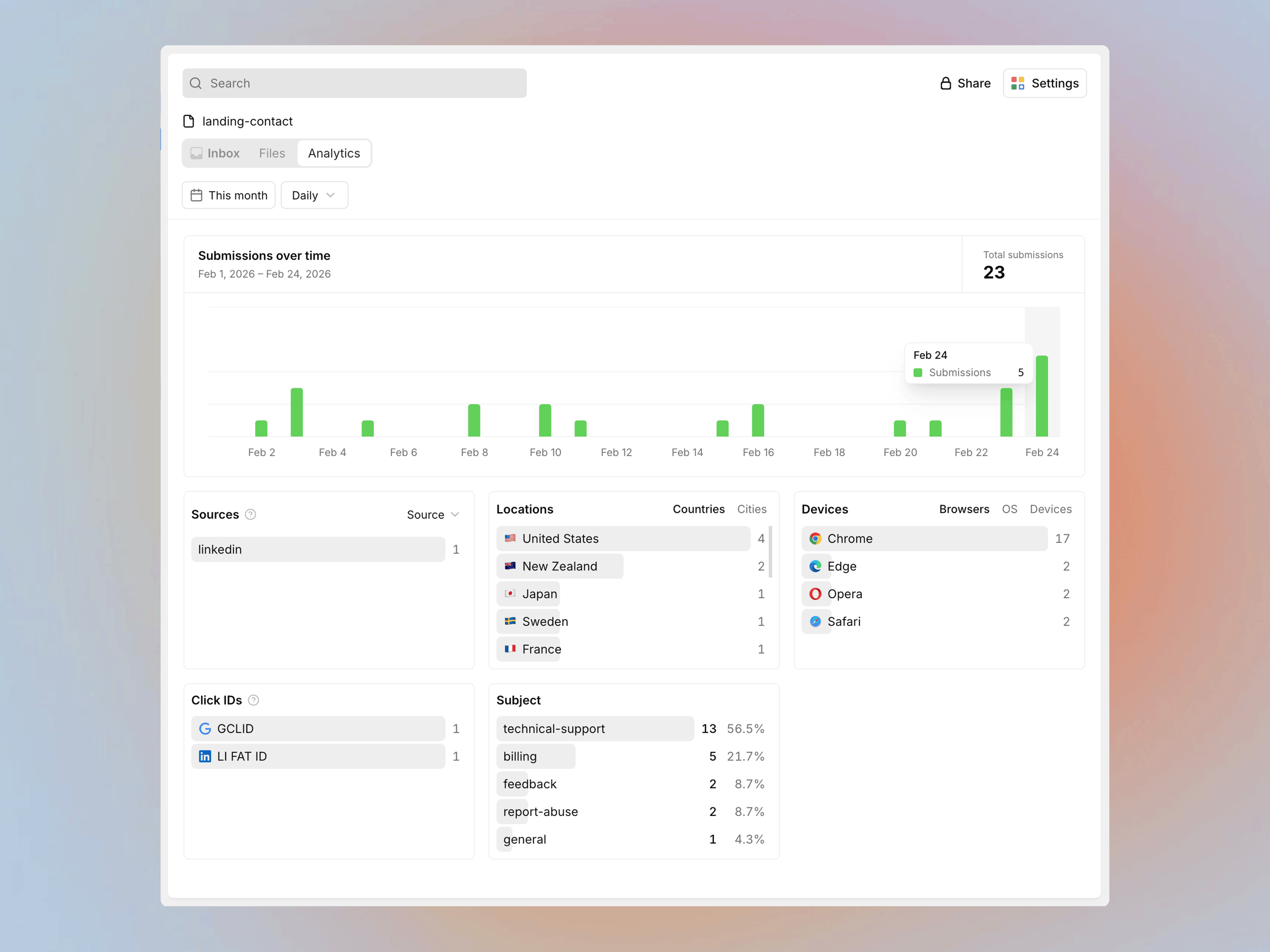
**Forminit shows what people choose, with counts and percentages for each option.** Use `select` Form Blocks for dropdowns, `radio` for single choices and `checkbox` for multiple choices. See the breakdowns in **submission details and the Analytics page**.
An agency can see how many inquiries request a website redesign, SEO work or ongoing support, and each service's share of responses. A support team can spot the most common request types without manually counting emails or exporting a spreadsheet.
Attribution reports show **how many submissions came from each source, medium and campaign**, using UTM parameters and supported ad click IDs such as Google `gclid`, Meta `fbclid` and Microsoft `msclkid`. The [browser SDK](/docs/sdk/#automatic-tracking) captures these values **when available**, so you can inspect an individual lead's source and compare campaign totals.
Track submission trends, lead sources and the options people select.
[Form Analytics](/blog/new-analytics-page-february-2026/) is available on **Pro and higher**. The reports sit alongside your stored submissions, giving your team context for its next action.
## Follow up from a fast, organized inbox
Forminit's [submission inbox](/docs/why-forminit/#submissions-are-stored-in-an-inbox-not-only-forwarded-to-email) helps you manage what happens after a form arrives. Find a name, email or detail with **full-text search**, then filter by status, date, starred items or unread submissions.
Add notes after a client call, star a promising lead and mark a response as read or unread. Track progress with **To do, In progress, Done and Closed** statuses. Anyone picking up the conversation can see the context beside the original response.
Regular submissions stay available until you delete them by default. On Pro and higher, [set a retention period per form](/docs/submission-retention/) to delete submissions and their files automatically. Spam submissions have a separate 30-day expiry.
Web3Forms also stores submissions. Its current storage policy allows retention up to three years, with indefinite retention on Pro and Agency. This storage period is distinct from the dashboard history windows listed in the table.
## Organize clients and teams with workspaces
[Forminit workspaces](/docs/workspace/) give agencies and freelancers a place to organize each client's forms. Businesses can separate projects or departments, with workspace-specific API keys and SMTP settings.
Use **Owner, Admin, Editor and Guest** roles to give people appropriate access. Let colleagues handle submissions and follow-up, give clients read-only visibility, and keep configuration with the people responsible for it. Forms and their working context stay organized as you move between clients.
The Business plan includes **unlimited workspaces and unlimited collaborators**, so adding a client or a teammate never changes your bill. Web3Forms includes 3 seats on Pro and 10 on Agency, with additional seats at $5 per seat per month.
## Make notification and autoresponse emails your own
Build [notification emails](/docs/email-notifications/) in a visual **WYSIWYG editor**, with formatting and form variables. Control **To, CC, BCC and Reply-to** so the right people receive each inquiry and replies reach the right inbox.
**Pro and Business have no recipient cap.** Notify a whole team, a client and a shared alias from one form, and add new addresses without a verification step. Web3Forms limits recipients by plan: 1 on Free, 3 on Starter, 5 on Pro and 10 on Agency, with 2 to 20 linked email addresses before add-ons.
On Pro and higher, compose [autoresponse templates](/docs/autoresponder/), add attachments and choose the reply address. On Business, use [custom SMTP](/docs/custom-sender-email-smtp/) to send from your own domain. A client inquiry can receive a branded acknowledgment, while an application form sends a different message and next steps.
Web3Forms also offers customizable autoresponders on Pro and Agency. Forminit's visual editors and recipient controls give you a flexible way to manage these messages alongside each form's workflow.
## Automate follow-up with Workflow
**Build the follow-up once and every submission runs it.** Forminit's [Workflow](/docs/workflow/) is a visual canvas for what happens after submit. Start from **Submission received**, chain the actions you need and branch with **If / else** steps.
- **Several actions in one flow.** Notify your team, send an autoresponse, post to Slack or Discord, add a row to Google Sheets, call your webhook, change the submission status, or move it to Spam or Trash. Steps before a branch run for every submission; steps on a branch run only for matching ones.
- **Routing on real answers.** Conditions read form fields, sender details and tracking data such as UTM parameters. Compare text, numbers, dates, email and URL domains, phone country codes or uploaded files, combine conditions with **Match all** or **Match any**, and add **Else if** branches for each route.
- **Full visibility when something fails.** Each submission shows which actions ran and the error behind any failure. Filter results by status and action in **Settings → Logs**, then **retry just the failed action** instead of the whole workflow. Spam you restore to the inbox can be processed with **Run workflow**.
- **Safe changes.** Edits stay in a draft until you **Publish**, and a new webhook must pass a test before it goes live.
```txt
╭───────────────────────╮
│ Submission received │
╰───────────┬───────────╯
╭───────────▼───────────╮
│ Send to Google Sheets │
╰───────────┬───────────╯
╭───────────▼───────────╮
│ If / else │
│ Budget > 5000? │
╰───────────┬───────────╯
╭─────────────┴─────────────╮
│ If │ Else
╭───────────▼───────────╮ ╭───────────▼───────────╮
│ Notify sales │ │ Email general │
│ in Slack │ │ enquiries │
╰───────────────────────╯ ╰───────────────────────╯
```
Email notifications, conditions and status actions work on every plan, including Free. Autoresponses, webhooks, Slack, Discord and Google Sheets start on Pro.
Web3Forms connects Slack, Discord, Telegram and webhooks on Pro, and each integration fires for every submission. Its own guides route submissions conditionally through Zapier filters rather than inside Web3Forms, and the integration docs do not describe a delivery log or retries.
## Signed webhooks and a clear activity timeline
Forminit's [signed webhooks](/docs/webhooks/) let your backend verify that a request came from Forminit before processing it. HMAC-SHA256 signatures, timestamps and event IDs support signature checks, replay protection and duplicate detection in your receiver. Webhooks start on Pro.
Detailed logs show form activity, submission events, webhook delivery attempts and errors. Review **Form Settings → Logs** and enable [webhook failure alerts](/blog/webhook-failure-alerts/) to investigate problems with delivery details at hand.
Web3Forms documents HTTP webhooks and retries. Its published integration guide does not describe a signing secret or signature-verification procedure.
## Collect files and structured responses from the start
Forminit includes [file uploads](/docs/file-upload/) on Free, with **100 MB storage** and up to **25 MB combined per submission**. Collect a brief, screenshot or application document and keep it with the response.
[Typed Form Blocks](/docs/form-blocks/) validate supported formats before storage and give fields a consistent structure for analytics and integrations. Form data is hosted in AWS Ireland.
## Migrating from Web3Forms
Keep your form's design and create a Forminit form in **Public** mode for direct browser submissions. Replace the Web3Forms action URL with your Forminit endpoint and remove the hidden `access_key` input. Rename fields such as `email` to `fi-sender-email` and `message` to `fi-text-message`:
```html
```
If your form uses a JavaScript handler or the Web3Forms React plugin, update that submission flow too. Recreate email settings, redirects, spam protection and integrations in Forminit; Web3Forms-specific hidden fields do not configure those features here. Replace any Web3Forms upload widget with a compatible file input or SDK flow.
Test field values, attachments and notification delivery before switching traffic. Follow the [HTML guide](/docs/html/) or [framework-agnostic SDK guide](/docs/sdk/) for the complete setup. Export any historical records and save attachments you need from Web3Forms; changing the endpoint only routes future submissions.
## FAQ
### Can I keep my existing Web3Forms form design?
Yes. Keep your HTML, CSS and layout. Replace the endpoint, remove the Web3Forms access_key field and map your inputs to Forminit Form Blocks. Update any JavaScript submit handler and recreate notifications, spam protection and integrations in Forminit.
### How is Protected mode different from a Web3Forms access key?
A Web3Forms access key is a public form identifier intended for browser code. Forminit Protected mode requires a valid X-API-KEY header on every submission, with the key kept in your backend. Web3Forms also has a separate authenticated API for reading submissions; that is different from authenticating incoming form submissions.
### What happens to my existing Web3Forms submissions?
Switching endpoints sends future submissions to Forminit. It does not move historical records or attachments. Export the submissions available in your Web3Forms account and save any files you need before changing or closing that account.
## About this comparison
Published by Forminit. Competitor details checked against the linked official sources on **17 September 2026**; workflow and automation details on **3 October 2026**; pricing, plan limits and team members on **6 October 2026**. Features and prices may change. [Suggest a correction](/contact/).