---
title: "Netlify Forms Alternative: Forminit vs Netlify Forms"
description: "Compare Forminit and Netlify Forms: hosting independence, Public or Protected submissions, field analytics, pricing and a fast inbox for team follow-up."
intro: "Forminit is a Netlify Forms alternative that keeps your forms independent of your hosting provider. Choose Public or Protected submission modes, understand responses and lead sources, and manage follow-up in a fast inbox."
updated: 2026-09-17
verified: 2026-09-17
---
**Forminit gives you one form backend across hosting providers and projects.** Use it on Netlify, Vercel, Cloudflare, AWS or your own server. Your submission endpoint, analytics and inbox stay together when you move a site or manage clients on different hosts. [Forminit has powered forms since 2015](/about/), originally as Getform.io.
Netlify Forms is integrated into Netlify projects through HTML detection during deployment. Forminit connects directly to your frontend or backend, with no build-time form detection to configure. You can keep your website design and hosting while adding a dedicated place to understand and act on every response.
## Pricing comparison
Prices are **USD, billed monthly**. Forminit's submission allowances reset monthly; storage is total file capacity. Netlify prices cover its **hosting platform**, with free, unlimited Forms on current credit-based plans. These rows show available tiers, not equivalent packages.
| Plan or capability | Forminit | Netlify Forms |
|---|---|---|
| **Free** | $0 — 100 submissions/month, 1 form, 100 MB storage | $0 hosting plan — unlimited submissions; 300 hosting credits/month |
| **Entry paid plan** | **Pro: $19/month** — 5,000 submissions, 5 forms, 1 GB storage | Personal: $9/month — unlimited submissions; 1,000 hosting credits/month |
| **Additional paid plans** | **Business: $49/month** — 10,000 submissions, 15 forms, 5 GB; **Volume: $99/month** — 50,000 submissions, unlimited forms, 10 GB | Pro: from $20/month — unlimited submissions; starts at 3,000 hosting credits/month |
| **Hosting** | Any provider; independent form endpoint | Form handling attached to a Netlify project |
| **Authentication mode** | **Public or Protected** — no key required, or a valid `X-API-KEY` on every submission | Public form POST; separate authenticated API for managing records |
| **Analytics and attribution** | Select, radio and checkbox counts and percentages, UTM reports and ad click sources on Pro+ | Submission totals and website analytics; equivalent form-field and campaign breakdowns not documented |
| **Submission management** | Fast inbox, full-text search, filters, notes, stars, read/unread and follow-up statuses | Verified/spam lists, CSV export and API access |
| **Team collaboration** | Workspaces with Owner, Admin, Editor and Guest roles | Platform team roles and project access controls |
| **Email customization** | Visual notification editor with To, CC, BCC and Reply-to; Business adds autoresponses and custom SMTP | Notification subjects and Reply-to; custom workflows through integrations or functions |
| **Signed webhooks** | HMAC-SHA256 signing on Pro+; delivery logs and failure alerts | Outgoing webhooks with optional JWS signing |
| **File uploads** | Included on Free; 25 MB combined per submission | 8 MB total request size; one file per field |
| **Submission history** | Regular submissions stay until deleted; optional per-form expiry on Pro+ | Stored submissions, CSV export and manual/API deletion |
Sources: [Forminit pricing](/pricing/), Netlify pricing, Forms billing and setup and upload limits. Other hosting usage consumes Netlify credits; paused projects cannot receive forms. Legacy plans have separate limits.
Forminit annual plans cost **$190 for Pro, $490 for Business and $990 for Volume**, paid upfront. Netlify's listed self-serve plans are billed monthly.
## Authentication mode: Public or Protected
**Forminit lets you control which integrations can submit to your form.** Choose the mode that fits the workflow:
- **Public:** accept submissions without an API key, from a browser or backend. This suits contact forms and landing pages. Public describes submission access; stored responses remain private.
- **Protected:** require a valid **`X-API-KEY` header** on every submission. Missing or invalid keys are rejected. Keep the key in your backend, Netlify Function, Worker or another private runtime, never in browser code.
For example, your backend can verify a customer's login and add a trusted account ID before forwarding a support request. Protected mode prevents requests without a valid key from bypassing that path. The key authenticates your integration; your application handles visitor permissions.
**Keys can be scoped, rotated and revoked without changing the form.** Replace a compromised key and update your integration while keeping the same endpoint and submission history. Knowing the form ID alone does not authorize a Protected submission. Both modes accept backend requests; see [Forminit's authentication guide](/docs/submit-form-api/#authentication).
Netlify's form submission setup uses a public POST with spam filtering. Its authenticated management API accesses forms and stored submissions. That is different from requiring a private key on each incoming submission; an equivalent per-form Protected switch is not documented.
## See what people choose and where leads come from
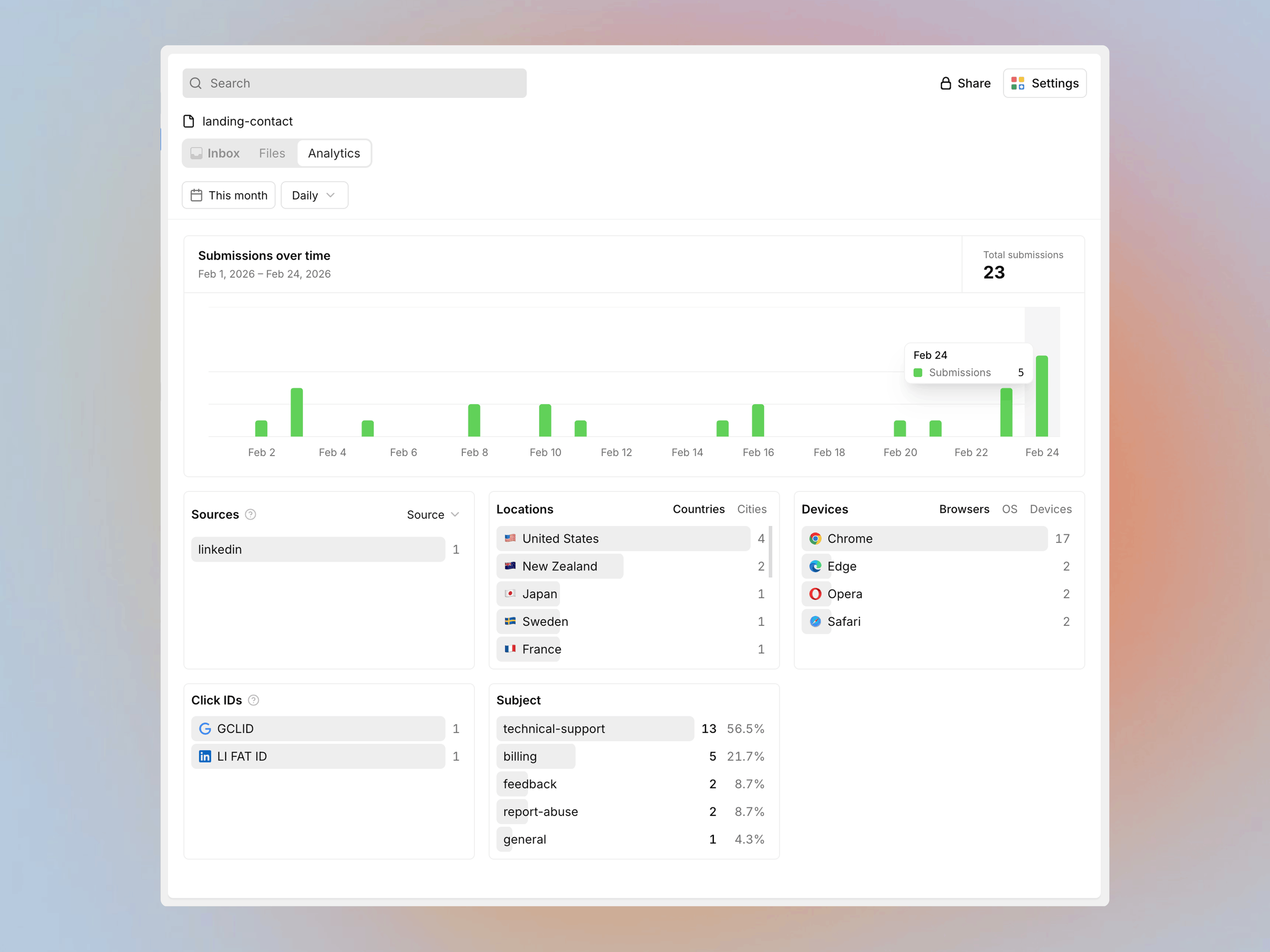
**Forminit turns form choices into counts and percentages.** Use `select` Form Blocks for dropdowns, `radio` for single choices and `checkbox` for multiple choices. View each option's response count and share in **submission details and the Analytics page**.
For an agency's inquiry form, see how many leads request a website redesign, ongoing support or an SEO project. The breakdown shows which services attract interest without manually counting responses.
Attribution reports show **how many submissions came from each source, medium and campaign**, using UTM parameters and supported ad click IDs such as Google `gclid`, Meta `fbclid` and Microsoft `msclkid`. The [browser SDK](/docs/sdk/#automatic-tracking) captures these values **when available**, connecting individual leads and campaign totals.
Understand submission trends, lead sources and the options people select.
[Form Analytics](/blog/new-analytics-page-february-2026/) starts on **Pro**. Netlify's Web Analytics measures website traffic and referring sources. Forminit's reports focus on the responses your forms collect.
## Follow up from a fast inbox
Find a name, email or detail with **full-text search**, then filter by status, date, starred items or unread submissions. Add internal notes after a call, star an important lead and mark responses as read or unread.
Use **To do, In progress, Done and Closed** statuses to track each response through follow-up. Your team can pick up a conversation with its context beside the original submission. Forminit's [submission inbox](/docs/why-forminit/#6-submissions-are-stored-in-a-real-inbox) keeps that work together; Netlify's Forms dashboard documents verified/spam lists, export and deletion.
## Organize clients and teams with workspaces
[Forminit workspaces](/docs/workspace/) help agencies and freelancers organize each client's forms, even when their sites use different hosts. Businesses can separate teams, projects or departments, with workspace-specific API keys and SMTP settings.
Use **Owner, Admin, Editor and Guest** roles to give people appropriate access. Colleagues can handle follow-up, clients can have read-only visibility, and configuration stays with the people responsible for it. Netlify also provides team roles and project permissions across its hosting platform.
## Customize the emails your forms send
Compose [notification emails](/docs/email-notifications/) in a visual **WYSIWYG editor**, with formatting and form variables. Set **To, CC, BCC and Reply-to** to direct each inquiry and its replies to the right people.
On Business, design [autoresponse templates](/docs/autoresponder/), add attachments and choose the reply address. Connect [custom SMTP](/docs/custom-sender-email-smtp/) to send from your own domain. Each client or form can have its own message and branding.
Netlify supports custom notification subjects and Reply-to. Forminit puts email-body editing and autoresponse configuration alongside your form's settings.
## Signed webhooks and a clear activity timeline
With Forminit's [signed webhooks](/docs/webhooks/), your receiving server can verify HMAC-SHA256 signatures before processing a submission. Timestamps and delivery IDs support replay checks and duplicate detection. Webhooks start on Pro.
Review delivery attempts, submission events and errors in **Form Settings → Logs**. Enable [webhook failure alerts](/blog/webhook-failure-alerts/) to see failure counts and error details, giving your team a practical trail to investigate when an integration needs attention.
Netlify also supports signed outgoing webhooks: its custom hook documentation covers Forms events and JWS signing. Signature verification is a shared capability.
## Uploads and data controls built in
Collect attachments on Forminit's free plan, with **100 MB storage** and **25 MB combined uploads per submission**. [Typed Form Blocks](/docs/form-blocks/) validate supported field formats before storage, and form data is hosted on AWS in Ireland.
Regular submissions stay until you delete them. On Pro and higher, [choose a retention period per form](/docs/submission-retention/) to remove submissions and their files automatically. Spam has a separate 30-day expiry. These controls keep data management alongside the forms your team already uses.
## Migrating from Netlify Forms
Keep your HTML and styling. Create a Forminit form in **Public** mode for direct browser submissions, change the action URL and map input names to Form Blocks:
```html
```
Remove Netlify-specific attributes and the hidden `form-name` field from this form. Update any JavaScript submit handler, including calls that still POST to `/`. Recreate notifications, success redirects, spam protection and integrations in Forminit, then test a submission before switching traffic. You can keep hosting the site on Netlify.
Follow the [HTML guide](/docs/html/) or [framework-agnostic SDK guide](/docs/sdk/) for automatic attribution and custom flows. Historical submissions and settings do not move automatically.
## FAQ
### Can I use Forminit while keeping my site on Netlify?
Yes. Keep your Netlify hosting and existing form design. Send submissions to Forminit using an HTML form action, the framework-agnostic SDK or your backend. Your Forminit endpoint and history stay the same if you later move hosts.
### Is Netlify Forms still free?
Yes. Forms are free and unlimited on Netlify's current credit-based plans, including Free. Other hosting usage consumes credits, and a paused Netlify project cannot receive forms. Legacy plans have separate metered form limits.
### What happens to my existing Netlify Forms submissions?
Switching sends future submissions to Forminit; it does not transfer historical records, files or settings. Export verified submissions from Netlify as CSV and save the files you need before deleting forms or closing your account.
## About this comparison
Published by Forminit. Competitor details checked against the linked official sources on **17 September 2026**. Features and prices may change. [Suggest a correction](/contact/).